
Complete Beginner-Friendly Guide with Examples (2026)
1. Introduction
Variables are one of the first Python concepts every beginner learns, and they remain important throughout a developer’s programming journey. Simply put, a variable allows a program to store information that can be reused, updated, and processed later during execution.
When you start learning Python, variables may seem very simple because most examples only store names, numbers, or basic values. However, as programs become larger, variables help organize and manage data efficiently.
Almost every Python project uses variables to store, update, and manage data during program execution. They help programs work with calculations, user input, loops, functions, and many other programming tasks that involve changing data.
In this beginner-friendly Python variables tutorial, you will learn how variables work, how to create and use them correctly, common mistakes to avoid, and practical concepts that help build a strong programming foundation.
2. What Are Variables in Python?
A variable in Python is used to store data that can be reused later inside a program.
For example:
name = "John"

age = 25
Here, the variable name stores a string, while age stores an integer.
Variables make programs dynamic. Instead of hardcoding everything manually, developers can store changing values and use them throughout the application.
For example:
username = input("Enter your username: ")

print(username)
Now the same program can work for different users automatically.
This flexibility is one of the biggest reasons variables form the foundation of programming.
3. How Variables Work Internally in Python
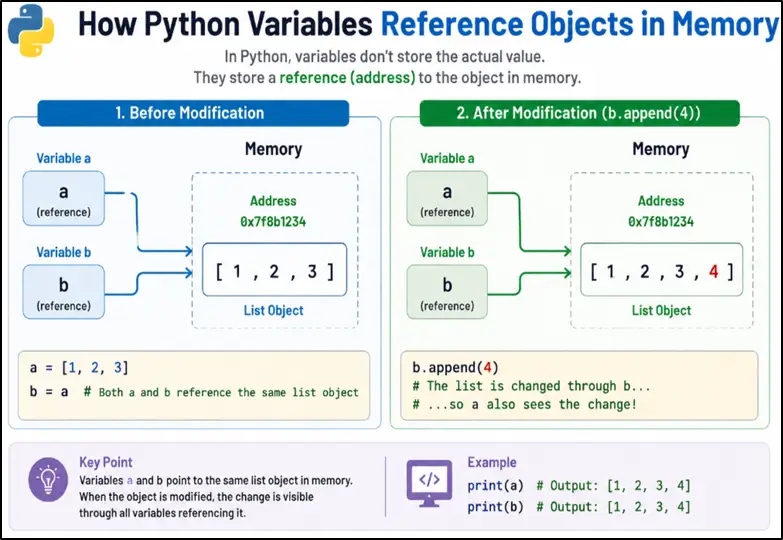
a = [1, 2, 3]

b = ab.append(4)
print(a)4. Creating Variables in Python
city = "New York"
temperature = 32
is_logged_in = True- city stores text data (string)
- temperature stores a number (integer)
- is_logged_in stores a True/False value (boolean)
5. Understanding Dynamic Typing in Python
value = 100

print(value)

value = "Python"

print(value)6. Common Variable Types Used in Real Projects
language = "Python"Integers are heavily used for counters, IDs, analytics, and calculations.
users_count = 150is_verified = Trueskills = ["Python", "SQL", "Machine Learning"]user = {
"name": "Alice",
"age": 28
}Learn how dictionaries store and organize data in our Python Dictionary Tutorial for Beginners.
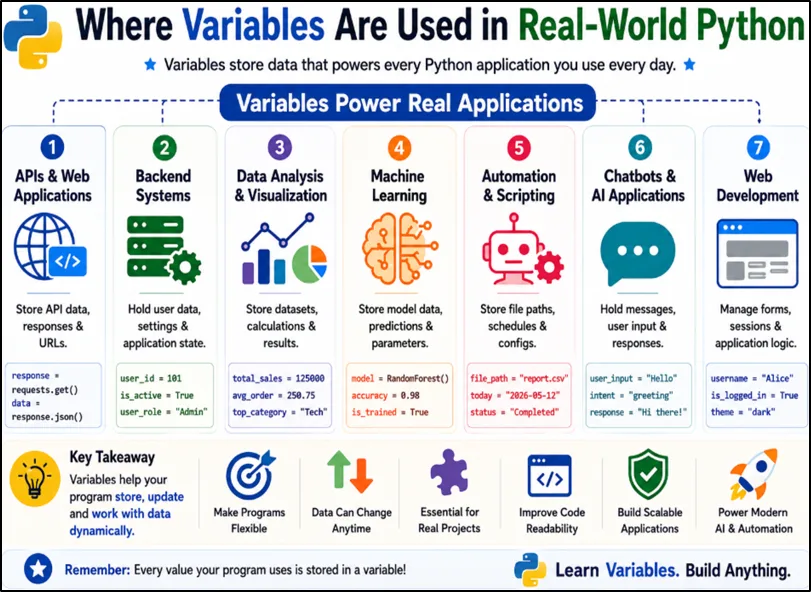
7. Variables in Real-World Python Development
Many beginners first use variables in small programs that store names, numbers, or simple values. However, variables become much more important as applications grow larger.
In real-world software development, variables help programs track information, perform calculations, store temporary results, and manage changing data during execution.
total_amount = 499

print(total_amount)
A weather application may store the current temperature:
temperature = 32

print(temperature)is_logged_in = True
print(is_logged_in)These examples may look simple, but the same concept is used throughout modern software development. Variables help applications remember information, make decisions, and process data efficiently.
8. Important Variable Usage Patterns in Python
One common example is counters.
count = 0

for i in range(5):
   count += 1

print(count)
Output
Another common pattern is accumulators.
total = 0

numbers = [10, 20, 30]

for n in numbers:
   total += n

print(total)
Output
Boolean flag variables are also heavily used in backend systems and APIs.
is_logged_in = True

if is_logged_in:
   print("Access Granted")
Output
Temporary variables help developers swap or process intermediate values cleanly.
a = 10
b = 20

temp = a
a = b
b = temp
These patterns may look simple initially, but they appear constantly in real applications.
9. Expressions in Python
An expression is a combination of variables, values, and operators that produces a result.
Example:
x = 10

y = 20

total = x + y
Here:
x + yis an expression.
Expressions are used heavily in calculations, backend validation logic, dashboards, analytics systems, AI workflows, and APIs.
Almost every Python program relies on expressions internally.
10. Naming Variables Properly in Python
Variable naming is one of the most underrated programming skills for beginners. Good variable names improve readability, debugging, collaboration, and long-term project maintenance in real-world Python development.
Compare these two examples:
x = 5000

monthly_salary = 5000
The second version instantly explains what the variable is storing. Experienced Python developers usually try to write variable names that clearly describe the data instead of using short confusing names.
This becomes extremely important in backend systems, APIs, automation scripts, AI applications, and large-scale Python projects where multiple developers work together on the same codebase.
Python also follows some important variable naming rules.
Variable Names Cannot Start with Numbers
Wrong
2name = "John"Correct
user_name = "John"Python gives an error if a variable starts with a number because variable names must begin with a letter or underscore _.
Variable Names Cannot Contain Spaces
Wrong
user name = "John"Correct
user_name = "John"Spaces are not allowed inside variable names because Python treats spaces as separators between different words or instructions.
Avoid Unsupported Special Characters
Wrong
user-name = "John"Correct
user_name = "John"Special characters like -, @, #, and % should not be used in variable names because they are reserved for other operations in Python.
Rules for Naming Variables in Python
- Variable names can contain letters, numbers, and underscores _
- Variable names cannot start with numbers
- Spaces are not allowed in variable names
- Unsupported special characters should be avoided
- Python variable names are case-sensitive
- Use meaningful and readable variable names whenever possible
Following proper Python variable naming conventions helps beginners write cleaner, more professional, and easier-to-maintain code in real-world software development projects.
11. Public and Non-Public Variables
When working on larger Python projects, developers often need a way to indicate which variables are safe to use throughout the program and which variables are intended only for internal program logic.
Python uses a simple naming convention for this:
- Public variables do not start with an underscore _
- Non-public variables start with an underscore _
This convention helps make Python code easier to understand and maintain, especially when multiple developers work on the same project.
Public Variable
A public variable is intended to be used openly throughout the program.
Example
user_name = "John"

print(user_name)
Output
John
Explanation
Here, user_name is a public variable because it does not start with an underscore. Other developers can access, modify, and use this variable freely wherever it is needed.
Public variables are commonly used for information that should be available to different parts of an application.
Non-Public Variable
A non-public variable starts with an underscore _ and is mainly intended for internal program use.
Example
_auth_token = "abc123"

print(_auth_token)
Output
abc123
Explanation
Imagine a login system that uses an authentication token internally to verify users.
_auth_token = "abc123"The underscore tells other developers:
"This variable is used internally by the system. Avoid changing it directly unless you know exactly what you are doing."
Python does not block access to non-public variables. The underscore is simply a warning and a coding convention followed by developers.
A good real-world example is a car dashboard. Drivers can see the steering wheel, accelerator, and brakes because they are meant to be used directly. However, the engine's internal components are not meant to be adjusted while driving.
Similarly, public variables are intended for normal use, while non-public variables are usually part of the program's internal working.
Using this naming convention makes Python code more readable, reduces accidental mistakes, and helps teams maintain large applications more effectively.
12. Avoiding Poor Variable Names
Some variable names technically work in Python, but they can make code very confusing for beginners and other developers.
Example
I = 10

O = 20

l = 30
These variable names can easily confuse developers because:
- I looks similar to 1
- O looks similar to 0
When programs become larger, such naming creates debugging problems and reduces readability.
Python keywords should also never be used as variable names because Python already uses them internally for special purposes.
Wrong
class = "Python"Correct
course_name = "Python"Here, class is a reserved Python keyword, so using it as a variable name gives an error.
Good developers usually choose meaningful variable names because readable code becomes easier to understand, debug, and maintain in backend systems, APIs, automation scripts, and real-world Python applications.
13. Parallel Assignment in Python
Parallel assignment in Python allows developers to assign multiple variables in a single line, making the code shorter, cleaner, and easier to read.
Example
x, y, z = 10, 20, 30Explanation
In this example, Python assigns:
- 10 to x
- 20 to y
- 30 to z
all in one line instead of writing multiple assignment statements separately.
This feature is commonly used in backend development, API processing, loops, tuples, and functions that return multiple values because it helps developers write cleaner and more efficient Python code.
14. Iterable Unpacking
Iterable unpacking in Python is an advanced form of parallel assignment where Python extracts values directly from lists or tuples and stores them into separate variables automatically.
This feature helps developers write cleaner and shorter Python code while working with backend APIs, database records, loops, tuples, and structured data.
Example
numbers = [10, 20, 30]

first, second, third = numbers

print(first)
Output
10
Explanation
In this example, Python takes values from the list one by one and automatically assigns them to variables:
- 10 → first
- 20 → second
- 30 → third
Unlike normal parallel assignment where values are written manually, iterable unpacking works by extracting values directly from an existing list or tuple.
If you are new to lists, explore our Python Lists - Basics Tutorial to learn how lists are created, accessed, and modified.
This becomes very useful in backend development, API processing, loops, database queries, and real-world Python applications where multiple values are processed together frequently.
15. Type Hints in Python Variables
Type hints in Python help developers indicate what type of data a variable is expected to store. Modern Python projects use type hints to improve code readability, reduce confusion, and make large applications easier to maintain.
Example
name: str = "Alice"

age: int = 25
Explanation
In this example:
- str tells Python that name should store text data
- int tells Python that age should store integer values
Type hints do not force Python to follow strict rules, but they help developers understand the code more easily and allow IDEs like VS Code or PyCharm to provide better suggestions and error detection.
16. The Walrus Operator in Python
The walrus operator := in Python allows developers to assign a value to a variable while using it inside an expression or condition. This helps make Python code shorter, cleaner, and easier to read.
Example
if (length := len("Python")) > 5:
   print(length)
Output
6
Explanation
In this example, Python first calculates the length of "Python" using len() and immediately stores the value inside the variable length using the walrus operator :=.
So instead of writing the calculation separately, Python performs assignment and condition checking together in a single line.
This feature helps developers avoid repeating calculations and is commonly used in modern Python codebases, backend applications, loops, and interview discussions to write cleaner and more efficient code.
17. Understanding Variable Scope in Python
Variable scope in Python determines where a variable can be accessed and used inside a program. Understanding variable scope helps beginners avoid confusion and prevents many common coding mistakes in real-world Python development.
Python mainly works with:
- local scope
- global scope
- nonlocal scope
Local Scope
A local variable is created inside a function and can only be used within that function.
def show_name():

   name = "Alex"

   print(name)

show_name()
Output
Alex
Here, name exists only inside the function show_name().
Global Scope
A global variable is created outside functions and can be accessed throughout the program.
language = "Python"

def show_language():

   print(language)

show_language()
Output
Python
Here, language is a global variable because it is defined outside the function.
Nonlocal Scope
Nonlocal scope in Python allows an inner function to access variables created inside its nearest outer function.
Example
def outer():

   message = "Hello"

   def inner():

       print(message)

   inner()

outer()
Output
Hello
Explanation
In this example, the variable message is created inside the outer() function. The inner() function is also defined inside outer(), so Python allows the inner function to access variables from its nearest outer function.
The statement def inner() only creates the inner function; Python does not execute it automatically. That is why we write inner() inside outer() to actually run the nested function and print the value "Hello".
This concept is called nonlocal scope in Python and is commonly used in nested functions, decorators, backend workflows, and real-world Python applications where inner functions need access to outer function data.
18. Class and Instance Variables
As you continue learning Python, you will eventually work with classes and objects. In object-oriented programming (OOP), variables can be shared by everyone or can belong to individual objects.
This is where class variables and instance variables become important.
Think about a company that has many employees.
Every employee works for the same company, but each employee has a different name.
Example
class Employee:

    company = "Google"

    def __init__(self, name):

        self.name = name
Explanation
In this example:
- company is a class variable.
- name is an instance variable.
The value "Google" is shared by every employee, so it is stored only once as a class variable.
However, every employee has a different name. One employee may be "John", another may be "Pardeep", and another may be "Sarah". Therefore, each employee object stores its own separate name value as an instance variable.
A simple way to remember this is:
- Class variable = shared by everyone
- Instance variable = unique for each object
For example, in a school, the school name is the same for all students, but every student has a different name and roll number.
This concept becomes useful later when building larger Python applications using object-oriented programming.
19. Deleting Variables in Python
name = "Python"

del name20. Common Beginner Mistakes With Variables
21. Why Variables Matter in Real Software Development
This is why variables remain one of the most important programming concepts for beginners and experienced developers alike.
22. Conclusion
Ready for the next step? Follow our Python Developer Roadmap for Beginners (2026) to learn what to study after variables and build a complete learning path.