
Python Decorators
It adds extra features to an existing function, without changing the original code of an existing function.
In simple words, a decorator upgrades your function without touching its code.
Example:
#decorator function definition
def add_message(func):

    def wrapper():
        print("Before function")
        func()
       print("After function")

    return wrapper

#function using decorator
@add_message
def greet():
    print("Hello!")


#calling the function
greet()Before function
Hello!
After function
Let me explain the complete execution flow in a simple step:
Step 1: Python reads the decorator definition
def add_message(func):
    ...
Nothing runs yet. Python just stores the function.
Step 2: Python reaches
@add_message
def greet():
    print("Hello!")
Python translates it to:
greet = add_message(greet)This is the MOST important step.
Decorators work only because of this hidden transformation.
Step 3: add_message(greet) runs
Here’s what happens inside add_message:
- It receives the original greet function as the argument func.
- It defines a new inner function named wrapper.
- The wrapper contains three lines:
print("Before function")
func()   # runs original greet
print("After function")
- And then add_message returns the wrapper function:
return wrapperPlease note that return wrapper is part of add_message, NOT part of wrapper.
It does NOT call wrapper. It just returns the wrapper function object.
When I first learned this, I actually thought return wrapper was calling the wrapper function, and it took me a while to realise it’s only returning the function object. Once that clicked, decorators started making sense instantly.
Step 4: greet gets replaced
Since add_message returned wrapper:
greet = wrapper
This means:
- greet no longer points to the original greet function.
- It now points to the wrapper function in memory.
When I first learned this, it surprised me that Python literally swaps the original function with the wrapper behind the scenes.
Step 5: Now you call greet()
greet()Because greet now points to wrapper, Python runs:
wrapper()Step 6: Inside wrapper()
Wrapper runs three things:
1. print("Before function")
2. func()
3. print("After function")
Here, func is the original greet(), so it prints:
Hello!
Then wrapper ends.
Decorator Execution Flow Diagram: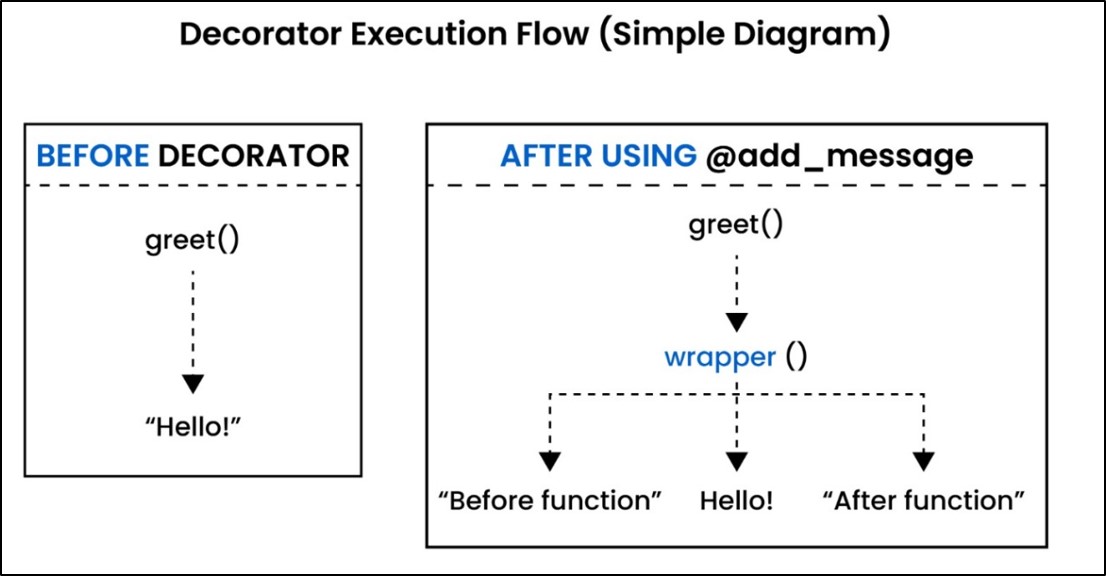
Important point (PLS DON’T MISS IT OUT): In above example, original function is given below:
def greet():
    print("Hello!")
And, Extra feature added by decorator is given below:
print("Before function")

print("After function")
Final Combined Behavior is given below:
After using the decorator:
1. The extra message runs:
2. Before function
3. Then the original function runs:
4. Hello!
5. The extra message runs:
6. After function
So now the decorated function prints:
Before function
Hello!
After function
Interview question: Why Is wrapper () Accessible Outside, Even Though It's Inside add message()?
wrapper() becomes accessible outside because the decorator returns the wrapper function itself (as shown below):
return wrapper
This returns the wrapper function object to Python and Python then assigns it to the name greet.
So, wrapper is no longer private, it now has a public name: greet().
Real-world example: Timing decorator
import time
def timer(func):
    def wrapper():
        start = time.time()
        func()
        end = time.time()
        print(f"Function took {end - start:.4f} seconds")
    return wrapper

@timer
def say_hello():
    time.sleep(1)
    print("Hello!")


say_hello()
Output:
Hello!
Function took 1.0003 seconds
Explanation:
In this example, the timer decorator measures how long a function takes to run. When you call say_hello(), Python doesn’t run it directly instead it executes the wrapper() function created inside the decorator. The wrapper records the start time, calls the original function, and then notes the end time.
Because say_hello() contains time.sleep(1), the program pauses for one second before printing “Hello!”. After the function finishes, the decorator prints how much time the function took to execute. This is a simple and effective way to check performance and understand which parts of your code run slowly.
Note: This is how real decorators are used in real projects in covering different scenarios like logging, authentication, caching, etc.
Why Decorators Are Important:
a) They add extra features to an existing function without touching the original code and this helps you upgrade a function safely without rewriting it.
b) They make your code cleaner and also help you avoid repeating the same logic everywhere. For example, instead of writing the same “extra code” in 10 different functions, you write it once in a decorator
c) They are heavily used in AI and backend projects for important tasks like logging, timing, authentication, and retry logic.
For example:
- Logging: Track when a model starts training
- Timing: Measure how long a function takes
- Authentication: Check user access before running a function
- Retry logic: Automatically re-run a function if it fails due to network or API errors
d) They allow you to add behavior before and after a function runs.
e) It is very important to have knowledge of decorators because they are widely used in frameworks like Django, Flask, FastAPI, TensorFlow, and PyTorch.
Python Decorators Quick Reference (Beginner to Pro)
| Concept | Meaning | Why It Matters |
| Decorator | It adds extra behavior to a function. | It avoids repetitive code. |
| @decorator | It is a shortcut for func = decorator(func) | It is most common interview question. |
| Wrapper Function | It is a function returned by decorator. | It runs extra code before and after functions. |
| Execution Order | Decorator à Wrapper à Original function | It helps in debugging and interviews. |
I still remember the first time I learned decorators. Nothing made sense in the beginning, and it didn’t come to me easily at all. But after a few days of using them, I realized how much repetitive code I was writing earlier. Decorators make your code look clean and professional.
Summary
Always remember below points:
- `@decorator` is just a shorthand for `func = decorator(func)`
- The decorator returns a new function (usually called `wrapper`)
- `wrapper` runs code before and/or after the original function
- It is used in important scenarios like logging, caching, authorization and performance timing
Frequently Asked Questions (FAQ)
1. What is the simplest definition of a Python decorator?
A decorator is a function that adds extra behavior to another function without modifying the function’s original code.
2. Why is wrapper() accessible outside even though it is defined inside the decorator?
Because the decorator returns the wrapper function, Python assigns that returned function to the original function name.
Example:
greet = wrapper
So wrapper becomes publicly accessible through greet().
3. What are the real-world uses of decorators in AI, web development, and backend systems?
Decorators are used for:
• Logging
• Timing & profiling
• Authentication & authorization
• Retry logic
• Caching
• API validation
• Pre/post-processing in AI training loops
4. What is the difference between a decorator and a higher-order function?
A decorator is a special kind of higher-order function that adds extra behavior to another function without changing its code.
All decorators are higher-order functions, but not all higher-order functions are decorators.
Also, a higher-order function is a function that either takes another function as input or returns a function as output.
5. Are decorators used in AI projects?
Absolutely YES. Decorators are used everywhere in AI and ML codebases because they help you add repetitive behaviors without cluttering the core logic.
In simple words, decorators help AI engineers in following scenarios:
• Log automatically
• Retry automatically
• Time functions automatically
• Secure operations automatically
• Track experiments automatically
Learn more in our “Python Recursion Explained" chapter.