Complete Guide to Nested Loops, break, continue, pass, enumerate(), zip(), Loop Optimization, and Real-World Projects.
1. Introduction
After learning basic Python loops, many beginners become comfortable working with lists, strings, and other collections of data.
If you're new to Python or would like to strengthen your fundamentals, you can explore our Python Loops Tutorial for Beginners, where you'll learn for loops, while loops, range(), and practical examples before moving on to advanced loop concepts.
These skills are useful, but real-world applications often require more control over how loops behave.
For example, a program may need to stop searching once a record is found, skip invalid data, or process information from multiple collections at the same time. Basic loops alone cannot handle these situations efficiently.
This is where advanced Python loop concepts become important. Features such as break, continue, pass, nested loops, enumerate(), and zip() help developers write cleaner and more efficient code.
These techniques are widely used in backend development, APIs, automation scripts, reporting systems, and data-processing applications. As projects grow larger, understanding these concepts becomes increasingly valuable.
In this Advanced Python Loops Tutorial for Beginners, you'll learn how loop control statements work, when to use them, and how they solve practical programming problems.
By the end of this guide, you'll understand how professional developers use advanced Python loops to process data efficiently and build scalable applications.
2. Why Advanced Loop Concepts Matter
Basic loops teach Python how to repeat tasks.
Advanced loop concepts teach Python how to make better decisions while repeating those tasks.
As programs become more complex, developers often need additional control over loop execution. Sometimes a loop should stop immediately. Sometimes specific records should be ignored. In other situations, data from multiple collections must be processed together.
Without advanced loop techniques, these problems often require extra variables, additional conditions, or unnecessary code. Features such as break, continue, pass, enumerate(), and zip() provide cleaner and more efficient solutions.
Learning these concepts helps developers write code that is easier to understand, easier to maintain, and closer to the patterns used in professional Python applications.
Real-World Example
Imagine a product search feature that needs to find a specific item from a catalog.
products = ["Laptop", "Keyboard", "Mouse", "Monitor"]

for product in products:

    if product == "Mouse":

        print("Product Found")

        break
Output
Product Found
Explanation
The loop checks products one at a time until the required item is found.
Instead of processing the remaining products unnecessarily, the break statement ends the loop immediately. This makes the code cleaner and demonstrates how advanced loop control can improve program efficiency.
3. Nested Loops in Python
A nested loop is created when one loop is placed inside another loop. While basic loops work with a single collection of data, nested loops are useful when information is organized into groups, categories, or multiple dimensions.
Many real-world datasets are structured this way. For example, a school contains multiple students, each student has multiple subjects, and each subject may have multiple marks. Processing this type of layered information often requires nested loops.
I. Nested Loop Example
categories = ["Electronics", "Clothing"]

products = ["Item A", "Item B"]

for category in categories:

    for product in products:

        print(category, "-", product)
Output
Electronics - Item A
Electronics - Item B
Clothing - Item A
Clothing - Item B
Explanation
The outer loop processes one category at a time. For every category, the inner loop processes all available products.
As a result, Python generates every possible category-product combination. This pattern is commonly used when matching related data or generating grouped outputs.
II. How Nested Loops Work Internally
Nested loops follow a simple rule: the inner loop must finish completely before the outer loop moves to its next iteration.
For the first category, Python processes all products. Once the inner loop finishes, Python returns to the outer loop and starts processing the next category.
Visual Flow
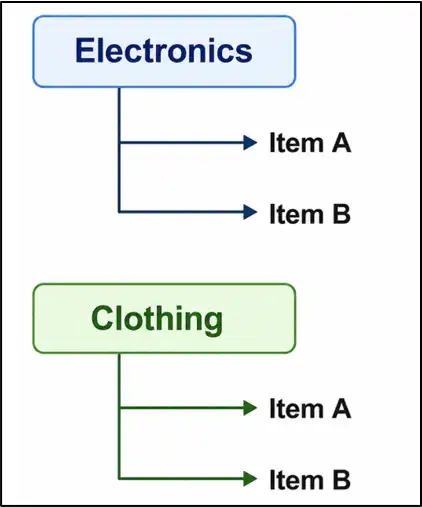
This structure helps beginners understand why nested loops often generate multiple combinations from grouped data.
III. Real-World Example
Consider a movie streaming platform where content is organized by genre.
genres = ["Action", "Comedy"]

movies = ["Movie 1", "Movie 2"]

for genre in genres:

    for movie in movies:

        print(genre, "-", movie)
Output
Action - Movie 1
Action - Movie 2
Comedy - Movie 1
Comedy - Movie 2
Explanation
Applications frequently organize information into categories. Nested loops help process each category and its associated items systematically.
Similar logic is used in reporting dashboards, booking systems, product catalogs, and content management platforms.
IV. When Should You Use Nested Loops?
Nested loops are useful when working with data that contains multiple levels of relationships.
Common examples include:
● Rows and columns in tables
● Product categories and products
● Departments and employees
● Students and subjects
● Event schedules and attendees
Nested loops are powerful, but they should be used thoughtfully. Adding too many levels of nesting can make code harder to read and may reduce performance when processing large datasets.
4. Understanding break Statement
The break statement in Python gives developers a way to stop a loop before it reaches the end. Instead of processing every item in a collection, Python can exit the loop as soon as a specific condition is met.
This is especially useful when the required information has already been found. By stopping unnecessary iterations, the break statement helps make programs more efficient and easier to understand.
I. Python break Statement Example
numbers = [10, 20, 30, 40, 50]

for number in numbers:

    if number == 30:
        break

    print(number)
Output
10
20
Explanation
Python starts processing the list from the beginning and prints the values 10 and 20.
When the value 30 is encountered, the break statement immediately terminates the loop. As a result, the remaining values are never processed.
II. Why Developers Use break
In many applications, continuing a loop after finding the required result serves no purpose.
For example, if a search operation locates the correct record in the first few iterations, checking hundreds of additional records only increases execution time. The break statement helps avoid this unnecessary work.
III. Real-World Example
Imagine a warehouse system searching for a specific product.
products = ["Laptop", "Mouse", "Keyboard", "Monitor"]

for product in products:

    if product == "Keyboard":
        print("Product Found")
        break
Output
Product Found
Explanation
The loop checks products one by one until the required item is found.
Once "Keyboard" is located, Python exits the loop immediately instead of continuing through the remaining products. This approach is commonly used in search features, inventory systems, and lookup operations.
IV. Common Use Cases of break
The break statement is frequently used in:
● Search operations
● Product lookups
● Login verification systems
● User authentication workflows
● Data validation processes
● API response filtering
● Inventory management applications
Whenever a program can stop safely after finding the required result, the break statement is often the most efficient solution.
5. Understanding continue Statement
The continue statement in Python allows a loop to skip specific items without stopping the entire loop. This is useful when some records should be ignored while the remaining data still needs to be processed.
Instead of ending execution like the break statement, continue simply skips the current iteration and moves directly to the next one. This helps developers filter data and handle exceptions more efficiently.
I. Python continue Statement Example
numbers = [10, 20, 30, 40, 50]

for number in numbers:

    if number == 30:
        continue

    print(number)
Output
10
20
40
50
Explanation
Python processes each number in the list one by one.
When the value 30 is encountered, the continue statement skips the remaining code for that iteration and immediately moves to the next value.
II. Why Developers Use continue
In many real-world applications, not every record needs to be processed.
Some records may be incomplete, invalid, archived, or marked for exclusion. Instead of writing complex conditions, developers often use continue to skip those records and keep the loop clean and readable.
III. Real-World Example
Imagine a training platform generating certificates for completed courses.
courses = [
    "Completed",
    "In Progress",
    "Completed",
    "Draft"
]

for course in courses:

    if course != "Completed":
        continue

    print("Generating Certificate")
Output
Generating Certificate
Generating Certificate
Explanation
The loop checks each course one by one and looks for courses with the status "Completed". If a course is "In Progress" or "Draft", the continue statement skips that iteration and moves directly to the next course. Because of this, the print ("Generating Certificate") statement runs only for completed courses. This is a common Python technique used to filter records and process only the data that meets specific conditions
IV. When Should You Use continue?
The continue statement is commonly used when:
● Ignoring invalid records
● Skipping incomplete data
● Filtering unwanted entries
● Processing approved records only
● Cleaning imported datasets
● Validating user input
It provides a simple way to ignore specific records while allowing the loop to continue processing everything else.
V. break vs continue
Both statements control loop execution, but they serve different purposes.
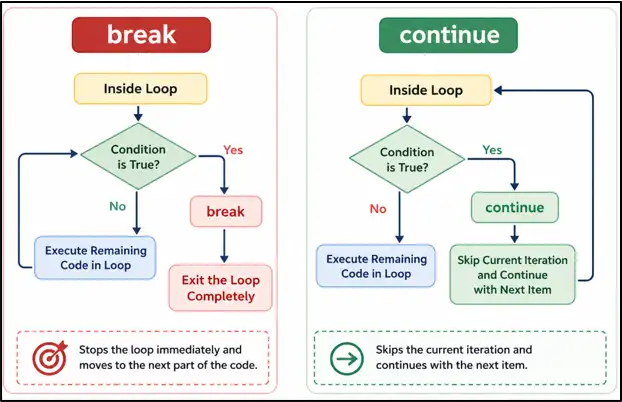
Choosing the correct statement depends on whether the loop should stop entirely or simply ignore a specific item.
Key Takeaway
The continue statement helps developers handle exceptions and filter data without stopping loop execution.
It is widely used in data processing, validation workflows, automation scripts, and backend applications where only selected records should be processed.
6. Understanding pass Statement
The pass statement in Python is used when a statement is required syntactically, but no action needs to be performed yet. Unlike break and continue, pass does not affect loop execution in any way.
Think of pass as a temporary placeholder. It allows developers to create the structure of a program first and fill in the actual logic later without causing errors.
I. Python pass Statement Example
for number in range(5):

    if number == 2:
        pass

    print(number)
Output
0
1
2
3
4
Explanation
When Python reaches the value 2, the pass statement executes. Since pass performs no action, the program simply continues executing the next line of code.
As a result, all numbers are printed normally and the loop behaves exactly as it would without the pass statement.
II. Why Developers Use pass
During software development, it is common to build the structure of an application before implementing every feature.
In such situations, developers often use pass to mark sections of code that will be completed later while keeping the program valid and executable.
Example:
for record in records:

    if record["status"] == "Pending":
        pass
In this example, the condition has been created, but the actual business logic has not been added yet.
III. Real-World Example
Imagine a reporting application that needs to handle multiple record statuses.
for status in statuses:

    if status == "Under Review":
        pass

    print(status)
Explanation
The application recognizes records that are still under review, but the handling logic has not been implemented yet.
Using pass allows developers to continue building and testing the rest of the program while leaving a placeholder for future functionality.
IV. When Should You Use pass?
The pass statement is most useful when designing program structures, creating application templates, or planning future features.
It is commonly seen during application development, code prototyping, testing phases, and situations where developers want to keep incomplete sections of code without generating syntax errors.
Key Takeaway
The pass statement does not stop a loop, skip an iteration, or change program flow. Its purpose is simply to act as a placeholder until actual logic is added.
Although simple, pass is a practical tool that helps developers build Python applications incrementally while keeping their code organized and error-free.
7. Python Loop else Statement
Most Python developers learn about for loops and while loops early in their programming journey. However, many beginners are unaware that loops can also include an else block.
The Python loop else statement provides a clean way to execute code after a loop finishes successfully. It helps reduce extra flags and conditions, making programs easier to read and maintain.
I. Loop else Example
numbers = [10, 20, 30]

for number in numbers:
    print(number)

else:
    print("Loop Completed")
Output
10
20
30
Loop Completed
Explanation
Python processes all values in the list and reaches the end of the loop normally.
Since the loop completes without interruption, the else block executes automatically after the final iteration.
II. Loop else with break
numbers = [10, 20, 30]

for number in numbers:

    if number == 20:
        break

    print(number)

else:
    print("Loop Completed")
Output
10
Explanation
The break statement stops the loop before all values are processed.
Because the loop does not finish normally, Python skips the else block completely.
III. Why Loop else Is Useful
Many beginners use extra variables to determine whether a loop completed successfully.
The loop else statement provides a cleaner solution by allowing Python to automatically execute specific code when the loop reaches its natural end.
This approach often makes programs shorter, easier to understand, and more maintainable.
IV. Real-World Example
Imagine an online learning platform checking whether a course exists in a catalog.
courses = ["Python", "Java", "SQL"]

search_course = "Docker"

for course in courses:

    if course == search_course:
        print("Course Available")
        break

else:
    print("Course Not Available")
Output
Course Not Available
Explanation
The loop searches through every course in the catalog.
Since Docker is not found, the loop completes normally and the else block displays a message indicating that the course is unavailable.
V. When Should You Use Loop else?
The loop else statement is particularly useful when searching, validating, or verifying information.
It works well in situations where one action should occur when a match is found, and a different action should occur when no match exists after checking all available records.
Key Takeaway
The Python loop else statement is a lesser-known feature that can simplify search and validation logic.
Instead of creating extra variables to track results, developers can use loop else to handle situations where a loop completes successfully without encountering a break statement.
8. Using enumerate() in Python
When working with loops, there are situations where displaying only the value is not enough. Many applications also need to know the position of each item while processing data.
The enumerate() function in Python solves this problem by providing both the index and the value during each iteration. This eliminates the need to create and update a separate counter variable manually.
I. Basic enumerate() Example
languages = ["Python", "Java", "Go"]

for index, language in enumerate(languages):

    print(index, language)
Output
0 Python
1 Java
2 Go
Explanation
For beginners, think of enumerate() as a tool that automatically keeps track of item positions inside a collection.
During every iteration, Python returns two values: the position of the item and the item itself. This makes the code shorter and easier to understand.
II. Starting From a Custom Number
By default, enumerate() starts counting from 0. However, Python allows developers to choose a different starting number.
languages = ["Python", "Java", "Go"]

for index, language in enumerate(languages, start=1):

    print(index, language)
Output
1 Python
2 Java
3 Go
Explanation
The start=1 parameter changes the first position from 0 to 1.
This approach is useful when generating rankings, serial numbers, leaderboard positions, or user-friendly reports where counting typically begins from 1.
III. Real-World Example
Imagine a project management application displaying a list of testing activities.
tasks = [
    "Login Testing",
    "API Testing",
    "Report Validation"
]

for task_no, task in enumerate(tasks, start=1):

    print(task_no, "-", task)
Output
1 - Login Testing
2 - API Testing
3 - Report Validation
Explanation
Instead of creating a separate variable to track task numbers, enumerate() automatically generates the numbering.
For beginners, this means less code, fewer mistakes, and better readability. Many business applications, dashboards, reports, and management systems use a similar approach when displaying numbered records.
IV. Why Developers Prefer enumerate()
Without enumerate(), developers often create a counter variable and update it manually inside the loop.
With enumerate(), Python handles the counting automatically, resulting in cleaner and more maintainable code.
As applications grow larger, small improvements like this help developers write code that is easier to read, debug, and maintain.
Key Takeaway
The Python enumerate() function is one of the most useful tools for working with loops. It allows developers to access both the item and its position during iteration without creating extra variables.
Whenever a program needs numbered output, rankings, serial numbers, task lists, or ordered records, enumerate() is often the simplest and most professional solution.
9. Using zip() in Python
In many Python programs, related information is often stored in separate collections. For example, one list might contain employee names while another contains employee IDs.
The zip() function in Python helps combine related data and process it together. This makes code easier to read and avoids the need to manually match items using indexes.
I. Basic zip() Example
names = ["Emma", "David", "Sophia"]

scores = [90, 85, 95]

for name, score in zip(names, scores):

    print(name, score)
Output
Emma 90
David 85
Sophia 95
Explanation
For beginners, think of zip() as a tool that joins matching items together based on their positions.
Python takes the first item from each list, then the second item from each list, and continues until all matching values have been processed.
II. Why zip() Is Useful
Without zip(), developers often use indexes to access multiple lists.
for i in range(len(names)):

    print(names[i], scores[i])
With zip(), the same task becomes simpler.
for name, score in zip(names, scores):

    print(name, score)
Explanation
The second approach is easier to read because Python directly provides the related values.
For freshers, this means writing less code and reducing the chances of mistakes caused by incorrect indexes.
III. Real-World Example
Imagine a store generating a simple price list.
products = ["Laptop", "Keyboard", "Mouse"]

prices = [1000, 50, 25]

for product, price in zip(products, prices):

    print(product, "-", price)
Output
Laptop - 1000
Keyboard - 50
Mouse - 25
Explanation
The first product is matched with the first price, the second product with the second price, and so on.
This allows Python to create meaningful pairs of related information automatically.
IV. Where Is zip() Used in Real Projects?
The zip() function is commonly used when working with related datasets.
Examples include matching:
- Products and Prices
- Employees and Departments
- Students and Grades
- Cities and Population Data
- Months and Sales Figures
Many reporting systems, dashboards, analytics applications, and backend services rely on similar data-processing patterns.
V. Key Takeaway
The Python zip() function is a simple and powerful way to process multiple collections together.
Whenever related information is stored in separate lists, zip() helps combine the data into meaningful pairs while keeping the code clean, readable, and easy to maintain.
10. Nested Loop Real-World Examples
Learning the syntax of nested loops is important, but understanding where they are used in real applications is even more valuable.
In professional software development, nested loops often help process grouped data, hierarchical information, and multi-level datasets. Let's explore a few practical examples that freshers can easily relate to.
I. Product Catalog Processing
Online stores usually organize products into categories. Each category contains multiple products that need to be displayed or processed together.
categories = {
    "Electronics": ["Laptop", "Mobile"],
    "Accessories": ["Keyboard", "Mouse"]
}

for category, products in categories.items():

    print(category)

    for product in products:

        print("-", product)
Output
Electronics
- Laptop
- Mobile
Accessories
- Keyboard
- Mouse
Explanation
This example uses a nested loop in Python to display product categories and the items inside each category. The items() method returns both the dictionary key (category) and its value (list of products), allowing the outer loop to process them together. Python first prints the category name and then the inner loop prints each product in that category. This is a common real-world Python technique used in e-commerce applications, inventory systems, and data processing.
II. Student Performance Report
Educational platforms often store multiple marks for each student. Nested loops help process these records and generate summary reports.
students = {
    "Emma": [85, 90, 92],
    "David": [78, 88, 81]
}

for student, marks in students.items():

    total = 0

    for mark in marks:

        total += mark

    print(student, total)
Output
Emma 267
David 247
Explanation
This example uses a nested loop in Python to calculate the total marks of each student. The items() method returns both the student name and the list of marks, allowing the outer loop to process each student one by one. The inner loop goes through every mark in the list and adds it to the total variable. After all marks are processed, Python prints the student name along with their total score, a common technique used in student management and reporting systems.
III. Event Seating Generator
Event booking platforms often need to create seat identifiers automatically.
rows = 3
seats = 4

for row in range(1, rows + 1):

    for seat in range(1, seats + 1):

        print(f"R{row}-S{seat}")
Output
R1-S1
R1-S2
...
R3-S4
Explanation
This example uses nested loops in Python to generate seat numbers for a seating arrangement. The outer loop creates each row (R1, R2, R3), while the inner loop generates all seat numbers within that row (S1 to S4). For every row, Python prints all available seats before moving to the next row. This approach is commonly used in theater booking systems, classrooms, stadiums, and event seating management applications.
IV. Why These Examples Matter
Nested loops become powerful when data contains multiple levels of relationships.
Instead of processing a single list, developers can work with categories and products, students and marks, rows and seats, or any grouped information that requires structured processing.
Learning these patterns helps beginners understand how real-world Python applications organize and process complex data efficiently.
Key Takeaway
Nested loops are more than a programming concept. They are a practical tool used to process structured and hierarchical data in real applications.
As you build larger Python projects, you'll frequently encounter situations where one piece of information contains multiple related records. Nested loops provide a simple and effective way to handle those relationships.
11. Loop Optimization Techniques
Writing a loop that works correctly is important, but writing a loop that works efficiently is equally valuable. As applications grow, even small inefficiencies can affect performance when processing large amounts of data.
Loop optimization is the practice of reducing unnecessary work inside loops. The goal is not to make code more complex, but to help Python complete tasks using fewer operations and resources.
I. Reduce Unnecessary Iterations
One of the simplest ways to optimize a loop is to stop processing once the required result has been found.
products = [
    "Laptop",
    "Keyboard",
    "Mouse",
    "Monitor"
]

for product in products:

    if product == "Mouse":
        print("Product Found")
        break
Output
Product Found
Explanation
This code searches through a list of products to find a specific item. Python reads each product one at a time and compares it with "Mouse". As soon as the match is found, it displays "Product Found" and exits the loop using the break statement. This technique helps improve performance by avoiding unnecessary iterations after the required item is located.
II. Use break Effectively
Many real-world applications perform searches repeatedly. Customer records, product catalogs, user accounts, and transaction histories often contain thousands of entries.
In these situations, stopping the loop as soon as the required record is found can significantly reduce processing time and improve application performance.
This optimization becomes increasingly important when working with large datasets, APIs, databases, and reporting systems.
III. Choose the Right Data Structure
Sometimes a slow loop is not caused by the loop itself. The actual issue may be the data structure being used.
Consider the following example:
users = {
    "Emma",
    "David",
    "Sophia"
}

if "Emma" in users:
    print("User Found")
Output
User Found
Explanation
In this example, the users are stored in a set, which is designed for fast lookups. When Python checks whether a user exists in a set, it can usually find the result much faster than searching through a large list one item at a time. As the amount of data grows, this difference becomes more noticeable.
For beginners, this highlights an important lesson: improving performance is not always about optimizing loops - choosing the right Python data structure can often have a bigger impact.
IV. Think Before Adding More Loops
Adding more loops may solve a problem, but it can also make the program slower and more difficult to understand. As programs grow, unnecessary iterations can increase execution time and make debugging harder.
Before creating another loop, check whether Python's built-in functions, dictionaries, sets, or other data structures can achieve the same result more efficiently. Fewer loops often lead to cleaner, faster, and easier-to-maintain code, especially in real-world Python applications.
Key Takeaway
Python loop optimization is the process of reducing unnecessary work while producing the same result. Techniques such as minimizing extra iterations, using break effectively, and avoiding redundant loops can help improve Python performance and execution speed.
Choosing the right data structure is equally important. By combining efficient loops with appropriate data structures, developers can write faster, more scalable Python code that performs well when processing large datasets and real-world applications.
12. Common Performance Mistakes
Many beginners write Python loops that produce the correct output but perform unnecessary work behind the scenes. While these issues may not be noticeable with small datasets, they can significantly affect performance as applications grow.
Understanding common loop optimization mistakes helps developers write faster, cleaner, and more scalable Python code.
I. Deep Nesting
Nested loops are useful when working with multiple collections of data. However, adding too many levels of nesting can increase execution time and make code harder to understand.
for department in departments:

    for team in teams:

        for employee in employees:

            print(employee)
Explanation
Deeply nested loops can dramatically increase the number of iterations a Python program performs. Each additional level of nesting multiplies the amount of work required, which can lead to slower execution when processing large datasets.
Whenever possible, simplify the logic, restructure the data, or use a more efficient approach to reduce unnecessary iterations and improve Python loop performance.
II. Expensive Operations Inside Loops
Loops often process hundreds or thousands of records. Performing expensive operations during every iteration can significantly reduce application performance.
for user in users:

    result = database_query()
Explanation:
Performing expensive operations such as database queries, API requests, or file reads inside a loop can significantly slow down an application. If the same operation can be executed once outside the loop and reused, there is usually no reason to repeat it during every iteration.
Reducing repeated expensive operations helps improve performance, decreases resource usage, and makes applications more efficient.
III. Repeated Searches Inside Loops
Sometimes beginners perform the same search during every loop iteration even though the result never changes. This creates unnecessary work and can make Python programs less efficient, especially when processing large collections of data.
Incorrect
products = [
    "Laptop",
    "Keyboard",
    "Mouse"
]

for product in products:

    if "Mouse" in products:
        print("Mouse Available")
Explanation
In this example, Python checks whether "Mouse" exists in the products list during every iteration of the loop. Since the list remains the same, the result of the search never changes.
For a list containing three items, the impact is small. However, when working with hundreds or thousands of records, repeatedly performing the same search can increase execution time and reduce application performance.
Better
products = [
    "Laptop",
    "Keyboard",
    "Mouse"
]

if "Mouse" in products:
    print("Mouse Available")

for product in products:
    print(product)
Explanation
Here, Python performs the search only once before the loop starts. After confirming that "Mouse" exists in the list, the loop focuses only on processing the products.
This approach avoids repeating the same operation unnecessarily and keeps the loop logic cleaner. In real-world Python applications, moving repeated searches, calculations, and checks outside loops can help improve performance and make code easier to maintain.
IV. Ignoring Built-In Functions
Many beginners write additional loops when Python already provides optimized built-in functions.
Example
numbers = [10, 20, 30]

total = sum(numbers)
Explanation
Python includes highly optimized built-in functions such as sum(), max(), min(), sorted(), and len(). These functions are typically faster, easier to read, and more reliable than writing custom loops for the same task.
Using Python built-in functions helps create cleaner code while improving readability and overall performance.
13. Backend Examples Using Advanced Loops
Advanced loops are heavily used in backend development. Modern applications process API responses, JSON data, log files, and database records every day, making loop optimization and data processing important skills for Python developers.
I. API Response Processing
Backend applications often receive data from APIs and need to process only the records that meet specific conditions. The continue statement helps skip unwanted records efficiently.
Once you're comfortable with loops, try fetching real data from APIs. Our
Python Requests Tutorial for Beginners shows how to send HTTP requests and work with live data in Python.
users = [
    {"name": "Emma", "active": True},
    {"name": "David", "active": False},
    {"name": "Sophia", "active": True}
]

for user in users:

    if not user["active"]:
        continue

    print(user["name"])
Output
Emma
Sophia
Explanation:
This example demonstrates how to use the continue statement in Python to filter records during loop execution. The loop processes one user at a time and checks whether the user is active. If the "active" value is False, Python skips the current iteration and moves to the next user. As a result, only active users are processed and displayed. This is a common Python backend development pattern used when working with API responses, JSON data, and database records.
II. JSON Data Transformation
Most backend services work with JSON data when communicating with APIs, databases, and frontend applications. Loops help extract, transform, and prepare data before it is displayed or stored.
If you're unfamiliar with JSON structures, read our
Python JSON Handling guide to learn how Python reads, writes, and processes JSON data in real-world applications.
products = [
    {"name": "Laptop", "price": 1000},
    {"name": "Mouse", "price": 25}
]

for product in products:

    print(product["name"])
Output:
Laptop
Mouse
Explanation
In this example, Python loops through a JSON-like structure and extracts product names. Backend applications frequently transform API responses into a format that is easier for users or other services to consume.
This technique is commonly used in e-commerce platforms, inventory systems, and product catalogs.
III. Batch Record Processing
Many backend systems process large numbers of records together rather than handling them one at a time. This approach is known as batch processing.
transactions = [
    120,
    350,
    500
]

for transaction in transactions:

    print("Processing:", transaction)
Output
Processing: 120
Processing: 350
Processing: 500
Explanation
This example uses a Python for loop to process multiple transactions stored in a list. Although the loop handles one transaction at a time, it automatically processes the entire collection without requiring separate code for each value. This approach is often called batch processing because a group of records is processed together as a batch. Similar techniques are used in payment systems, reporting platforms, and data processing applications that work with large numbers of records.
IV. Why Advanced Loops Matter in Backend Systems
Modern software systems rarely process a single record at a time. Advanced loop techniques help developers work with collections of users, transactions, products, logs, and other business data more effectively. Understanding these patterns
makes it easier to build automation tools, reporting systems, monitoring solutions, and production-ready applications.
14. Mini Project: Log File Analyzer
This project demonstrates how advanced Python loops are used in real backend applications. Instead of printing simple numbers, you will process log records, filter useful information, and generate a summary report.
Log analysis is a common task in backend development, DevOps, cloud platforms, monitoring systems, and enterprise applications. Developers often examine thousands of log entries to identify errors, warnings, and system activity.
I. Problem Statement
Imagine a web application generates log messages throughout the day.
The application needs to:
- Process all log records
- Ignore informational messages
- Count errors and warnings
- Generate a summary report
II. Sample Log Data
logs = [
    "INFO: User Login",
    "ERROR: Database Connection Failed",
    "WARNING: Low Disk Space",
    "INFO: Product Viewed",
    "ERROR: Payment Failed",
    "WARNING: High Memory Usage"
]
logs = [
    "INFO: User Login",
    "ERROR: Database Connection Failed",
    "WARNING: Low Disk Space",
    "INFO: Product Viewed",
    "ERROR: Payment Failed",
    "WARNING: High Memory Usage"
]

error_count = 0
warning_count = 0

for log in logs:

    if log.startswith("INFO"):
        continue

    print(log)

    if log.startswith("ERROR"):
        error_count += 1

    elif log.startswith("WARNING"):
        warning_count += 1

print("\nSummary Report")
print("Errors:", error_count)
print("Warnings:", warning_count)
IV. Output
ERROR: Database Connection Failed
WARNING: Low Disk Space
ERROR: Payment Failed
WARNING: High Memory Usage
Summary Report
Errors: 2
Warnings: 2
V. How the Project Works
Step 1
Python starts reading the log records one by one using a for loop.
During the first iteration:
log = "INFO: User Login"
Step 2
The program checks:
if log.startswith("INFO"):
Since the log starts with "INFO", the continue statement executes.
continue
Python immediately skips the remaining code and moves to the next log entry.
Step 3
The next record is:
log = "ERROR: Database Connection Failed"
This record is not skipped.
Python prints:
ERROR: Database Connection Failed
The program then checks:
if log.startswith("ERROR"):
The condition is true, so the error counter increases.
error_count += 1
Current value:
error_count = 1
Step 4
The process continues for every log record.
Whenever an error appears:
error_count += 1
Whenever a warning appears:
warning_count += 1
Informational logs are skipped automatically.
Step 5
After all records have been processed, Python generates the final report.
print("Errors:", error_count)
print("Warnings:", warning_count)
VI. Concepts Practiced
This project gives beginners hands-on experience with several advanced Python loop concepts that are commonly used in real-world applications. As you build the Log File Analyzer, you learn how to use for loops, the continue statement, conditional logic, counters, accumulators, string methods, and data filtering to process information efficiently.
More importantly, you see how Python loops are used in backend development to analyze records, filter unwanted data, and generate meaningful reports. These practical skills are valuable when working with log files, API responses, monitoring systems, analytics platforms, and other data processing applications.
VII. Why This Project Matters
This project demonstrates how a simple loop can evolve into a practical monitoring tool. By combining filtering, counters, conditional logic, and report generation, beginners gain experience with the same problem-solving patterns used in production software environments.
15. Best Practices for Efficient Loops
Advanced loop concepts become more useful when applications grow and data becomes more complex. The goal is not to use more loop features, but to write Python loops that remain clear, reliable, and easy to maintain.
I. Process Data in Small Steps
Trying to perform too many tasks inside a single loop can make the code difficult to understand and maintain. A better approach is to solve one problem at a time.
active_users = []

for user in users:

    if user["active"]:
        active_users.append(user)
Explanation
The purpose of this loop is very clear: it only collects active users. It is not generating reports, counting users, or modifying data. By keeping the loop focused on a single task, the code becomes easier to read, test, and debug.
In real-world Python applications, developers often process data in stages. One loop may filter records, another may calculate statistics, and a third may generate reports. This approach makes complex programs easier to maintain.
II. Handle Unexpected Data Gracefully
Real-world API responses and database records are not always complete. Some records may contain missing fields or invalid data.
for user in users:

    if "name" not in user:
        print("Missing name")
        continue

    print(user["name"])
Explanation
This loop checks whether the name field exists before attempting to use it. If the field is missing, Python displays a message and skips the current record using continue.
Without this check, the program could fail when processing incomplete data. Adding simple validation inside loops helps create more reliable Python applications that can safely handle API responses, JSON data, and database records.
III. Focus on Readability First
Advanced Python features can sometimes reduce the amount of code you write. However, code should always be easy to understand for anyone who reads it later.
for order in orders:

    if order["status"] == "paid":
        print("Process order:", order["id"])
Explanation
This loop clearly shows that only paid orders should be processed. The condition is simple, the variable names are meaningful, and the purpose of the loop is easy to understand.
In real-world software development, code is often maintained by multiple developers. Writing readable loops makes debugging easier, reduces mistakes, and helps future developers quickly understand the business logic.
IV. Think About Scalability
A loop that works correctly with a few records should also be able to handle hundreds or thousands of records as an application grows.
total_sales = 0

for sale in sales:

    total_sales += sale["amount"]

print("Total Sales:", total_sales)
Explanation
This loop processes every sales record and continuously updates the total using an accumulator variable. The same logic works whether there are 5 sales records or 50,000 sales records.
Backend systems, analytics platforms, and reporting tools often process large collections of data. When writing loops, it is important to think beyond small examples and consider how the code will behave as the amount of data increases over time.
16. Common Mistakes Beginners Make
Learning advanced Python loops is an important step, but many beginners still make mistakes that can lead to incorrect results, slower performance, or code that is difficult to maintain. Understanding these common issues will help you write cleaner, more efficient Python programs.
I. Misusing break
The break statement immediately stops a loop. While this can improve performance in some situations, using it incorrectly may cause important data to be skipped.
Example
Explanation
In this example, the loop stops as soon as "Emma" is found. If there are additional records that still need to be processed, they will never be reached. Before using break, make sure that ending the loop early is the correct decision.
II. Misusing continue
The continue statement skips the current iteration and moves directly to the next one. Although it is useful for filtering data, incorrect conditions can accidentally skip records that should be processed.
When using continue, always check the condition carefully. If the condition is too broad, Python may skip valid records that should be processed. This mistake commonly happens when filtering API data, user records, or imported files.
III. Excessive Nested Loops
Nested loops are useful when working with multiple collections of data. However, adding too many levels of nesting can make code difficult to read, debug, and maintain.
Deep nesting also increases the number of iterations a program must perform, which can reduce performance when processing large datasets. Whenever possible, simplify the logic or reorganize the data structure to reduce nesting.
IV. Incorrect enumerate() Usage
Incorrect
for item in enumerate(products):
    print(item)
for index, item in enumerate(products):
    print(index, item)
Explanation
The enumerate() function returns both the index and the value for each item in a collection. By unpacking these values into separate variables, the code becomes easier to read and understand. This approach is commonly used when developers need both the position and the value while looping through data.
17. Python Advanced Loop Interview Questions
Advanced loop questions are frequently asked in Python interviews because they test problem-solving skills, code readability, and the ability to process data efficiently.
The following questions cover practical concepts that beginners and junior developers are likely to encounter during technical interviews.
I. When Should You Use enumerate() Instead of a Manual Counter?
Use enumerate() when you need both the position and value of an item during iteration. It produces cleaner code and reduces the need for extra variables.
II. What Are the Advantages of Using zip() in Python?
zip() allows multiple collections to be processed together in a single loop. This improves readability and reduces the complexity of managing multiple indexes.
III. How Can You Skip Invalid Records During Data Processing?
The continue statement allows a loop to ignore records that do not meet specific conditions. This technique is commonly used when filtering API responses, JSON data, and database records.
IV. Why Are Nested Loops Sometimes Necessary?
Nested loops are useful when working with grouped data such as categories and products, students and grades, or rows and columns. They allow multiple levels of information to be processed systematically.
V. How Can Loops Help Generate Reports in Python?
Loops can process records, count values, calculate totals, and prepare summary reports. This is useful in analytics, dashboards, log analysis, and backend reporting systems.
VI. Why Do Employers Ask Advanced Loop Questions?
Advanced loops demonstrate a developer's ability to work with real-world data, automate repetitive tasks, and write efficient backend code. Strong loop knowledge is valuable in APIs, automation, and data processing projects.
18. Frequently Asked Questions (FAQ)
I. Are Advanced Python Loops Important for Backend Development?
Yes. Advanced loops are widely used for processing API responses, filtering JSON data, generating reports, and handling large collections of records in backend applications.
II. Which Advanced Loop Concept Should Beginners Learn First?
Most beginners should start with break, continue, and nested loops before moving to enumerate(), zip(), and loop optimization techniques.
III. Do Advanced Loops Improve Python Performance?
Advanced loops can help reduce unnecessary processing when used correctly. Features such as filtering, accumulators, and efficient iteration often lead to cleaner and faster code.
IV. Is There a Difference Between Beginner and Advanced Python Loops?
Basic loops focus on iteration, while advanced loops focus on controlling execution, filtering records, processing grouped data, and solving practical programming problems more efficiently.
V. Can Advanced Loops Be Used With API and JSON Data?
Absolutely. Modern applications frequently use loops to process API responses, transform JSON data, and prepare information for users or other services.
VI. What Should I Learn After Advanced Python Loops?
After mastering advanced loops, most beginners continue with Python functions, file handling, exception handling, object-oriented programming, and working with APIs.
19. Final Thoughts
Many developers think advanced loops are only about learning a few extra Python keywords. In reality, they help transform simple scripts into programs that can organize information, automate repetitive work, and solve more realistic problems.
The examples in this guide represent the same thought process used by professional developers every day: deciding which records to process, which ones to ignore, how to organize data, and how to generate meaningful results from large collections of information.
Keep experimenting with the examples, modify the mini-projects, and build your own solutions.
The confidence you develop while working with advanced loops will make future topics such as Python Functions, APIs, file handling, object-oriented programming, and backend development much easier to learn.
