
In Python programming, tuples are one of the most important data structures. Below is a list of core features of Python tuples:
• Immutable (once created)
• Ordered
• Memory-efficient
• Faster (than lists)
• Allows duplicate values
• Can store mixed data types
• Hashable
All these features make them perfect for real-world Python applications, ML pipelines, and API development.
In this guide, we will cover everything you need (as a fresher or experienced person), and each topic will be explained in simple words with examples.
Prerequisite: To understand Python tuples clearly, you should be comfortable with Python Variables, Numbers, and Strings. Familiarity with Python Lists is helpful but not mandatory.
Let us start now (each topic):
1. What is a Tuple in Python?
A tuple is a built-in data structure in Python which is used to store multiple values together in a single variable.
There are several features supported by a Python tuple. Let us help you understand them with the help of a table:
| 1. Immutability | Once you have created a tuple, you can’t add, remove, or modify it. |
| 2. Ordered | The position of each element inside a tuple is fixed, and you can’t change it. You can access its elements using an index. |
| 3. Memory Efficient | It takes less memory because you cannot resize or modify it. Hence, it is a good candidate for large datasets. |
| 4. Faster Performance | It gives fast performance for iteration and access (as compared to lists) due to its immutable feature. |
| 5. Allows Duplicate Values | Python allows you to store duplicate values. |
| 6. Store Mixed Data Types | A tuple can store mixed data types as well. |
2. How to Create Tuples in Python?
There are multiple ways to create tuples in Python. Let’s discuss each one by one:
a) Standard Tuple
t = (10, 20, 30)This is one of the most common methods used to create a tuple. In this method, a tuple is created by placing comma-separated values inside parentheses.
b) Tuple Without Parentheses
t = 10, 20, 30In this, multiple values are automatically packed into a tuple without parentheses.
c) Single-Element Tuple
x = (5,)In this, a tuple contains only one value followed by a comma.
If you remove the comma, then Python won’t create a tuple; it will be considered an integer.
d) Empty Tuple
x = ()In this, a tuple is created and it doesn’t contain any element.
e) Using tuple() Constructor
It is a built-in Python function which is used to create a tuple from another iterable object like a list, string, set, or range.
Let me show you two simple ways to create a tuple using the constructor:
Example 1: Using a List
lst = [10, 20, 30]
t = tuple(lst)
print(t)
Output:
(10, 20, 30)
Example 2: Using a String
t = tuple("India")
print(t)
Output:
('I', 'n', 'd', 'i', 'a')
3. Tuple Operations in Python
Python supports multiple tuple operations, which we will discuss one by one below:
a) Indexing
In this, a specific element in a tuple is accessed using its position (or index).
Example:
m = (10, 20, 30)
print(m[0])
print(m[1])
Output:
10
20
Always remember that in Python, indexing always starts from 0.
The first element can be accessed with m[0] and the second element with m[1].
b) Slicing
In this, a portion of a tuple is extracted by specifying a start and end index.
Example:
m = (10, 20, 30, 40, 50)
print(m[1:3])
Output:
(20, 30)
In Python slicing, the start index (1) is included but the end index (3) is not included. That is why it prints (20, 30).
c) Concatenation (+)
It is used to combine two tuples into a single new tuple.
Example:
m1 = (10, 20)
m2 = (30, 40)
print(m1 + m2)
Output:
(10, 20, 30, 40)
d) Repetition (*)
It is used to repeat the elements of a tuple a specific number of times.
Example:
print((5,) * 4)Output:
(5, 5, 5, 5)
In the above example, element 5 is repeated 4 times.
e) Membership (in)
It is used to check whether a value exists inside a tuple or not.
If it exists, then it returns True; otherwise, False is returned.
Example:
m1 = (10, 20, 30)
print(30 in m1)
Output:
True
In the above example, the in operator checks whether the value 30 exists inside tuple m1. Since 30 exists, it returns True.
f) Length (len)
It is used to return the total number of elements in a tuple.
Example:
m1 = (10, 20, 30)
print(len(m1))
Output:
3
Since tuple m1 contains three elements, it returns 3.
4. Convert List ↔ Tuple in Python
Based on my experience, I have seen multiple instances where you have to move data often between mutable and immutable forms.
It is very common to convert a list to a tuple or a tuple to a list for the following:
• Database processing
• API handling
• Machine-learning pipelines
There are some built-in functions in Python which are used to perform this type of conversion safely and efficiently.
a) List → Tuple
Suppose we have a list containing values 10, 20, 30, and this list needs to be converted into a tuple.
lst = [10, 20, 30]
m1 = tuple(lst)
In the above line of code, the tuple() function converts the list (lst) to a tuple.
b) Tuple → List
Suppose we have a tuple containing values 5, 10, 15.
t = (5, 10, 15)
m1 = list(t)
In the above line of code, the list() function converts the tuple (t) to a list (m1).
Golden Rule
If you don’t want to change your data (like database records or API responses), then you should convert a list to a tuple to protect it from accidental updates.
On the other hand, if you want to modify your data (like add, remove, or update values) for data cleaning or feature engineering, then you should convert the tuple into a list first, because lists allow changes.
5. Nested Tuples & Iteration Patterns
a) Nested Tuple
A nested tuple is a tuple that contains other tuples.
I have seen that nested tuples are used to represent:
• Rows of data
• Coordinates
• Records or grouped values
In real projects, nested tuples are widely used for matrices, configuration data, and tables.
Example:
matrix = ((10, 20), (30, 40), (50, 60))This is how we define a nested tuple in Python. The above is a nested tuple because it has an outer structure which is a tuple, and each element inside it is also a tuple.
b) Iterating Over a Nested Tuple
To read a nested tuple or tabular data, you can use a for loop to go through it.
Example:
matrix = ((10, 20), (30, 40), (50, 60))

for row in matrix:
    print(row)
Output:
(10, 20)
(30, 40)
(50, 60)
Explanation
In this example, the for loop goes through the outer tuple one element at a time.
First, it goes through element (10, 20), followed by (30, 40), and at last (50, 60).
In each iteration, the variable row receives one inner tuple (like (10, 20) or (30, 40) or (50, 60)) and then it is printed.
Please note that iteration always follows the original order of elements.
Why Nested Tuples Matter
a) It helps you store your structured data safely.
b) You can iterate through complex datasets easily.
c) You can also model your real-world tabular data with nested tuples.
c) Tuple of Lists (Important for Interviews)
Till now, we have learned that a tuple can’t be changed at all, as it is immutable.
But when you have a tuple that contains a list inside it, then Python allows changes inside the list.
Let us try to understand it with the help of an example.
Example:
data = ([10, 20], [30, 40])
data[0].append(25)
print(data)
Output:
([10, 20, 25], [30, 40])
Explanation
The above example seems confusing because we have learned (till now) that tuples are immutable, but let me explain it in a simple way.
In the first line, a tuple named data is created which contains two lists inside it.
After that, we add a new value (25) to the first list [10, 20], which is stored inside a tuple.
If you run the above program, the list inside it is changed. That is why the first updated list is [10, 20, 25].
Please understand that Python blocks changes to the tuple itself, not to the inner list.
That is why, if you run the above program, it will run without giving any error.
6. Built-In Functions for Tuples
There are many powerful built-in functions available in Python that work perfectly with tuples.
Let us try to understand each one by one in simple words:
a) sorted() with Tuple
This function is used to arrange the elements (of a tuple) in sorted order, and it returns a new list.
Example:
t = ("red", "blue", "green")
print(sorted(t))
Output:
['blue', 'green', 'red']
Explanation
In this example, Python first sees all elements present in tuple t.
After that, it sorts them alphabetically (A–Z) and finally returns a new list.
Please note that the original tuple remains unchanged.
b) reversed() with Tuple
This function is used to reverse the order of elements without modifying the original tuple.
Example
t = ("red", "green", "blue")

print(tuple(reversed(t)))
print(t)
Output:
('blue', 'green', 'red')
('red', 'green', 'blue')
Explanation
In the above example, Python first sees all elements inside tuple t.
The reversed() function reads elements from last to first.
After this, Python creates a new reversed sequence, and that sequence is converted into a new tuple using the tuple() constructor.
Finally, the reversed tuple is printed, as you can see in the first line of the output.
Always remember that the reversed() function does not change the original tuple. It only creates a reversed iterator.
c) any() with Tuple
This function is used to check the collection one element at a time and returns True if at least one element is true.
On the other hand, if all elements are false, then False is returned.
Example
print(any((0, 0, 1)))Output:
True
Explanation
First, Python starts checking the tuple (0, 0, 1) from the first element, which is 0.
Since the first element is 0, it returns false.
Next, the second element is also 0, so it again returns false.
The third element is 1, and it returns True.
Python immediately stops checking further and prints the output as True.
Real-World Usage
This function is used in multiple scenarios in real projects, like:
• Log and error monitoring systems to check if there is any error in logs
• Configuration validation to check if any config value is missing
• Business rules and decision engines to trigger an action if any rule matches
• Machine learning feature validation to check if any feature is active before running prediction
d) all() with Tuple
This function checks each element one by one in a tuple.If all elements are true, then only it returns True.
If it finds even one false value, it immediately returns False.
Example 1
print(all((10, 20, 30)))Output:
True
Example 2
print(all((10, 0, 30)))Output:
False
Golden Rule
One can efficiently process tuple data with the help of built-in functions while keeping the tuple unchanged.
7. Real-World Tuple Use Cases
There are multiple use cases where tuples are used in real projects. If your data is fixed and predictable, then you can use tuples without any worry.
Let’s discuss a few use cases of tuples in real projects:
a) When we fetch data as a single row from databases, then it is often represented as a tuple.
The tuple data structure ensures that data remains read-only during processing.
b) In real projects like mapping systems and logistics platforms, coordinates are the main inputs.
In these scenarios, latitude-longitude pairs are used to store this data in a tuple, because these values should remain fixed throughout the project flow.
c) Tuples are also used for caching and lookup tables because they can act as dictionary keys.
It is common to split data into training and testing parts in machine learning workflows.
Internally, Python uses the tuple data structure to return these multiple datasets from a single function in a clean way.
Example: Returning Multiple Values in ML Pipelines
def split_data(data):
    train = data[:80]
    test = data[80:]
    return train, test

data = list(range(100))

train_data, test_data = split_data(data)

print(train_data)
print(test_data)
Output:
[0, 1, 2, 3, 4, 5, 6, ..., 78, 79]
[80, 81, 82, 83, 84, ..., 98, 99]
Explanation
In the above example, we have defined a function split_data() which takes a complete dataset as input.
After that, data is split into an 80:20 ratio.
The below line of code selects the first 80 elements of the dataset and assigns them to the train variable:
train = data[:80]
The next line selects the remaining elements starting from index 80 to the end and assigns them to the test variable:
test = data[80:]
After that, the two values stored inside train and test variables are packed into a tuple and returned to the calling function:
return train, test
The most important thing here is unpacking:
• train_data receives the training portion (80 values)
• test_data receives the testing portion (20 values)
Please note that the below line creates a list of 100 numbers starting from 0 to 99:
data = list(range(100))
8. Production-Level Tuple Examples
Once you start working on real Python-based projects, you will often see tuples in day-to-day code.
In most places, tuples are used to pass related values together between different parts of a program.
I have seen that many experienced developers use tuples for below tasks:
• Protect constants
• Simplify data handling
• Avoid accidental bugs in critical code paths
Based on my professional experience on real-world Python systems, below are some production-level examples where tuples are commonly used.
Example 1: Role-Based Access Control
ALLOWED_ROLES = ("admin", "manager", "viewer")

def validate(role):
    if role not in ALLOWED_ROLES:
        raise ValueError("Unauthorized role")
Explanation
The above code is mostly used in authentication and authorization systems.
In the above example, we have defined a tuple named ALLOWED_ROLES that contains three role names, which are fixed.
After that, we have defined a function validate which checks if the given role exists in the tuple or not.
For this, the not in membership operator is used.
If the role is not found in the tuple, then an exception object ValueError is thrown and access is denied immediately.
Example 2: Converting Tuple Data into a Dictionary
def parse_user(row):
    name, age, city = row
    return {"name": name, "age": age, "city": city}

user_row = ("Aman", 25, "Mumbai")

user_data = parse_user(user_row)

print(user_data)
Note:
In production applications, data often comes from several sources like:
• APIs
• Databases
• CSV / ETL pipelines
This type of data is normally received as a tuple. The above function example converts a raw-level tuple into a fixed structure so that it could be used by an application.
Explanation:
In the above example, first we have defined a function that receives a tuple in the row variable.
In the next line, tuple unpacking is done and it assigns each value to a meaningful variable like name, age, and city.
The third statement is a return statement which converts the tuple into a dictionary and then returns it.
Please note that conversion from a tuple to a dictionary is done so that downstream code becomes more readable and no one needs to remember index positions.
After that, we have created a tuple like:
user_row = ("Aman", 25, "Mumbai")
Actually, this line of code simulates a row returned from a database or API (I have kept things simple for better understanding).
In the next line of code, a function parse_user() is called and the user_row (tuple) is passed as an argument, which finally helps to convert a tuple into a dictionary.
Finally, the dictionary object named user_data is printed.
In production code, dictionaries are mostly used inside the business logic and tuples are used at the boundary (API / DB layers).
9. Difference Between List and Tuple
| Tuple | List |
| 1. A tuple is written using round brackets ( ) | 1. A list is written using square brackets [ ] |
| 2. Once a tuple is created, you can’t change its elements. | 2. Once a list is created, you can change its elements. |
| 3. Because tuple structure is fixed, it is fast. | 3. As lists support element modification, they are slightly slower than tuples. |
| 4. As they don’t support resizing, that is why tuples consume less memory. | 4. Lists consume more memory because they allow dynamic changes. |
| 5. You can use a tuple as a dictionary key because its elements are immutable. | 5. You cannot use a list as a dictionary key because it is mutable. |
When to Use Tuple vs List in Python (Decision Flowchart)
The following flowchart helps you quickly decide whether to use a tuple or a list in real-world Python projects.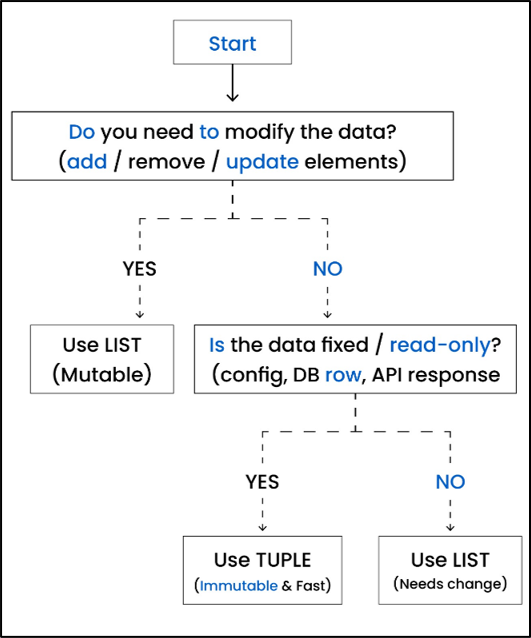
Golden Rule
If you need flexibility, then use a list. On the other side, if you need safety and performance, then use a tuple.
10. Advanced Tuple Concepts: Packing & Unpacking Patterns
It allows you to group values together and then assign them back to variables in a clean way.
Based on my experience, I can say that it will help you write short and more readable code.
These patterns are used in multiple areas like:
• loops
• function returns
• data processing
They are also asked in Python interview questions as well.
a) Basic Unpacking
In this, Python assigns multiple values to multiple variables in a single statement.
Each variable will receive the value based on its position in the tuple.
Example
name, age, city = ("Aman", 25, "Mumbai")Explanation
In this example, a tuple is created and has three values.
After that, Python assigns each value to the variables at the same position.
So, the first value "Aman" is assigned to name, the second value 25 is assigned to age, and finally, the third value "Mumbai" is assigned to the city variable.
Note: Packing means to combine multiple values into a single tuple.
Example
m1 = "Aman", 25, "Mumbai"b) Ignoring Values
Sometimes, you don’t need all values or elements from a tuple.
In those scenarios, you can use an underscore _, which tells Python to intentionally ignore that value.
All other values are stored in variables.
Example
a, _, c = (10, 20, 30)Explanation
In this example, variables a and c hold values 10 and 30 respectively.
Value 20 is ignored and not assigned because underscore _ is mentioned.
c) Extended Unpacking
It allows Python to assign multiple remaining values using a single variable.
This is mainly used when the exact number of values is not known in advance.
To collect multiple values in a single variable, we use an asterisk (*).
Example
a, *b = (10, 20, 30, 40)Explanation
In the above example, variable a receives value 10, and variable b holds multiple values (20, 30, 40).
d) enumerate() Returns Tuples
The enumerate() function returns two related values together during looping.
These two values are packed in a tuple, which can be unpacked easily.
Let’s try to understand it:
Example
for index, value in enumerate(["a", "b"]):
    print(index, value)
Output:
0 a
1 b
Explanation
In the above example, the enumerate() function receives a list ["a", "b"] and produces pairs of values in a tuple like:
(0, "a")
(1, "b")
Please note that each pair contains an index and the corresponding element from the list.
After that, tuple unpacking is done by Python.
The first value of the tuple is received in the index variable, and the second value of the tuple is received in the value variable.
This is tuple unpacking.
Finally, these two values are printed in each iteration of the for loop.
End-to-End Python Tuple Learning Flow (From Basics to Real-World Usage)
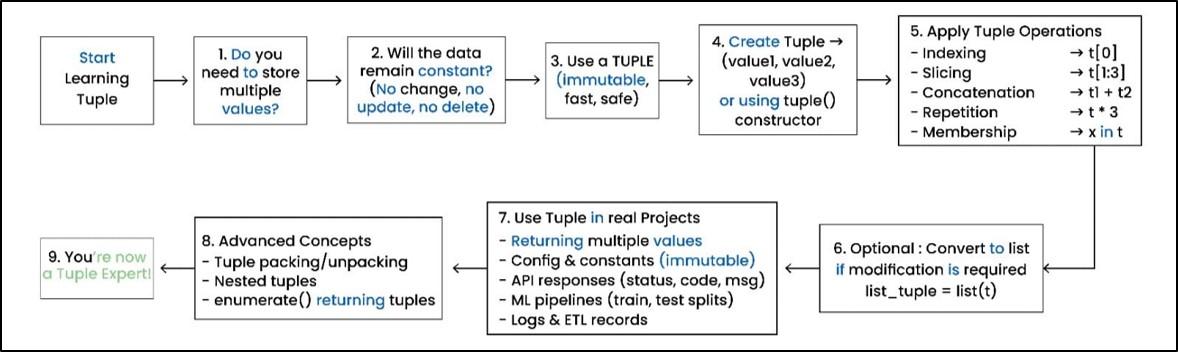
Before moving to common mistakes, the above flowchart gives you a complete picture of how tuples are used in Python from start to production.
11. Common Mistakes with Tuples
In the past couple of years, I have seen many developers do the following mistakes. Please avoid them, as it will help you in your coding journey:
a) Many developers try to update tuple elements and often get errors because you can’t change tuple elements.
b) Freshers often use a tuple where a list is needed, but later they struggle when they want to change their data.
c) Even experienced developers sometimes forget that mutable objects inside tuples can cause unexpected behavior and confusion, because developers expect tuples to be completely safe.
d) Few developers use large tuples to store many related values, but large tuples make the code hard to read.
If your data has meaning, then you should use named structures like namedtuple or dataclass to make your code much cleaner.
12. Python Tuple FAQ
1. What is a Tuple in Python and Why is it Immutable?
Ans:
It is a fixed and ordered collection of values. It is immutable because you can’t change any of its elements once you create it.
If your data doesn’t change, then a tuple is a good candidate, and it is memory-efficient as well.
2. What is the Difference Between Tuple and List?
Ans:
a. A tuple remains of fixed size, but a list can grow or shrink based on need.
b. A tuple is fast and reliable, but lists are flexible.
c. One should use lists when values will change. On the other side, one should use tuples when values or elements remain fixed.
d. Tuple consumes less memory, but lists take more memory because Python keeps extra space for changes.
e. Tuple provides safety because it doesn’t allow modifications, but lists can be modified accidentally in large codebases.
3. Can Tuples Contain Mutable Objects?
Ans:
In simple words, a tuple itself can’t be changed, but it can store objects (like a list) that can be modified.
So yes, a tuple can have mutable objects.
4. Why are Tuples Faster Than Lists?
Ans:
Python stores a tuple in a compact form because it will never change.
There is no need to keep extra memory for resizing.
That is why Python doesn’t keep track of how much space is free, and hence tuples are accessed faster compared to lists.
5. How Do You Return Multiple Values Using a Tuple?
Ans:
Python allows you to return multiple values using a tuple.
One can pack multiple return values into a single tuple.After that, the caller function can unpack them into separate variables.
It is widely used in ML, data processing, and utilities.
Example
def cal_x(a, b):
    return a + b, a - b, a * b

x, y, z = cal_x(20, 10)
6. Can You Sort a List of Tuples in Python?
Ans:
Yes, one can sort a list of tuples in the Python language.
Example
data = [("Aman", 29), ("Raj", 21), ("Neha", 15)]

sort_list = sorted(data, key=lambda x: x[1])

print(sort_list)
Output:
[('Neha', 15), ('Raj', 21), ('Aman', 29)]
Explanation
In the above example, first we create a list named data.
Please remember that each item inside the list is a tuple, so the list data has a total of three records.
In the next line, the sorted() function is used to arrange the list in a particular order.
The key argument tells Python which part of each tuple to use for sorting.
Here, we have created a temporary lambda function which takes x (each tuple in the list) as the input argument.
Then x[1] means it picks the second item (age) from tuple x.
Finally, the sorted() function uses age (second item from each tuple) for sorting.
Once sorting is completed, the result is stored inside the sort_list variable, and the output is printed.
13. Summary
Based on my experience, I can confidently say that tuples are one of the most reliable and high-performance data structures in Python projects.
Tuples are perfect for storing fixed values in:
• Configuring enterprise systems
• APIs
• Returning multiple outputs in ML workflows
I have seen tuple-based patterns provide multiple benefits when you design production pipelines, like:
• Reduce bugs
• Improve speed
• Simplify code
So, if you learn Python tuples at the beginning of your career, then it will help you write fast, safe, and more scalable Python code.