Complete Guide to Python Conditional Statements with Real Examples.
1. Introduction
Programming is not just about writing code that performs calculations or stores data. Most real-world applications need to make decisions based on different situations.
A food delivery app checks whether a delivery partner is available, a banking system verifies whether a transaction should be approved, and an e-commerce website decides whether a customer qualifies for a discount.
To handle these situations, Python provides conditional statements that allow programs to evaluate conditions and choose different actions. Instead of following the same path every time, applications can respond differently based on user input, business rules, or system data.
In this Python If Else Tutorial for Beginners, you'll learn how Python conditional statements work, including if, if-else, if-elif-else, and nested if statements. We'll also explore practical examples, common mistakes, and real-world use cases that help freshers and junior developers build a strong foundation in Python decision-making.
2. What Are Conditional Statements in Python?
Conditional statements are instructions that allow a Python program to choose between different actions based on a condition.
They evaluate whether a condition is True or False and then execute the appropriate block of code. This capability helps programs handle different situations and produce different outcomes.
Consider a login system. Before granting access, the application must verify whether the entered password is correct.
Similarly, an online examination portal may determine whether a student has passed or failed based on the marks obtained.
An e-commerce website might apply a discount only when the total purchase amount meets predefined criteria.
These situations may seem simple, but they represent the core logic behind many modern applications.
Without conditional statements, every user would receive the same result regardless of the input or circumstances.
By using if, if-else, and if-elif-else statements, developers can create applications that handle different scenarios efficiently, follow business rules, and provide a better user experience.
3. Why Decision-Making Matters in Programming
Software becomes useful when it can respond differently to different situations. In real-world applications, the same action is not performed for every user. Instead, the program must evaluate available information and determine the most appropriate next step.
Consider a streaming platform such as Netflix.
Before playing a movie or TV show, the system may need to check whether the user's subscription is active.
It may also need to verify whether the content is available in the user's country or region.
In some cases, the platform must check age restrictions before allowing access to certain content.
Each of these checks represents a decision that the application must make before continuing.
This process is known as decision-making in programming. Using Python conditional statements, developers can define rules that help applications handle different scenarios correctly.
As applications grow in complexity, decision-making becomes even more important. It helps software provide personalized experiences, enforce business rules, improve security, and deliver the right outcome based on the available data.
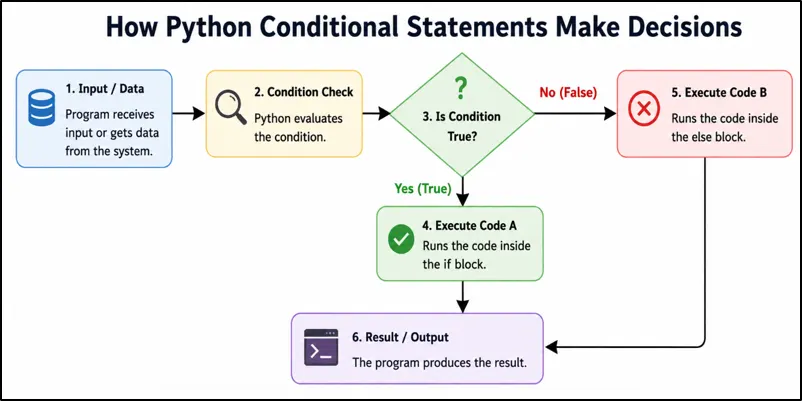
Figure: How Python Conditional Statements Evaluate Conditions and Select Different Execution Paths Based on True or False Outcomes.
4. Python if Statement
The if statement in Python is the most basic way to control the flow of a program. It allows Python to execute a piece of code only when a specified condition is satisfied.
In simple terms, the program asks a question. If the answer is True, the code inside the if block runs. If the answer is False, Python skips that block and continues with the rest of the program.
Syntax
if condition:
statement
Example
age = 20

if age >= 18:

    print("Eligible to vote")
Output
Eligible to vote
Explanation
In this example, the variable age stores the value 20.
Python checks whether age is greater than or equal to 18.
Since 20 >= 18 evaluates to True, Python enters the if block and executes the print() statement.
As a result, the message "Eligible to vote" is displayed on the screen.
If the value of age were less than 18, the condition would become False, and the print statement would not execute.
Real-World Example
account_balance = 5000

if account_balance > 0:

    print("Account is active")
Output
Account is active
Explanation
Here, account_balance contains the value 5000.
Python checks whether the account balance is greater than zero.
Since the condition is True, the program displays "Account is active".
Similar checks are commonly used in banking applications, payment systems, subscription platforms, and financial software where certain actions are allowed only when predefined conditions are met.
5. Python if-else Statement
In many situations, a program needs to handle both possible outcomes of a condition. If the condition is true, one action should be performed. If the condition is false, a different action should be taken.
This is where the if-else statement in Python becomes useful. It allows developers to define two separate execution paths, ensuring that the program can respond appropriately regardless of the result of the condition.
Syntax
if condition:
statement
else:
statement
Example
age = 16

if age >= 18:

    print("Eligible to vote")

else:

    print("Not eligible to vote")
Output
Not eligible to vote
Explanation
In this example, the variable age contains the value 16.
Python first checks whether age is greater than or equal to 18.
Since 16 >= 18 evaluates to False, Python does not execute the code inside the if block.
Instead, it moves directly to the else block and displays "Not eligible to vote".
The else block acts as a fallback option that runs whenever the condition in the if statement is not satisfied.
Real-World Example
password = "python123"

if password == "python123":

    print("Login successful")

else:

    print("Invalid password")
Output
Login successful
Explanation
Here, Python compares the entered password with the expected password.
Since both values are the same, the condition evaluates to True, and the program displays "Login successful".
If the password did not match, Python would execute the else block and display "Invalid password" instead.
This type of logic is widely used in login systems, user authentication, account verification, and access-control mechanisms where the application must decide whether a user should be granted access.
6. Python if-elif-else Statement
In real-world applications, there are often more than two possible outcomes. A simple if-else statement works well when there are only two choices, but many situations require a program to evaluate multiple conditions before deciding what action to take.
The if-elif-else statement in Python allows developers to check several conditions in sequence and execute the code associated with the first condition that evaluates to True.
Syntax
if condition:
statement
elif condition:
statement
else:
statement
Example
marks = 82

if marks >= 90:

    print("Grade A")

elif marks >= 75:

    print("Grade B")

elif marks >= 60:

    print("Grade C")

else:

    print("Grade D")
Output
Grade B
Explanation
In this example, the variable marks contains the value 82.
Python starts checking the conditions from top to bottom.
The first condition, marks >= 90, evaluates to False, so Python moves to the next condition.
The second condition, marks >= 75, evaluates to True because 82 is greater than 75.
As soon as Python finds a condition that is True, it executes the corresponding block and skips all remaining elif and else blocks.
As a result, the output is "Grade B".
Real-World Example
temperature = 35

if temperature >= 40:

    print("Heatwave Alert")

elif temperature >= 30:

    print("Hot Weather")

elif temperature >= 20:

    print("Pleasant Weather")

else:

    print("Cold Weather")
Output
Hot Weather
Explanation
Here, the variable temperature contains the value 35.
Python first checks whether the temperature is 40 or higher. Since that condition is False, it moves to the next condition.
The condition temperature >= 30 evaluates to True, so Python prints "Hot Weather" and ignores the remaining conditions.
Similar decision-making logic is commonly used in weather applications, grading systems, pricing engines, recommendation systems, and business dashboards where multiple outcomes are possible based on different conditions.
7. Nested if Statements in Python
Sometimes a single condition is not enough to make a decision. A program may need to verify one condition first and then perform additional checks before taking an action.
In such situations, developers use nested if statements in Python, where one if statement is placed inside another if statement.
This approach is useful when a second condition should only be evaluated after the first condition has already been satisfied.
Example
age = 25

citizen = True

if age >= 18:

    if citizen:

        print("Eligible to vote")
Output
Eligible to vote
Explanation
In this example, Python first checks whether the person's age is at least 18.
Since the condition evaluates to True, Python proceeds to the nested if statement.
It then checks whether the value of citizen is True.
Because both conditions are satisfied, Python executes the print() statement and displays "Eligible to vote".
If either condition were false, the message would not be displayed.
Real-World Example
logged_in = True

is_admin = True

if logged_in:

    if is_admin:

        print("Access granted")
Output
Access granted
Explanation
Here, the application first verifies whether the user is logged into the system.
Only after confirming that the user is authenticated does Python check whether the user has administrator privileges.
Since both conditions evaluate to True, the program displays "Access granted".
Nested conditions like these are commonly used in admin dashboards, role-based access control systems, banking portals, content management systems, and enterprise applications where multiple levels of verification are required before granting access to sensitive features.
8. Comparison Operators Used with Python Conditional Statements
When writing Python conditional statements, developers rarely use fixed values alone. Most decisions are made by comparing one value with another and then checking the result.
This comparison is performed using comparison operators in Python. These operators return either True or False, allowing the program to determine whether a particular condition has been satisfied.
The following comparison operators are commonly used with if, if-else, if-elif-else, and nested if statements.
Operator | Meaning |
== | Equal to |
!= | Not equal to |
> | Greater than |
< | Less than |
>= | Greater than or equal to |
<= | Less than or equal to |
Let's understand each comparison operator with a simple example.
I. Equal To (==)
The == operator checks whether two values are exactly the same.
product_price = 100

if product_price == 100:
    print("Price matched")
Output
Price matched
Explanation
Python compares the value stored in product_price with 100.
Since both values are equal, the condition evaluates to True, and the message is displayed.
II. Not Equal To (!=)
The != operator checks whether two values are different.
user_role = "guest"

if user_role != "admin":
    print("Limited access")
Output
Limited access
Explanation
The value "guest" is different from "admin".
Therefore, the condition becomes True, and Python executes the if block.
III. Greater Than (>)
The > operator checks whether the value on the left is larger than the value on the right.
stock_quantity = 50

if stock_quantity > 20:
    print("Sufficient stock available")
Output
Sufficient stock available
Explanation
Since 50 is greater than 20, the condition evaluates to True.
Python executes the statement inside the if block.
IV. Less Than (<)
The < operator checks whether the value on the left is smaller than the value on the right.
battery_level = 15

if battery_level < 20:
    print("Low battery warning")
Output
Low battery warning
Explanation
The battery level is below the specified threshold.
As a result, Python displays the warning message.
V. Greater Than or Equal To (>=)
The >= operator checks whether a value is greater than or equal to another value.
experience_years = 5

if experience_years >= 5:
    print("Eligible for senior position")
Output
Eligible for senior position
Explanation
The value is exactly 5, which satisfies the condition.
Because the condition evaluates to True, the message is displayed.
VI. Less Than or Equal To (<=)
The <= operator checks whether a value is less than or equal to another value.
remaining_seats = 10

if remaining_seats <= 10:
    print("Seats filling fast")
Output
Seats filling fast
Explanation
The number of remaining seats is equal to 10.
Since the condition allows values less than or equal to 10, Python executes the if block.
Important Note
A common beginner mistake is confusing = with ==.
- = is used to assign a value to a variable.
- == is used to compare two values.
Understanding comparison operators is essential because they form the foundation of decision-making logic in Python and are widely used in multiple places like validation systems, pricing rules, authentication workflows, reporting dashboards, and backend applications.
9. Logical Operators in Python Conditions
In many real-world situations, a single condition is not enough to make a decision. Applications often need to evaluate multiple requirements before performing an action.
For example, a user may need to be both logged in and verified before accessing a secure feature. Similarly, a customer may receive a special offer if they are a premium member or if they have reached a minimum purchase amount.
To handle such scenarios, Python provides logical operators that allow developers to combine multiple conditions into a single expression.
Operator | Meaning |
and | All conditions must be True |
or | At least one condition must be True |
not | Reverses the result of a condition |
The following examples demonstrate how each logical operator works in Python.
I. Logical AND Operator (and)
The and operator returns True only when all specified conditions are true.
age = 25
citizen = True

if age >= 18 and citizen:
    print("Eligible")
Output
Eligible
Explanation
Python first checks whether the person's age is at least 18.
It then checks whether the person is a citizen.
Since both conditions evaluate to True, the entire expression becomes True, and the message is displayed.
The and operator is commonly used when multiple requirements must be satisfied before an action can be performed.
II. Logical OR Operator (or)
The or operator returns True if at least one of the conditions evaluates to true.
premium_user = False
admin_user = True

if premium_user or admin_user:
    print("Access granted")
Output
Access granted
Explanation
Here, premium_user is False, but admin_user is True.
Because the or operator requires only one condition to be true, the overall expression evaluates to True.
As a result, Python executes the if block and grants access.
The or operator is frequently used in membership systems, permission checks, and feature-access rules.
III. Logical NOT Operator (not)
The not operator reverses the result of a condition.
If a condition is True, not changes it to False. If a condition is False, not changes it to True.
account_locked = False

if not account_locked:
    print("Login allowed")
Output
Login allowed
Explanation
The variable account_locked contains the value False.
The not operator reverses this value, making the condition evaluate to True.
Because the condition becomes true, Python executes the if block and displays "Login allowed".
The not operator is commonly used in authentication systems, security checks, feature flags, and validation logic where developers need to verify that a condition is not present.
When Should You Use Logical Operators?
- Use and when every condition must be satisfied.
- Use or when any one condition is sufficient.
- Use not when you want to check the opposite of a condition.
Logical operators are heavily used in backend development, authentication systems, APIs, access-control mechanisms, and business-rule validation because real-world decisions often depend on multiple conditions rather than a single check.
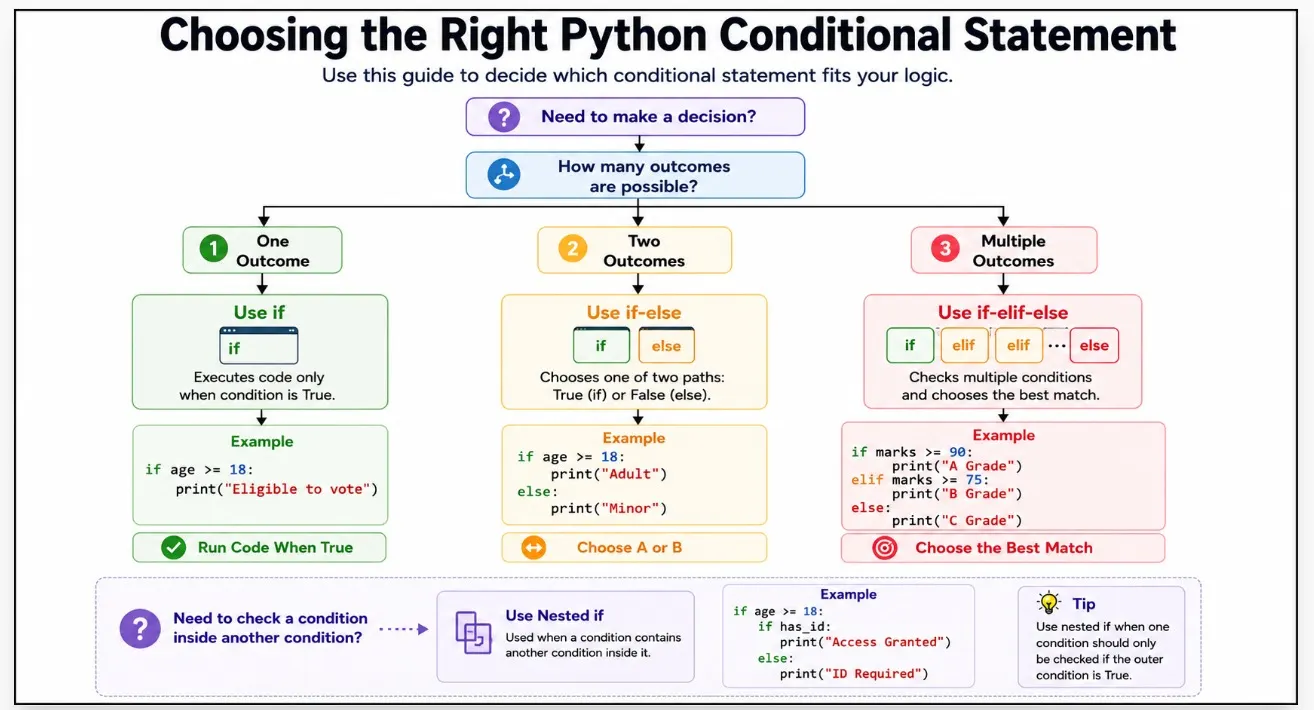
Figure: How to Choose Between Python if, if-else, if-elif-else, and Nested if Statements.
10. Real-World Examples of Python Conditional Statements
Learning the syntax of if, if-else, and if-elif-else statements is important, but understanding where they are used in real applications is what truly builds programming confidence.
In this section, you'll see how Python conditional statements help solve practical business problems that developers encounter in e-commerce platforms, ticket booking systems, and educational applications.
These examples demonstrate how software makes decisions based on user data and predefined rules.
In real applications, this data is often stored inside collections. The
Python Lists – Basics tutorial shows how developers manage groups of values before applying conditional logic.
I. E-Commerce Discount System
Online shopping platforms frequently run promotional campaigns where discounts are applied only when a customer spends a certain amount.
cart_total = 600

if cart_total >= 500:
    print("Discount Applied")
else:
    print("No Discount")
Output
Discount Applied
Explanation
In this example, the customer's cart value is 600.
The application checks whether the purchase amount is greater than or equal to 500.
Since the condition evaluates to True, the customer becomes eligible for the promotion, and the system displays "Discount Applied".
Similar conditional logic is widely used in online stores for coupons, free shipping eligibility, loyalty rewards, cashback programs, and seasonal sales campaigns.
II. Movie Ticket Eligibility System
Movie booking platforms often categorize tickets based on a person's age. Different ticket types may have different pricing, permissions, or content restrictions.
age = 14

if age >= 18:
    print("Adult Ticket")
else:
    print("Child Ticket")
Output
Child Ticket
Explanation
Here, the age of the customer is 14.
The system checks whether the customer is at least 18 years old.
Since the condition evaluates to False, Python executes the else block and displays "Child Ticket".
Applications in the entertainment industry use similar decision-making logic for age verification, parental controls, content restrictions, and pricing categories.
III. Student Result Processing System
Educational software and examination portals often determine a student's result automatically based on predefined passing criteria.
marks = 45

if marks >= 40:
    print("Pass")
else:
    print("Fail")
Output
Pass
Explanation
In this example, the student scored 45 marks.
The application checks whether the marks are greater than or equal to the minimum passing score of 40.
Since the condition evaluates to True, the student is declared Pass.
This type of conditional logic is commonly used in grading systems, learning management platforms, certification portals, scholarship eligibility checks, and academic reporting tools.
Key Takeaway
These examples demonstrate an important principle: business rules are often implemented using conditional statements. As applications grow, the conditions become more sophisticated, but the underlying logic remains the same. Understanding this concept early makes it easier to build practical applications and solve real-world problems with Python.
11. Backend and API Examples of Python Conditional Statements
As developers move beyond beginner programs, conditional statements become an essential part of backend development. Modern applications constantly evaluate conditions before processing requests, validating users, returning responses, or granting access to specific features.
You will also frequently hear the term API (Application Programming Interface).
An API allows different software applications to communicate with each other and exchange information. For example, a weather application retrieves forecast data through an API, while a payment application uses APIs to process transactions securely.
Mobile apps, websites, and backend servers rely heavily on APIs to send and receive data.
Behind these interactions, Python conditional statements help determine how requests should be handled and what response should be returned.
In the following examples, you'll see how conditional logic is used in real backend systems for authentication, API response handling, and user access control.
I. API Authentication Check
Before allowing access to protected resources, most applications verify whether a valid authentication token is available.
token = "abc123"

if token:
    print("User authenticated")
else:
    print("Authentication failed")
Output
User authenticated
Explanation
In this example, the variable token contains a value.
Python checks whether the variable is not empty.
Since a token exists, the condition evaluates to True, and the user is considered authenticated.
In real-world applications, authentication tokens are commonly used to secure APIs, validate user sessions, and control access to protected endpoints.
II. API Status Code Validation
When applications communicate with external services, they often receive HTTP status codes that indicate whether a request was successful or not.
status_code = 200

if status_code == 200:
    print("Success")
elif status_code == 404:
    print("Not Found")
elif status_code == 500:
    print("Server Error")
else:
    print("Unknown Response")
Output
Success
Explanation
The value 200 represents a successful request.
Python checks each condition from top to bottom until it finds a matching status code.
Since the first condition evaluates to True, the program displays "Success" and skips the remaining conditions.
This pattern is extremely common when working with REST APIs, third-party integrations, payment gateways, cloud services, and microservice architectures.
III. User Role Validation
Many applications provide different levels of access based on a user's role.
role = "admin"

if role == "admin":
    print("Full Access")
else:
    print("Limited Access")
Output
Full Access
Explanation
Here, Python checks whether the user's role is "admin".
Since the condition evaluates to True, the application grants full access.
If the role were different, the user would receive restricted permissions instead.
Role-based validation is widely used in admin dashboards, content management systems, banking applications, enterprise software, and cloud platforms where different users require different levels of access.
Many backend systems store user information inside dictionaries. The
Python Dictionary Tutorial for Beginners explains how key-value data structures work alongside conditional statements.
Key Takeaway
Understanding these patterns early makes it easier to read API documentation, debug backend applications, and work with real production systems later in your Python journey.
12. Common Python Conditional Statement Mistakes Beginners Should Avoid
Learning Python if-else statements is relatively straightforward, but many beginners make small mistakes that lead to syntax errors, unexpected results, or difficult-to-debug code.
Understanding these common mistakes early can save hours of troubleshooting and help build better coding habits. The following issues are frequently encountered in Python interviews, coding assessments, and real development projects.
I. Using = Instead of ==
One of the most common beginner mistakes is using the assignment operator (=) when a comparison operator (==) is required.
Incorrect
Explanation
The = operator assigns a value to a variable, while == compares two values.
When checking conditions inside an if statement, Python expects a comparison, not an assignment. This mistake often results in a syntax error.
II. Forgetting the Colon (:)
Every Python conditional statement must end with a colon.
Incorrect
Explanation
The colon tells Python that a block of code follows the condition.
Without it, Python cannot determine where the conditional block begins and raises a syntax error.
III. Incorrect Indentation
Python uses indentation to define code blocks instead of curly braces.
Incorrect
if age > 18:

print("Eligible")
if age > 18:
    print("Eligible")
Explanation
The code inside an if statement must be indented consistently.
Incorrect indentation is one of the most common causes of errors for beginners learning Python conditional statements.
IV. Writing Conditions in the Wrong Order
When using if-elif-else, conditions should be arranged from the most specific to the most general.
Incorrect
marks = 95

if marks >= 50:
    print("Pass")
elif marks >= 90:
    print("Excellent")
marks = 95

if marks >= 90:
    print("Excellent")
elif marks >= 50:
    print("Pass")
Explanation
Python evaluates conditions from top to bottom.
In the incorrect example, a score of 95 satisfies marks >= 50 first, so Python never reaches the marks >= 90 condition. Proper ordering ensures the correct result is produced.
V. Creating Too Many Nested if Statements
Beginners often place multiple if statements inside each other even when a simpler solution exists.
Less Readable
if logged_in:
    if verified:
        if is_admin:
            print("Access Granted")
if logged_in and verified and is_admin:
    print("Access Granted")
Explanation
Deeply nested conditions make code harder to read, maintain, and debug.
In many situations, logical operators such as and and or provide a cleaner and more professional solution.
VI. Comparing Different Data Types Accidentally
Another common mistake is comparing numbers with strings.
Incorrect
age = "18"

if age == 18:
    print("Eligible")
age = 18

if age == 18:
    print("Eligible")
Explanation
The string "18" and the integer 18 are different data types.
Even though they look similar, Python treats them differently, causing the condition to evaluate unexpectedly.
Key Takeaway
Most errors in Python conditional statements are not caused by complex logic. They usually result from small mistakes such as incorrect operators, missing colons, improper indentation, or poorly structured conditions.
By avoiding these common pitfalls, beginners can write cleaner code, debug problems faster, and build a stronger foundation for backend development, APIs, automation, and real-world Python projects.
13. Best Practices for Writing Conditional Statements
Writing conditional statements that work is important, but writing them clearly is what makes code professional.
These best practices will help beginners improve readability, reduce errors, and write cleaner Python if-else statements.
I. Keep Conditions Simple and Readable
A condition should clearly communicate its purpose. If a condition becomes too long or difficult to understand, it may be harder to maintain later.
Good
if age >= 18:
    print("Eligible")
Avoid Overly Complex Conditions
if age >= 18 and citizen and verified and has_permission and account_active:
    print("Eligible")
Explanation
Simple conditions improve readability and make debugging easier.
When conditions become complex, consider breaking them into smaller variables or separate checks so that the logic remains easy to understand.
II. Use Meaningful Variable Names
Variable names should clearly describe the information they store.
Good
Explanation
A descriptive variable name immediately tells other developers what the variable represents.
Meaningful names improve code readability, reduce confusion, and make large projects easier to maintain.
III. Use Constants Instead of Magic Numbers
Hardcoding numbers directly inside conditions can make code difficult to understand and maintain. Using named constants makes the purpose of a value much clearer.
Good
PASS_MARKS = 40

if marks >= PASS_MARKS:
    print("Pass")
if marks >= 40:
    print("Pass")
Explanation
In the first example, the constant PASS_MARKS clearly explains why the value 40 is being used.
If the passing criteria changes in the future, developers only need to update the constant instead of searching through the entire codebase.
IV. Keep Conditional Blocks Focused
Conditional blocks should contain only the code needed to handle a specific decision. Large blocks of code inside a single condition can make programs harder to read and maintain.
Good
if order_confirmed:
    send_confirmation_email()

Here, send_confirmation_email() represents a function responsible for sending a confirmation email to the customer.
if order_confirmed:
    send_confirmation_email()
    update_inventory()
    generate_invoice()
    notify_warehouse()
    create_shipping_label()
Explanation
The first example keeps the condition simple and focused on a single responsibility.
Breaking complex operations into smaller functions improves readability, simplifies debugging, and makes the code easier to maintain as applications grow.
As programs grow, developers often move conditional logic into reusable functions. The
Python Functions Basics guide explains how functions help organize and simplify larger applications.
V. Use Boolean Variables Directly
When working with Boolean values, avoid unnecessary comparisons.
Good
if is_logged_in:
    print("Welcome")
if is_logged_in == True:
    print("Welcome")
Explanation
The first version is shorter, cleaner, and follows common Python coding practices.
Experienced Python developers generally use Boolean variables directly whenever possible.
Key Takeaway
Good conditional statements are not just about making decisions - they are also about writing code that is easy to read and maintain. Keeping conditions simple, choosing meaningful variable names, avoiding magic numbers, and following clean
coding practices can significantly improve code quality as projects become larger and more complex.14. Python If Else Interview Questions
The following Python conditional statement interview questions are commonly asked in fresher and junior developer interviews. Understanding these concepts will help build a strong foundation in Python decision-making and control flow.
I. What is the difference between if and if-else in Python?
An if statement executes code only when a condition evaluates to True.
An if-else statement provides an alternative code path when the condition evaluates to False.
II. What is the purpose of the elif statement in Python?
The elif statement allows developers to test multiple conditions within the same decision structure.
It helps keep code cleaner and more readable than writing multiple separate if statements.
III. What is the difference between = and == in Python?
The = operator assigns a value to a variable.
The == operator compares two values and returns either True or False.
IV. How does Python execute an if-elif-else block?
Python evaluates conditions from top to bottom.
The first condition that evaluates to True is executed, and the remaining conditions are skipped.
V. What is a nested if statement?
A nested if statement is an if statement placed inside another if statement.
It is commonly used when one condition must be checked before evaluating another condition.
VI. What is the difference between and and or operators in Python?
The and operator requires all conditions to be True.
The or operator requires only one condition to be True for the overall expression to evaluate to True.
VII. Why are Python conditional statements important in backend development?
Conditional statements allow software to make decisions based on user input, business rules, and system data.
They are widely used in authentication systems, APIs, access control, payment processing, and request validation.
15. Frequently Asked Questions (FAQ)
I. Can conditional statements be used with strings in Python?
Yes. Python allows conditions to compare string values using comparison operators.
This is commonly used in login systems, user role validation, menu-driven applications, and text-based user input processing.
II. Can one condition contain multiple checks?
Yes. Multiple conditions can be combined using logical operators such as and, or, and not.
This approach helps developers create more flexible decision-making rules without writing separate conditional statements.
III. What happens if no condition matches in an if-elif structure?
If none of the conditions evaluate to True, Python skips all matching blocks.
An optional else block can be used to define a default action in such situations.
IV. Do conditional statements affect application performance?
For most applications, conditional statements have a negligible performance impact.
Writing clear and maintainable conditions is usually more important than micro-optimizing decision logic.
V. Are conditional statements used in machine learning and AI applications?
Yes. Conditional logic is frequently used to validate input data, handle prediction results, process model outputs, and manage workflow decisions.
Many AI and automation systems rely on conditional statements behind the scenes.
VI. What should beginners learn after mastering Python conditional statements?
After learning Python conditional statements, the next logical step is exploring the
Python Loops Tutorial for Beginners, where you'll learn how to repeat actions automatically based on different conditions.
These concepts work together with conditional logic and form the foundation of real-world Python development.
Before moving to more advanced topics, you can test your knowledge with the
Python Loops & Conditions MCQ Questions, which cover conditional statements, logical operators, loops, and real-world decision-making scenarios commonly asked in interviews.
16. Final Thoughts
Programming is ultimately about solving problems, and most real-world problems involve making choices. Every time an application approves a payment, recommends a movie, validates a login, or processes an API request, it follows a set of logical decisions behind the scenes.
Learning conditional statements is often the moment when Python starts feeling like a real programming language rather than a collection of commands. Once you can translate requirements into conditions and outcomes, building applications becomes much easier. This skill will continue to appear in almost every Python project, whether you work with automation, web development, APIs, data science, or AI.
