
After a few days, my manager told me to update a small feature. I changed the same logic in 15 places and still broke the build.
At that time, it was my first lesson.
“Good programmers don’t write more code - they write reusable code.”
And functions are the backbone of writing reusable and easily maintainable code.
Functions are the central point of every Python program these days.
Today, functions are used in many areas like:
• To build automation tools
• To develop AI models
• To work on backend applications
• In small college projects
I would try to make each concept simple and relatable.
1. What is a Function?
It is a block of reusable code which is written to perform a particular task.
For example, if you need to write the same logic at multiple places in your code, you create a function and write that logic (in Python language) inside that function, and then you can call that function multiple times (based on your needs).
You don’t need to write the same logic / code again and again at multiple places.
Also, it keeps your code clean and short (manageable).
Flowchart: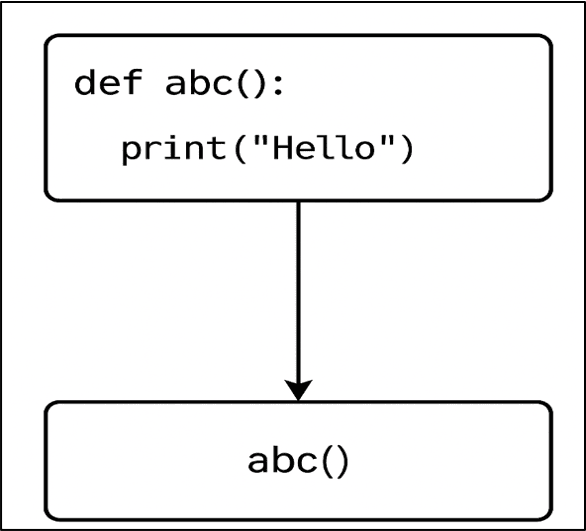
In the above flowchart, you can clearly see how a simple Python function actually runs step by step. Many beginners assume that Python starts executing the function as soon as they write the def line, but that’s not true. Let me break it down in the simplest possible way.
a). Python first reads the function definition
When Python sees:
def abc():
    print("Hello")
it doesn’t execute the code inside the function yet. It simply registers that a function named abc() exists.
b). The real action begins when the function is called
The line:
abc()
is the caller - this is where the function actually gets triggered.
At this moment Python says, “Okay, someone wants to run abc(). Let me jump inside that function.”
c). Python jumps inside the function
Control now moves into the function body:
print("Hello")
and Python executes it.
d). Output appears
You see Hello printed on the screen.
This is how every function works behind the scenes.
e). After finishing, Python returns control to the calling function
Once the last statement inside the function completes, Python steps out of the function and returns control back to the place from where the function was called.
Example: Defining and Calling a Basic Python Function
def abc():
         print("Hello")

abc()  # The function call
Output:
Hello
Explanation:
In this example, def abc(): creates a simple function that prints “Hello” whenever it is called.
When you write abc(), Python jumps to that function and runs the print statement.
Real World Applications
1. It is used in login systems like:
• Website login
• Mobile app login
• Forgot-password workflow
2. In AI/ML pipelines, functions are used at multiple places like:
• To clean the data
• To train a particular model
• To evaluate the model’s accuracy
• To predict the output
3. Banking & Payment applications like Paytm, UPI, Amazon Pay use common functions to verify balance, process a transaction, and send notifications.
Why It Matters
a) They make your code DRY (because repetition creates bugs and wastes resources).
b) They enhance readability and make your code bug-free.
2. Function Parameters
Parameters are variable names that you write inside the function parentheses.
Example:
def add(x, y):
    pass
Explanation:
In the above program, x and y are called parameters, and both act like empty containers.
When a function is called, Python sends values into them.
So, when you call the function like:
add(3, 5)
Internally, 3 and 5 are assigned to parameters x and y respectively:
• x = 3
• y = 5
This shows how parameters work - they receive the values you send to the function.
pass is used to skip the block without performing any action and it is used when you want the structure, but you are not ready to write the code yet.
3. The return Statement
It sends a value back to the place where the function was called.
Please note that after executing a return statement, the function immediately stops and the value written after the return keyword becomes the final output of that function.
Python automatically returns None if you don’t write a return statement inside a function.
Example (function definition):
def total(a, b):
    return a + b
To call this function (written above), write the following line:
result = total(10, 30)# This line calls total() and gives it two values: 10 and 30
print (result)
What happens inside Python step by step:
a) Python sees that total is a function and (10, 30) are the values you want to send.
b) Python jumps to the place where the function total() is defined.
c) It assigns the values (10, 30) to parameters (a, b).
d) After that, Python executes the code inside the function and executes:
return a + bPython calculates the sum (10 + 30) and returns 40 to the place where the function was called.
e) The returned value (40) is stored inside a variable called result:
result = 40Finally, it print the result value as 40
Important Points About the return Statement
1. If you write any line after a return statement (inside a function), it will not execute because return immediately stops the function.
2. If you don’t write a return statement (inside a function), then Python returns None.
3. A return statement can return any data type like:
• Number
• String
• List
• Tuple
• Dictionary
• Object
• even another function
4. A function can have multiple return statements, but Python runs only the one that gets executed first.
5. print() and return are different:
• print() only shows output on the screen
• return sends output back to the calling function
6. If you write a return statement outside a function, Python throws an error.
(because return works only inside a function)
4. Default Parameters (Fixed Values)
In some scenarios, if you want to give pre-set values to function arguments, then you can use default parameters or fixed values.
If the caller function does not pass a value, Python automatically uses the default value.
Note: The caller function is the one that actually calls the function.
This makes your function easier to understand and prevents errors.
Example:
def abc(name="Student"):
    print("Hello", name)


abc()           # uses default value i.e., Student
abc("Aman")     # uses given value i.e., Aman
Output:
Hello Student
Hello Aman
Explanation:
In this example, the function abc(name="Student") is created with a fixed default value for name.
If you call abc() without giving any name, Python automatically uses “Student”.
But when you call abc("Aman"), it replaces the default value and prints “Hello Aman”.
It is a simple way to make your function work even when the user forgets to pass a value.
Honestly, this is one of those things that makes functions feel flexible and beginner-friendly.
5. Positional Arguments
It means the arguments you pass to a function must follow the same left-to-right order as the function’s parameters.
In simple words:
Python matches the first value with the first parameter, the second value with the second parameter, and so on.
Please note that if you change the order of the arguments, the meaning will also change. Hence, the position of each value is very important.
Example 1:
def student_details(name, age, grade):
    print("Name:", name)
    print("Age:", age)
    print("Grade:", grade)


student_details("Harsh", 12, "6th")
Output:
Name: Harsh
Age: 12
Grade: 6th
Explanation:
In this example, the function student_details() expects the values in a fixed left-to-right order: first the name, then age, and finally the grade.
When we call student_details("Harsh", 12, "6th"), Python assigns these values in the same sequence and prints the details correctly.
If you change the order, the output will also change because Python strictly matches values by their position.
(When I first learned this, even I got confused until I realized Python simply follows the order we give.)
Example 2 (Wrong order):
def student_details(name, age, grade):
    print("Name:", name)
    print("Age:", age)
    print("Grade:", grade)


student_details(12, "Harsh", "6th")
Output:
Name: 12
Age: Harsh
Grade: 6th
Explanation:
In this example, the function expects the values in the order name, age, grade, but we passed them in the wrong order.
So Python simply assigns the first value (12) to name, the second value (“Harsh”) to age, and the third one (“6th”) to grade.
That’s why the output looks odd, because the values were placed in the wrong positions.
6. Keyword Arguments
It allows you to call a function by using parameter names.
Since you are mentioning the names of parameters, the order of the arguments doesn’t matter.
This helps reduce mistakes.
This approach is useful when you have too many parameters in a function.
Example:
def student_details(name, age, grade):
    print("Name:", name)
    print("Age:", age)
    print("Grade:", grade)


# Calling the function using Keyword arguments
student_details(grade="6th", name="Harsh", age=12)
Output:
Age: 12
Name: Harsh
Grade: 6th
Explanation:
In this example, the function student_details() is defined to print a student’s name, age, and grade.
When we call this function using keyword arguments, Python matches each value based on the parameter name, not the position.
So even though the order is mixed, Python still prints the correct details: Harsh, 12, and 6th.
(If you observe closely, this is the point where most beginners realize how useful keyword arguments really are.)
Learn more about Functions in our “Intermediate Python Functions” chapter.