
In this guide, you will learn:
- Python dictionary basics and key-value pairs
- How to create dictionaries in Python
- Dictionary methods like get(), items(), update(), and pop()
- Dictionary comprehension with real examples
- Nested dictionaries and real-world data structures
- Python dictionary vs list vs tuple vs set
- Real-world Python dictionary applications
- Python dictionary interview questions and answers
- Common Python dictionary mistakes beginners make
- Backend development and API examples using dictionaries
- Mini Python backend project using dictionaries
By the end of this guide, you will understand how Python dictionaries are used in APIs, backend development, JSON handling, machine learning, automation scripts, and real-world Python applications.
1. What is a Python Dictionary?
- A key acts like a label
- A value stores the actual information
user = {
    "name": "Raj",
    "age": 25,
    "city": "Mumbai"
}
Code Explanation
In this Python dictionary example, user is a dictionary variable that stores data in key-value pairs. Here, name, age, and city act as keys, while Raj, 25, and Mumbai are their corresponding values.
This type of Python dictionary structure is used in APIs, server-side applications, JSON processing, and modern software systems because labeled data becomes much easier to read and manage.
In the above dictionary:
- name, age, and city are keys
- Raj, 25, and Mumbai are values
One thing beginners love about dictionaries is that you do not need to remember positions like index 0, 1, or 2.
Instead of writing:
user[0]You can directly access meaningful data like:
user["name"]
user["age"]
This makes code much easier to read and maintain.
2. Why Python Dictionaries Are Important
- Fast
- Flexible
- Easy to understand
- Perfect for labeled data
- Useful for APIs and JSON
- Efficient for large applications
3. Fast Lookup Performance in Python Dictionaries
user["city"]Whether your dictionary contains:
- 3 items
- 300 items
- or 3 million items
Interview Question
Python dictionaries use hashing to directly locate values using keys. Lists scan items one-by-one, which becomes slower for large data.
4. Real-World Example of Python Dictionary
employee = {
    "id": 101,
    "name": "Aman",
    "department": "Engineering",
    "salary": 90000
}
This structure is very similar to:
- API responses
- JSON files
- database records
- machine learning datasets
- cloud configuration data
That is why dictionaries are used heavily in modern Python applications.
5. Different Ways to Create Dictionaries in Python
In real projects, developers create dictionaries in multiple ways depending on the data source.
Let us understand the most important dictionary creation methods.
Creating Dictionary Using Curly Braces
This is the most common and beginner-friendly method.
car = {
    "brand": "Tesla",
    "year": 2026
}
Code Explanation
This is one of the simplest Python dictionary examples for beginners. The dictionary stores car-related information where brand and year are keys linked to their respective values.
In real Python projects, developers use dictionaries like this to store structured information such as product details, employee records, configuration settings, and API data.
Curly braces {} are used to create dictionaries.
If your data contains labels like name, email, or city, then dictionaries are usually a better choice than lists.
Creating Dictionary Using dict() Function
car = dict(brand="Tesla", year=2026)Code Explanation
In this example, the built-in dict() function is used to create a Python dictionary. Python automatically converts brand and year into keys and stores their values inside the dictionary.
This approach is widely preferred in server-side Python applications and configuration management because it keeps dictionary creation clean and readable.
This style is commonly used while working with:
- configurations
- application settings
- dynamic values
Creating Dictionary from Tuples
- CSV files
- databases
- APIs
pairs = [("a", 10), ("b", 20)]

result = dict(pairs)Output:
{'a': 10, 'b': 20}
During one of my automation projects, I used this pattern frequently while converting CSV rows into structured dictionaries.
Creating Dictionary Using zip()
Sometimes APIs return separate lists for keys and values.
keys = ["id", "name"]
values = [101, "Raj"]

user = dict(zip(keys, values))Output:
{'id': 101, 'name': 'Raj'}
Here, zip() combines both lists by pairing items at the same position. The dict() function then converts those pairs into a dictionary, which is commonly used in Python API and JSON handling.
This approach is widely adopted in API mapping and dynamic data processing workflows.
Dictionary Comprehension in Python
It is widely used in Python automation, backend development, and data processing projects to create clean and efficient dictionaries quickly.
squares = {x: x*x for x in range(5)}Output:
{0: 0, 1: 1, 2: 4, 3: 9, 4: 16}
Dictionary comprehensions may look difficult initially, but after practicing a few examples, they become one of the biggest time-saving features in Python.
6. How to Access Dictionary Values in Python
You can access dictionary values using keys.
Example:
user = {
    "name": "Raj",
    "age": 30
}

print(user["name"])Output:
Raj
Safe Access Using get() Method
user["email"]If the key does not exist, Python raises a KeyError.
A safer approach is using .get().
user = {
    "name": "Raj",
    "age": 40
}

email = user.get("email", "not provided")

print(email)Output:
not provided
Why get() is Important
I have personally seen backend APIs fail because developers directly accessed missing keys without validation.
7. Important Dictionary Methods in Python
There are several dictionary methods that are used heavily in production code.
keys() Method
It is used to access only keys.
user = {
    "name": "Raj",
    "age": 40,
    "city": "Mumbai"
}

for key in user.keys():
print(key)Output:
name
age
city
values() Method
It is used to access only values.
for value in user.values():
print(value)Output:
Raj
40
Mumbai
items() Method
It is used to access both keys and values together.
for key, value in user.items():
print(key, value)Output:
name Raj
age 40
city Mumbai
update() Method in Python Dictionary
- modify existing values
- add new keys
- merge data
user = {
    "name": "Raj",
    "age": 40
}

user.update({
    "age": 45,
    "email": "raj@gmail.com"
})

print(user)Output:
{'name': 'Raj', 'age': 45, 'email': 'raj@gmail.com'}
I have used .update() extensively while merging API responses and cleaning user payloads.
8. Removing Data from Dictionary
pop() Method
user = {
    "name": "Raj",
    "age": 40,
    "city": "Mumbai"
}

age = user.pop("age")

print(age)
print(user)Output:
40
{'name': 'Raj', 'city': 'Mumbai'}
In this Python dictionary example, the pop() method removes the key "age" from the dictionary and returns its value. After removing the key, the updated dictionary is printed, showing that "age" no longer exists in the dictionary.
popitem() Method
It removes the last inserted key-value pair.
user.popitem()This method is useful for stack-like operations.
Example:
user = {
    "name": "Raj",
    "age": 40,
    "city": "Mumbai"
}

removed_item = user.popitem()

print(removed_item)
print(user)Output:
('city', 'Mumbai')
{'name': 'Raj', 'age': 40}
Here, the popitem() method removes the last inserted key-value pair from the dictionary and returns it as a tuple. After removing "city": "Mumbai", the updated dictionary is printed without the last item.
9. Python Dictionary Merge Methods
- APIs
- configs
- databases
- environment variables
Merge Dictionaries Using |
d1 = {"a": 10, "b": 20}
d2 = {"b": 25, "c": 30}

merged = d1 | d2

print(merged)Output:
{'a': 10, 'b': 25, 'c': 30}
In this example, d1 and d2 store different key-value pairs, and Python combines both into a new dictionary named merged. If the same key exists in both dictionaries, the value from the second dictionary replaces the first one, which helps keep the latest updated data.
Merge Dictionaries Using **
The ** unpacking operator is used to combine multiple dictionaries into a new dictionary. Before Python 3.9, it was one of the most common ways to merge dictionaries.
Example:
d1 = {"a": 10, "b": 20}
d2 = {"b": 25, "c": 30}

merged = {**d1, **d2}

print(merged)Output:
{'a': 10, 'b': 25, 'c': 30}
Explanation
In this example, the ** operator unpacks all key-value pairs from both dictionaries into a new dictionary called merged. If the same key exists in both dictionaries, Python keeps the value from the second dictionary.
10. Python Dictionary Comprehension Real Use Cases
- backend systems
- data cleaning
- machine learning
- monitoring tools
Real Project Example: Filter Error Logs
errors = {
    k: v for k, v in logs.items()
    if v["status"] == "error"
}
Output
{
"log2": {"status": "error"},
"log4": {"status": "error"}
}
Machine Learning Dictionary Example
unique_vals = ["low", "medium", "high"]

encode_map = {
   val: i for i, val in enumerate(unique_vals)
}

print(encode_map)
Output
{
"low": 0,
"medium": 1,
"high": 2
}
11. How Python Dictionaries Work Internally
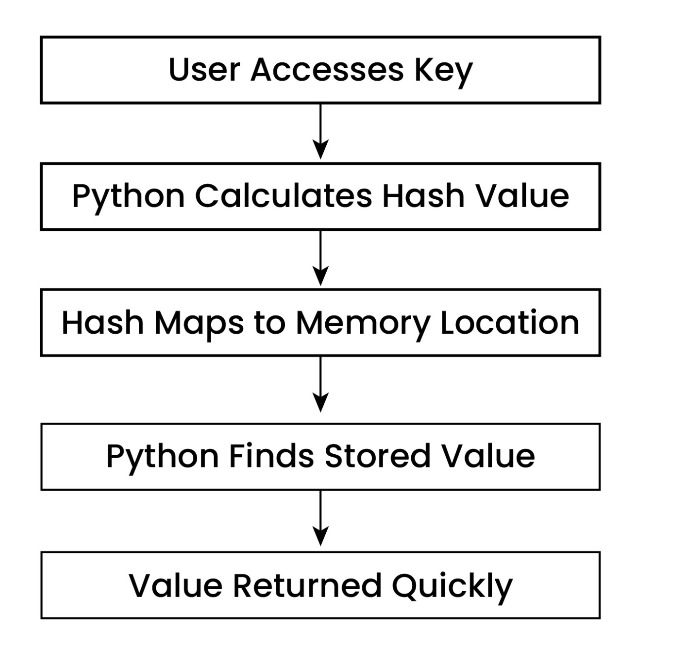
Python Dictionary Lookup Process:
student = {
    "name": "John",
    "age": 21
}

print(student["name"])Output:
John
- Python calculates hash value of key
- Hash maps to memory location
- Value is stored there
- Python directly jumps to that location later
Why Dictionary Keys Must Be Immutable
- strings
- numbers
- tuples
Beginner Mistake
my_dict = {
    [1, 2]: "hello"
}
Here, the list [1, 2] is used as a dictionary key, which raises an error because Python dictionary keys must be immutable. Since lists are mutable and their values can change later, Python does not allow them as dictionary keys.
12. Real-World Applications of Python Dictionaries
As developers start working on real-world Python projects, dictionaries become one of the most important data structures for processing user data, configuration settings, API payloads, and large datasets in a clean and organized way.
JSON and API Handling
If you want to understand how Python dictionaries work with real API responses and JSON payloads, you should also explore our complete Python JSON Handling tutorial for beginners .
payload = {
    "name": "Raj",
    "age": 30
}
During API development projects, I noticed that understanding dictionaries automatically makes JSON handling easier.
Backend Development
- request payloads
- authentication data
- configuration settings
- caching
- session management
request_payload = {
   "username": "rahul123",
   "email": "rahul@gmail.com",
   "role": "admin"
}

print(request_payload["email"])
Explanation
In backend development, dictionaries are commonly used to store request payloads, user data, authentication details, and API responses. This makes it easier for Python applications to process structured data efficiently.
Machine Learning Pipelines
Dictionaries are heavily used in:
- feature mapping
- label encoding
- preprocessing
- dataset transformation
Feature Mapping Example
feature_mapping = {
   "low": 0,
   "medium": 1,
   "high": 2
}

print(feature_mapping)
Output
{'low': 0, 'medium': 1, 'high': 2}
In machine learning pipelines, feature mapping is used to convert text labels into numerical values that machine learning models can understand. Python dictionaries make this process simple and efficient for data preprocessing and model training tasks.
ETL and Data Engineering
- Extract
- Transform
- Load
raw_data = {
"Name": "amit",
"AGE": "20"
}

clean_data = {
"name": raw_data["Name"].title(),
"age": int(raw_data["AGE"])
}

print(clean_data)
Output
{'name': 'Amit', 'age': 20}
Explanation
In this Python ETL example, raw_data stores unprocessed data where the name is in lowercase and age is stored as a string. The clean_data dictionary transforms that raw data by converting the name into proper title format and changing age from string to integer for cleaner and structured processing.
This type of data transformation is heavily used in data engineering pipelines, automation workflows, machine learning preprocessing, and ETL systems where raw data needs to be cleaned before further use.
13. Production-Level Python Dictionary Patterns
During my early backend learning journey, I noticed that most real APIs and web applications internally process request data using Python dictionaries. Once I understood how dictionaries work in production code, concepts like API handling, validation, caching, and backend optimization became much easier to understand.
API Payload Validation Example
REQUIRED_FIELDS = ("name", "email", "age")


def validate_payload(payload: dict):

   missing = [
       field for field in REQUIRED_FIELDS
       if field not in payload
   ]

   if missing:
       raise ValueError(f"Missing fields: {missing}")

   return {
       "name": payload["name"].strip(),
       "email": payload["email"].lower(),
       "age": int(payload["age"])
   }


user_data = {
   "name": "  Raj  ",
   "email": "RAJ@GMAIL.COM",
   "age": "25"
}

print(validate_payload(user_data))
Output
{
'name': 'Raj',
'email': 'raj@gmail.com',
'age': 25
}
This type of dictionary-based validation is very common in Python backend development, REST APIs, authentication systems, and real-world web applications where user input must be cleaned before processing.
Since production-level dictionary logic is often written inside reusable Python functions, beginners should also learn Python Functions Basics to better understand function arguments, return values, and reusable backend code structures.
Simple Python Cache Example
cache = {}


def load_from_db(uid):
   print("Fetching data from database...")
   return {
       "id": uid,
       "name": "Raj"
   }


def fetch_user(uid):

   if uid in cache:
       print("Returning data from cache")
       return cache[uid]

   data = load_from_db(uid)

   cache[uid] = data

   return data


print(fetch_user(101))
print(fetch_user(101))
Output
Fetching data from database...
{'id': 101, 'name': 'Raj'}
Returning data from cache
{'id': 101, 'name': 'Raj'}
14. Common Python Dictionary Mistakes
Accessing Missing Dictionary Keys Directly
user = {
   "name": "Raj"
}

print(user["email"])
Output
KeyError: 'email'
Explanation
In this Python dictionary example, the key "email" does not exist inside the dictionary, so Python raises a KeyError. This is one of the most common mistakes beginners make while handling API responses, JSON data, and backend request payloads.
To understand how Python handles errors like KeyError, TypeError, and runtime exceptions in real applications, you can also read our complete Python Exception Handling tutorial with practical examples.
Safer Approach Using get()
print(user.get("email"))Output
None
Explanation
The get() method safely checks for the key without crashing the program. This approach is commonly used in Python backend development and API handling where some fields may be optional.
Using Mutable Objects as Dictionary Keys
Many freshers try using lists as dictionary keys without realizing that dictionary keys must be immutable.
Example
my_dict = {
   [1, 2]: "hello"
}
Output
TypeError: unhashable type: 'list'
Explanation
Here, the list [1, 2] is used as a dictionary key, which raises an error because lists are mutable and can change later. Python only allows immutable objects like strings, numbers, and tuples as dictionary keys.
Repeating the Same Dictionary Key
user = {
   "name": "Raj",
   "name": "Aman"
}

print(user)
Output
{'name': 'Aman'}
Explanation
In this Python dictionary example, the second "name" key replaces the first one automatically. Python dictionaries do not allow duplicate keys, so the latest value always overwrites the previous value.
Modifying Dictionary While Looping
user = {
   "name": "Raj",
   "age": 25
}

for key in user:
   user["city"] = "Mumbai"
Output
RuntimeError: dictionary changed size during iteration
Explanation
In this example, the dictionary structure changes while Python is still looping through it. This is a common beginner mistake in Python automation scripts, backend processing, and data transformation tasks.
Storing Too Much Nested Data
user = {
   "profile": {
       "personal": {
           "contact": {
               "email": "raj@gmail.com"
           }
       }
   }
}
Explanation
Deeply nested dictionaries may look organized initially, but they become difficult to read, maintain, and debug in large Python applications. Keeping dictionary structures simple usually improves code readability and backend development efficiency.
15. Python Dictionary vs List vs Tuple vs Set
| Data Structure | Ordered | Mutable | Lookup Speed | Best Use Case |
| Dictionary | Yes | Yes | O(1) | Labeled data, APIs, JSON |
| List | Yes | Yes | O(n) | Ordered collections |
| Tuple | Yes | No | O(n) | Fixed Data |
| Set | No | Yes | O(1) | Unique items |
If you want to understand immutable data structures more deeply, you can also explore our complete Python Tuples tutorial with practical examples and real-world use cases.
16. Python Dictionary Interview Questions
These Python dictionary interview questions are commonly asked in Python fresher interviews, backend development interviews, coding rounds, and technical assessments. Understanding these beginner-friendly Python dictionary concepts can help junior developers and freshers answer interview questions more confidently.
17. Mini Project for Beginners and Junior Developers
Smart API Rate Limit Tracker Using Python Dictionary
- tracking users
- counting API requests
- blocking excessive requests
- monitoring usage
- generating reports
- handling structured backend data
Problem Statement
- each user can make only 5 API requests
- after crossing the limit, access should be blocked
- the system should store request history
- the system should show blocked users
- the system should generate usage reports
What You Will Learn From This Project
- Nested dictionary handling
- Real-world Python backend logic
- Request tracking using dictionaries
- Updating dictionary values dynamically
- Dictionary-based report generation
- Conditional logic with dictionaries
- Looping through structured data
- Practical Python project structure
api_limits = {
   "max_requests": 5
}

users = {}


def register_request(username):

   if username not in users:
       users[username] = {
           "requests": 0,
           "blocked": False,
           "history": []
       }

   if users[username]["blocked"]:
       print(f"{username} is temporarily blocked.")
       return

   users[username]["requests"] += 1

   request_number = users[username]["requests"]

   users[username]["history"].append(
       f"API Request {request_number}"
   )

   print(f"Request accepted for {username}")

   if request_number >= api_limits["max_requests"]:
       users[username]["blocked"] = True

       print(f"{username} has crossed API limit and is now blocked.")


def show_user_report(username):

   if username not in users:
       print("User not found.")
       return

   data = users[username]

   print("\nUser API Report")
   print("-" * 40)

   print(f"Username: {username}")
   print(f"Total Requests: {data['requests']}")
   print(f"Blocked Status: {data['blocked']}")

   print("\nRequest History:")

   for item in data["history"]:
       print(item)

   print("-" * 40)


def show_blocked_users():

   print("\nBlocked Users")
   print("-" * 40)

   blocked_found = False

   for username, data in users.items():

       if data["blocked"]:
           blocked_found = True
           print(username)

   if not blocked_found:
       print("No blocked users found.")

   print("-" * 40)


register_request("aman")
register_request("aman")
register_request("aman")
register_request("aman")
register_request("aman")
register_request("aman")

register_request("neha")
register_request("neha")

show_user_report("aman")

show_blocked_users()
Output
Request accepted for aman
Request accepted for aman
Request accepted for aman
Request accepted for aman
Request accepted for aman
aman has crossed API limit and is now blocked.
aman is temporarily blocked.
Request accepted for neha
Request accepted for neha
User API Report
----------------------------------------
Username: aman
Total Requests: 5
Blocked Status: True
Request History:
API Request 1
API Request 2
API Request 3
API Request 4
API Request 5
---------------------------------------
Blocked Users
----------------------------------------
aman
----------------------------------------
Code Explanation for Freshers and Junior Developers
- Python backend development
- API request tracking
- authentication systems
- rate limiting systems
- monitoring dashboards
- cloud applications
- web application security
Why This Project Adds Real Value
Project Improvement Ideas
- request timestamps
- automatic cooldown timers
- JSON file storage
- Flask API integration
- admin dashboard
- request analytics
- IP-based blocking
- login authentication
- database integration
- live monitoring system
18. Frequently Asked Questions
19. Python Dictionary Quick Revision Cheat Sheet
- Python dictionaries store data in key-value pairs.
- Dictionaries are mutable, which means values can be changed after creation.
- Dictionary keys must be immutable like strings, numbers, or tuples.
- Python dictionaries provide very fast lookup performance using hashing.
- The get() method safely accesses dictionary values without raising errors.
- The items() method is used to access keys and values together.
- The update() method helps merge or modify dictionary data.
- The pop() method removes a specific key from the dictionary.
- Dictionary comprehensions help create dictionaries using loops in a single line.
- Python dictionaries are heavily used in APIs, JSON handling, backend development, machine learning, and automation projects.