
• AI systems
• Enterprise APIs
• Large data platforms
• Production-grade ML pipelines
As the size of your project keeps growing, one challenge is very common:
How can developers keep their code clean, predictable, and easy to understand for every team member?
One of the most powerful features is Type Hinting.
In this post, you will learn Type Hinting in very simple words so that you can understand it easily.
What is Type Hinting?
Prerequisite: To understand Python type hinting clearly, you should be comfortable with Python Functions Basics and Advanced Python Functions. Familiarity with Python Tuples is helpful but not mandatory.
Type Hinting means telling Python and developers in advance what type of data a function expects and what it returns.
It is like a label that helps in 3 ways:
• improves clarity
• reduces the number of bugs
• helps tools like VS Code to auto-detect errors early
This feature is very helpful in large projects and especially ML pipelines.
Example 1: Basic Type Hints
def add(a: int, b: int) -> int:
return a + bExplanation:
In this example, a function named add is created and it takes two inputs a and b.
The int after variables a and b is the type hint which means a and b should both be integers.
But you can still pass a string or a float as Python doesn’t enforce it.
-> int tells that the function add will return an integer number.
If you call add() using the wrong data types, then your program might crash at runtime:
add("hello", 10)
If you use the above arguments, tools like VS Code or PyCharm will show warnings before running the code because "hello" is not an integer. These warnings help you fix mistakes early and avoid runtime crashes.
Example 2: Collection With Types
from collections.abc import Iterable

def average(values: Iterable[float]) -> float:
return sum(values) / len(values)Explanation:
In the above example, Iterable class is imported from collections.abc so that you can loop through.
The function average takes a collection of float numbers (list, tuple, generator, etc.).
It takes a collection of float numbers,
• adds those float numbers with sum()
• counts total float numbers with len()
• and finally returns their average
-> float tells Python that the average() function will return a float value.
But it is only a hint and not a strict rule.
Real-World Applications of Type Hints
It is very important to see how type hints are used in real applications.
Example 1: Creating an Employee API with FastAPI
from fastapi import FastAPI
from pydantic import BaseModel, Field

app = FastAPI()

class Employee(BaseModel):
    id: int
    name: str
    department: str | None = None
    salary: float = Field(..., ge=0)

@app.post("/employees")
def create_employee(emp: Employee):
return {"message": f"Employee {emp.name} added!"}In the above example, first we imported FastAPI class and after that we imported BaseModel class and Field function.
• FastAPI helps to build APIs (web services).
• BaseModel and Field both are used to define data shapes and validation rules.
BaseModel defines the structure, and Field adds validation rules.
Then we created a FastAPI application object app – it is your API.
After that, we created an Employee model and it also tells what type of data we expect when someone sends employee information.
For example, employee id must be an integer and name must be a string
The department can be optional and salary must be a float number, and ge=0 means it should be greater than or equal to zero.
Finally, we wrote:
@app.post("/employees")which means If someone sends employee data to this URL, then run the function create_employee().FastAPI automatically converts the incoming JSON into an Employee object because of emp: Employee.
Important point to remember is that /employees is the POST endpoint where tools like Postman send employee data.
When you send data using JSON:
• FastAPI takes the JSON
• changes it to an Employee object
• runs the function create_employee
• finally returns a message that employee is added successfully
How a POST Request Flows Through FastAPI?
Let me explain it with the help of a simple flowchart followed by an explanation: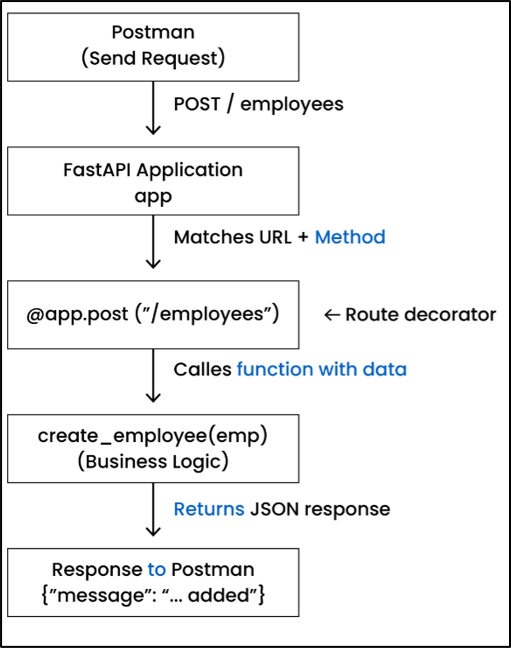
Description:
Above diagram explains in a simple way how a POST request travels from Postman tool to your FastAPI function:
a) Postman tool sends a POST request to the URL “/employees” with JSON data.
b) After that, the request is received by the FastAPI app, and FastAPI checks whether the URL and method match any defined route.
c) Next, it finds the route @app.post("/employees"), which is connected to your function.
d) Then, FastAPI calls create_employee() and parses the JSON data into it as the Employee object.
e) After this, business logic is run inside the function and a JSON response is returned by the function.
f) In last, a response is sent back (from FastAPI) to Postman tool.
Run the Service
You can use the following command to start your FastAPI server:
uvicorn main:app --reload
Let’s simplify it:
a) uvicorn – It is a server that is used to run FastAPI apps.
b) main:app – It tells the server (uvicorn) to run the app (the FastAPI object) inside the Python file main.py.
c) --reload – If you change your code, then it restarts the server automatically.
Why Type Hints Matter
a) Catch Errors Before Running the Code
If you pass an incorrect data type, the tool (like VS Code / MyPy) warns you before running your code. They also help prevent bugs and reduce chances of runtime errors.”
b) More Readable Code
It provides more clarity to the code.
For example:
def add(a: int, b: int) -> int:
c) Automatic Validations
Once FastAPI reads your type hints, it automatically does the following tasks:
• validates the incoming data
• generates the input/output schemas
• also creates request/response formats
Common Mistakes with Type Hints
a) Forgetting to add a return type
Normally, developers forget to add a return type like:
def add(a: int, b: int)It becomes hard to understand the code and in large projects, missing return types creates confusion.
b) Using wrong type
If you write a: int but you give a = "Hello", then in that case int becomes meaningless.
So, you should always match your type hint with actual data.
c) Using old style in new Python versions
In modern Python (3.9+), the preferred style to write a type hint for a list is list[int].
But beginners still write old style List[int] which confuses them.
So, to keep your code clean, you should always use list[int] and prefer using the modern style for consistency as well
d) Overuse
Some developers add hints to every variable, which makes your code noisy.My recommendation is to add hints only where they improve clarity and understanding.
e) Not updating type hints
Sometimes, developers have to change the logic written inside a function, but they forget to update the type hints.
So, it can mislead future readers and can also cause bugs when the code is evolved in the future.
Summary
Type Hinting helps in many ways as it makes your code clean and easy to maintain.
If you start using simple hints like int, str, list[int], etc., then it helps in multiple ways:
• helps to catch errors early
• improves IDE suggestions
• helps to write professional code
Honestly, if you want to write production-quality code in Python, then you should master Type Hints.
Learn more in our “Python Generator Functions" chapter.