Complete Guide to Python for Loops, While Loops, range(), and Real-World Examples.
1. Introduction
Loops are one of the most important concepts in Python because they allow a program to execute the same block of code multiple times without repetition. Learning loops is a major step for beginners because they are used in almost every real-world Python application.
Whether an e-commerce website is displaying thousands of products, a banking system is processing transactions, or an API is returning hundreds of records, loops help developers process large amounts of data efficiently. Instead of writing the same code repeatedly, a loop automates the entire process.
As developers gain experience, they quickly discover that loops appear everywhere in backend development, automation scripts, data analysis, artificial intelligence, and web applications. Understanding how loops work helps build cleaner, more scalable, and easier-to-maintain programs.
In this Python Loops Tutorial for Beginners, you'll learn what loops are, how Python for loops and while loops work, how to iterate through strings and lists, and how loops are used in real-world projects with practical examples.
2. What Are Loops in Python?
A loop is a programming structure that repeatedly executes a block of code. Instead of writing the same statement again and again, developers use loops to automate repetitive tasks and process data more efficiently.
For example, imagine displaying the same message five times. Writing five separate print statements works, but it quickly becomes difficult to manage as programs grow larger. A loop provides a cleaner and more scalable solution.
Without a Loop
print("Learn AI Way")

print("Learn AI Way")

print("Learn AI Way")

print("Learn AI Way")

print("Learn AI Way")
With a Loop
for i in range(5):

    print("Learn AI Way")
Output
Learn AI Way
Learn AI Way
Learn AI Way
Learn AI Way
Learn AI Way
The loop produces the same result using much less code. This improves readability, reduces duplication, and makes programs easier to maintain. That's why loops are one of the most widely used concepts in Python programming and real-world software development.
I. Why Developers Use Loops
In real-world Python projects, developers often need to perform the same task multiple times. For example, an application might need to process hundreds of users, products, orders, or API records. Writing separate code for each item would be time-consuming and difficult to manage.
Loops solve this problem by allowing Python to repeat the same set of instructions automatically. This makes programs shorter, cleaner, and easier to update in the future.
Loops help developers process large amounts of data efficiently while keeping code clean, reusable, and easy to maintain.
Because of these advantages, loops are widely used in web applications, automation scripts, backend systems, and data-processing programs.
II. Types of Loops in Python
Python provides two main types of loops, and each is designed for a different situation.
For Loop
A for loop is used when working with a collection of data. Python automatically retrieves one item at a time and processes it.
Common examples include:
- Looping through a list of products
- Reading customer records
- Processing API responses
- Iterating through text data
While Loop
A while loop is used when repetition depends on a condition. The loop continues running until the condition becomes False.
Common examples include:
- Login systems
- User input validation
- Retry mechanisms
- Verification processes
Understanding the difference between for loops and while loops is important because both are widely used in Python programming and real-world software development.
3. Why Loops Matter in Programming
Most software applications work with more than one piece of data. A shopping website may have thousands of products, a banking system may process millions of transactions, and a social media platform may handle countless posts and comments every day.
The challenge is not performing an action once. The challenge is performing the same action consistently across a large volume of data. This is where loops become essential in programming.
Common real-world scenarios include:
- Displaying products on a website
- Processing customer orders
- Reading API data
- Generating business reports
- Analyzing application logs
- Sending notifications to users
Without loops, handling large datasets would require significantly more code and make applications difficult to manage as they grow.
I. Real-World Example
Imagine an online store that needs to display available products.
products = ["Laptop", "Mouse", "Keyboard"]

for product in products:

    print(product)
Output
Laptop
Mouse
Keyboard
Explanation
The application stores multiple products inside a list. The loop accesses each product one by one and displays it automatically.
This same approach is used whenever applications need to process multiple records using identical logic.
4. How Python Loops Work Internally
Before learning different types of loops, it's helpful to understand what happens behind the scenes when Python executes a loop. Having a clear mental model makes loops much easier to understand and debug later.
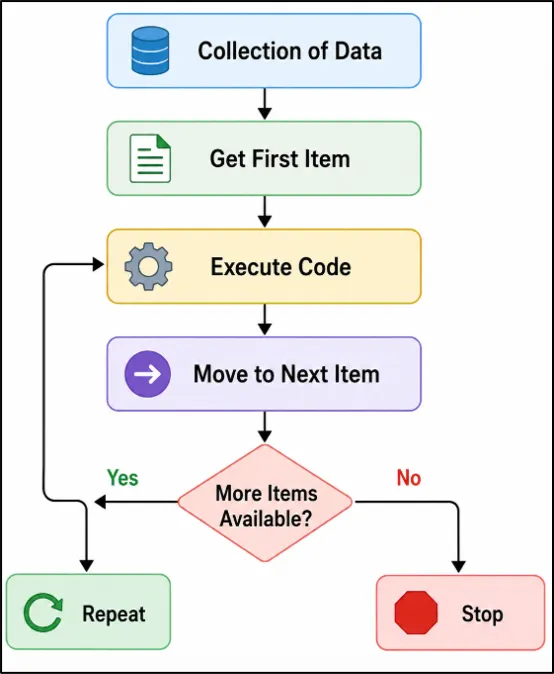
Think of a loop as a worker processing items from a queue. Python picks one item, performs the required task, moves to the next item, and continues until there is nothing left to process.
Whenever Python executes a loop:
- Python starts the loop.
- It retrieves the first item from the collection.
- The code inside the loop runs.
- Python moves to the next item.
- The process repeats automatically.
- The loop stops when all items have been processed.
Python Loop Execution Flow Explained for Beginners
Figure: Python loop execution flow showing how data is processed step by step until all items are completed.
Real-World Python Loop Example: Warehouse Order Processing
Imagine a warehouse employee packing customer orders.
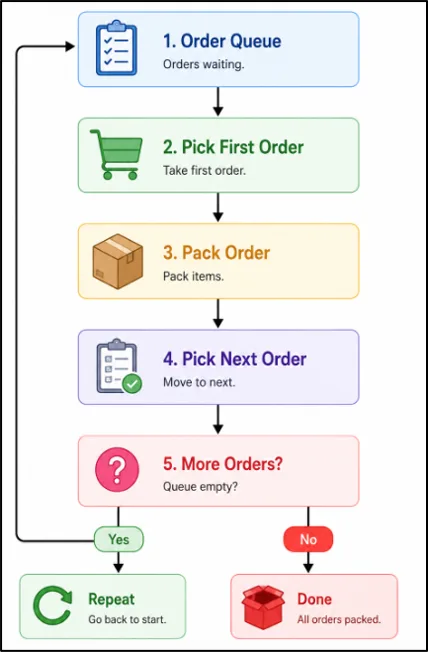
Figure: A warehouse order workflow that demonstrates how loops repeatedly process items until none remain.
A Python loop works in a very similar way. Instead of processing physical orders, it processes data such as products, users, transactions, or API records.
Why Understanding This Matters
Many beginners focus only on loop syntax. However, understanding how Python moves through data step by step makes it easier to:
- Read loop-based code
- Debug mistakes
- Process collections efficiently
- Understand advanced topics such as list comprehensions and iterators
I. Beginner Tip: Choosing the Right Loop
One of the most common beginner questions is:
"Should I use a for loop or a while loop?"
A simple rule works in most situations.
Use a For Loop When:
● Working with lists
● Processing strings
● Reading tuples
● Iterating through dictionaries
● Handling API or database records
Python automatically processes each item one by one.
Use a While Loop When:
● Waiting for user input
● Building login systems
● Retrying failed operations
● Validating data
● Monitoring a condition
The loop continues running until the condition becomes False.
Quick Decision Guide
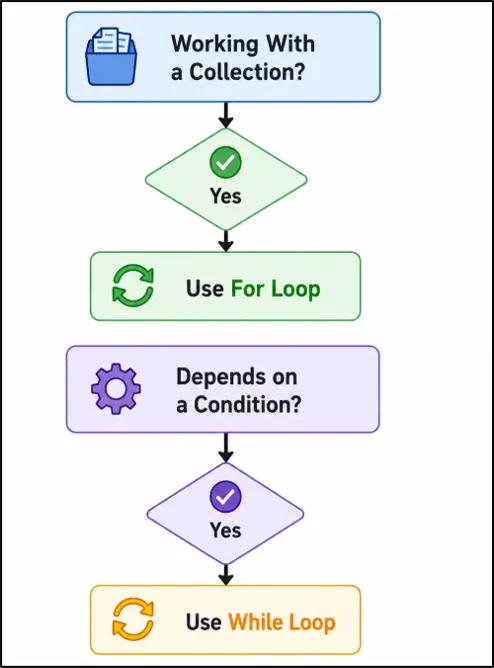
This simple rule helps most beginners choose the correct loop type without confusion.
5. Python For Loop
The for loop is one of the most beginner-friendly features in Python. It allows Python to automatically move through a sequence and execute the same block of code for each item.
Unlike some programming languages where developers manually manage loop counters, Python keeps the syntax simple and readable. This makes for loops easier to learn and widely used in everyday programming tasks.
A for loop can work with:
- Strings
- Lists
- Tuples
- Dictionaries
- range()
Learning the Python for loop is important because it becomes a foundation for many advanced topics later, including file handling, data processing, automation, and working with external libraries.
I. Python for Loop Syntax
for variable in sequence:
    statement
Here:
- variable stores the current item being processed
- sequence contains the values to iterate through
- statement represents the code that runs during each iteration
Python automatically retrieves one item at a time until the sequence is fully processed.
II. Python for Loop Example
languages = ["Python", "Java", "JavaScript"]

for language in languages:
    print(language)
Output
Python
Java
JavaScript
Explanation
The loop starts with the first item in the list and assigns it to the variable language. After printing the value, Python moves to the next item and repeats the process until all values have been processed.
III. Understanding Iteration Step by Step
When the loop runs, Python performs the following actions:
- Assigns "Python" to language
- Executes print(language)
- Assigns "Java" to language
- Executes print(language)
- Assigns "JavaScript" to language
- Executes print(language)
- Ends the loop
Understanding this flow helps beginners visualize what happens during each iteration.
IV. When Should You Use a For Loop?
A for loop is usually the best choice whenever Python needs to work through all items in a sequence.
Common situations include:
- Reading names from a list
- Displaying menu options
- Processing configuration values
- Scanning text character by character
- Working with rows of data
If Python already knows where to get the next item, a for loop is often the simplest and cleanest solution.
V. Benefits of Using a For Loop
For loops are popular because they are simple, readable, and work naturally with Python data structures.
They help beginners process multiple values efficiently while keeping code clean and maintainable.
6. Looping Through Strings in Python
A string contains multiple characters, and a Python for loop can access each character in sequence. This technique, known as string iteration in Python, is useful when working with text-based data.
Learning how to loop through a string helps beginners understand how Python reads and processes text behind the scenes.
I. Python String Loop Example
website = "LearnAIWay"

for letter in website:
    print(letter)
Output
L
e
a
r
n
A
I
W
a
y
Explanation
During each iteration, Python assigns the next character to the variable letter and executes the code inside the loop. The process continues until all characters in the string have been processed.
II. Practical String Example
word = "Programming"
vowel_count = 0

for letter in word:
    if letter.lower() in "aeiou":
        vowel_count += 1

print("Total Vowels:", vowel_count)
Output
Total Vowels: 3
Explanation
This program checks each character in the word and counts how many vowels are present. Similar logic is often used when analyzing text, generating summaries, or extracting useful information from user-provided content.
III. Common Uses of String Iteration
Developers commonly loop through strings to analyze, search, validate, and extract information from text.
Understanding how to loop through a string in Python is an important skill because text data appears in almost every type of software application.
7. Looping Through Lists in Python
Lists are one of the most commonly used data structures in Python because they can store multiple values in a single variable. When a list contains many items, a loop provides an easy way to access and work with each item individually.
Learning how to loop through a list is important because lists are used extensively in Python programs to store related information such as names, scores, categories, and other grouped data.
If you're still getting comfortable with collections, the
Python Lists – Basics guide explains how lists are created, modified, and used in real Python programs.
I. Python List Loop Example
cities = ["Houston", "Dallas", "Austin"]

for city in cities:
    print(city)
Output
Houston
Dallas
Austin
Explanation
During each iteration, Python retrieves one city from the list and stores it in the variable city. The loop continues until every item in the list has been processed.
II. Practical List Example
scores = [85, 92, 78, 95]

for score in scores:
    print("Student Score:", score)
Output
Student Score: 85
Student Score: 92
Student Score: 78
Student Score: 95
Explanation
This example displays each score stored in the list. Similar logic is used whenever an application needs to display, review, or analyze multiple values stored together.
III. Why Lists and Loops Work So Well Together
A list can contain many items, while a loop provides a way to visit each item automatically. This combination allows developers to perform the same operation on every value without manually accessing each element.
Examples include student records, product catalogs, survey responses, and sales reports.
IV. Key Takeaway
Whenever data is stored inside a list, a for loop provides a simple and efficient way to work with every item. Mastering how to loop through a list in Python is an important step because list processing appears frequently in beginner, intermediate, and professional Python programs.
8. Looping Through Tuples in Python
A tuple stores multiple values and can be processed using a loop just like a list.
Example
days = ("Monday", "Tuesday", "Wednesday")

for day in days:
    print(day)
Output
Monday
Tuesday
Wednesday
Tuples are commonly used for fixed values such as days, months, coordinates, and configuration settings.
9. Looping Through Dictionaries in Python
A dictionary stores data as key-value pairs, making it easy to organize and retrieve related information. Unlike lists that use positions (indexes), dictionaries use meaningful keys such as "name", "email", or "salary" to access data.
Learning how to loop through a dictionary in Python is important because dictionaries are widely used to represent structured information and configuration data.
Since dictionaries are one of the most important Python data structures, the
Python Dictionary Tutorial for Beginners covers key-value pairs, common operations, and practical examples in more detail.
I. Loop Through Dictionary Keys
employee = {
    "name": "David",
    "department": "IT",
    "experience": 5
}

for key in employee:
    print(key)
Output
name
department
experience
Explanation
When you loop through a dictionary directly, Python returns the keys by default. This is useful when you need to know what information is available inside the dictionary.
II. Loop Through Dictionary Values
employee = {
    "name": "David",
    "department": "IT",
    "experience": 5
}

for value in employee.values():
    print(value)
Output
David
IT
5
Explanation
The values() method returns all values stored in the dictionary. This approach is useful when only the actual data matters and the keys are not required.
III. Loop Through Dictionary Keys and Values
employee = {
    "name": "David",
    "department": "IT",
    "experience": 5
}

for key, value in employee.items():
    print(key, ":", value)
Output
name : David
department : IT
experience : 5
Explanation
The items() method returns both keys and values together. This is one of the most useful dictionary iteration techniques because it provides complete information during each loop iteration.
IV. Practical Example
settings = {
    "theme": "Dark",
    "language": "English",
    "notifications": "Enabled"
}

for key, value in settings.items():
    print(key, "=", value)
Output
theme = Dark
language = English
notifications = Enabled
Explanation
This example displays application settings stored inside a dictionary. Similar patterns are commonly used when reading configuration values, preferences, or system settings.
V. Key Takeaway
When working with dictionaries, you can loop through:
- Keys using for key in dictionary
- Values using dictionary.values()
- Keys and values together using dictionary.items()
Understanding dictionary iteration in Python is an important skill because it helps developers work efficiently with structured data stored as key-value pairs.
10. Understanding the range() Function in Python
The range() function generates a sequence of numbers that can be used inside a loop. It is especially useful when you want a loop to run a specific number of times instead of iterating through a list, string, tuple, or dictionary.
Learning how to use range() in Python is important because it gives developers precise control over loop execution and is one of the most frequently used functions in Python programming.
I. Python range() Syntax
range(start, stop, step)
Parameters
- Start : Number where the sequence begins
- Stop: Number where the sequence ends (not included)
- step: Difference between consecutive numbers
II. Simple range() Example
for number in range(5):
    print(number)
Output
0
1
2
3
4
Explanation
When only one value is provided, Python starts at 0 by default and stops before the specified number. Therefore, range(5) produces numbers from 0 to 4.
III. range() With Start and Stop Values
for number in range(1, 6):
    print(number)
Output
1
2
3
4
5
Explanation
The sequence begins at 1 and continues until it reaches the value before 6.
IV. range() With Step Value
for number in range(0, 11, 2):
    print(number)
Output
0
2
4
6
8
10
Explanation
The third argument controls how much the number increases during each iteration. In this example, Python increases the value by 2 each time.
V. Visualizing range()
range(5)
0 → 1 → 2 → 3 → 4
range(1, 6)
1 → 2 → 3 → 4 → 5
range(0, 11, 2)
0 → 2 → 4 → 6 → 8 → 10
VI. Common range() Mistake
One of the most common beginner mistakes is assuming that the stop value is included.
range(5)
Produces:
0 1 2 3 4
Not:
0 1 2 3 4 5
Quick Tip
A simple way to remember range() is:
Start at the first value, move using the step value, and stop before the stop value.
This small rule helps avoid one of the most common Python loop mistakes.
11. Python While Loop
A while loop in Python executes a block of code repeatedly as long as a specified condition remains True. Unlike loops that work through a sequence of values, a while loop continues running until a condition changes.
Learning how to use a while loop in Python is important because many programs need to keep running until a specific event or requirement is satisfied.
I. Python While Loop Syntax
while condition:
statement
Python checks the condition before each iteration. If the condition evaluates to True, the loop continues. If it becomes False, the loop stops.
II. Simple While Loop Example
count = 1

while count <= 5:
    print(count)
    count += 1
Output
1
2
3
4
5
Explanation
The loop begins with the value 1. After each iteration, the value of count increases by 1. When count becomes 6, the condition is no longer true, so Python exits the loop.
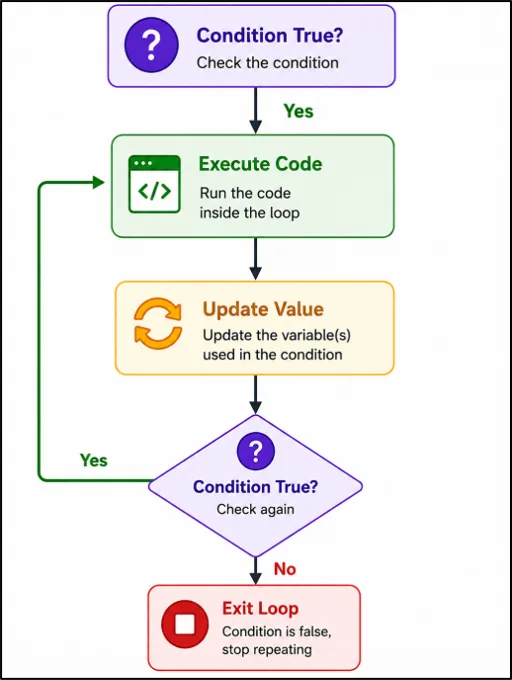
III. How a While Loop Works
Figure: Python while loop execution flow showing condition checking and repeated code execution.
Here, Python first checks whether the condition is True.
If the condition is True, the code inside the while loop executes and the loop variable is updated.
Python then checks the condition again. As long as the condition remains True, the loop continues to repeat.
When the condition becomes False, Python exits the loop and stops execution.
IV. Practical While Loop Example
This program keeps asking the user for input until the word "exit" is entered. Once the condition becomes False, the loop stops and Python executes the next statement.
This type of logic is commonly used in menu-driven programs, command-line tools, and interactive applications where users control when the program should end.
Code:
user_choice = ""

while user_choice != "exit":
    user_choice = input("Type 'exit' to stop: ")

print("Program Ended")
Explanation
This program continues running until the user enters the word "exit". Similar patterns are used in menus, interactive applications, and command-line tools where the program waits for a specific input before stopping.
V. Infinite Loop Warning
One of the most common beginner mistakes is creating an infinite loop, which occurs when the condition never becomes False.
Incorrect Example
count = 1

while count <= 5:
    print(count)
Problem
The value of count never changes, so the condition always remains True. As a result, the loop continues forever.
Correct Example
count = 1

while count <= 5:
    print(count)
    count += 1
Beginner Tip
Whenever you write a while loop, ask yourself:
"What will eventually make this condition become False?"
If you can answer that question, you will avoid most infinite-loop mistakes.
VI. Key Takeaway
A while loop is useful when the number of iterations is not known in advance. Instead of running a fixed number of times, the loop continues until a condition changes, making it a powerful tool for interactive and event-driven programs.
12. For Loop vs While Loop
Both for loops and while loops allow Python to execute code repeatedly, but they are designed for different situations. Understanding the difference helps beginners write cleaner code and choose the right approach for a problem.
A common question during Python interviews and real-world development is: "Should I use a for loop or a while loop?" The answer depends on how the repetition is controlled.
I. Comparison Table
|
Feature
|
For Loop
|
While Loop
|
|
Controls Repetition Using
|
Sequence of values
|
Condition
|
|
Best For
|
Fixed data sets
|
Unknown number of repetitions
|
|
Syntax
|
Simpler
|
Slightly more flexible
|
|
Risk of Infinite Loop
|
Low
|
Higher
|
|
Beginner Friendliness
|
Easier
|
Requires more attention
|
II. When Should You Use a For Loop?
A for loop is a good choice when the values to process are already available.
Common examples include:
- Reading student names
- Displaying menu items
- Processing exam scores
- Printing monthly sales figures
- Working with predefined data
scores = [85, 90, 95]

for score in scores:
    print(score)
In this example, Python automatically processes every value in the list.
III. When Should You Use a While Loop?
A while loop is useful when the number of repetitions is not known in advance.
Common examples include:
- Waiting for a user action
- Running a menu repeatedly
- Monitoring a process
- Checking a condition continuously
- Keeping an application active until a command is received
choice = ""

while choice != "quit":
    choice = input("Enter command: ")
In this example, the loop continues until the user enters "quit".
IV. Beginner Tip
If you can clearly identify the values that need to be processed, a for loop is usually the better option.
If the stopping point depends on user actions or changing conditions, a while loop is often the better choice.
V. Key Takeaway
There is no "best" loop in Python. The best choice depends on the problem being solved. As you practice Python programming, you'll naturally learn when a for loop provides a simpler solution and when a while loop offers more control.
Choosing the correct loop improves code readability and makes programs easier to understand and maintain.
13. Real-World Examples of Python Loops
After learning the syntax of for loops and while loops, many beginners wonder how these concepts are used in actual software projects. The reality is that loops are involved whenever an application needs to perform the same operation on multiple pieces of information.
Let's explore a few practical examples that demonstrate how Python loops solve common programming tasks.
I. Sending Notifications to Multiple Users
Many applications need to send notifications to several users at once.
users = ["Emma", "David", "Sophia", "Michael"]

for user in users:
    print("Notification sent to", user)
Output
Notification sent to Emma
Notification sent to David
Notification sent to Sophia
Notification sent to Michael
Explanation
The loop goes through each user in the list and performs the same action. This approach is commonly used in messaging systems, learning platforms, and notification services.
II. Calculating Total Expenses
Business applications often need to calculate totals from multiple values.
expenses = [250, 180, 320, 150]

total = 0

for expense in expenses:
    total += expense

print("Total Expense:", total)
Output
Total Expense: 900
Explanation
The loop adds each expense to the running total. Similar calculations are frequently used in budgeting tools, accounting software, and financial dashboards.
III. Why These Examples Matter
Although the examples are simple, they represent the same thinking used in larger software systems. Whether an application is sending notifications, calculating totals, generating reports, or analyzing records, loops provide a structured way to repeat operations efficiently.
As a beginner, the important lesson is not the specific example. The important lesson is recognizing situations where the same action must be performed multiple times. Whenever that happens, a loop is often the right solution.
14. Backend Examples Using Loops
Many beginners think loops are only used for printing numbers or processing simple lists.
In reality, loops are one of the most commonly used tools in backend development. Whenever an application receives multiple records from an API, database, or log file, loops help process that data efficiently.
Let's look at some practical backend examples.
I. Processing API Responses
Many applications receive data from APIs in JSON format.
Example:
users = [
    {"name": "John"},
    {"name": "Emma"},
    {"name": "David"}
]

for user in users:
    print(user["name"])
Output
John
Emma
David
Explanation
The loop processes each user record returned by the API. This type of logic is commonly used in web applications, dashboards, and automation systems.
II. Processing Database Records
Databases often return multiple rows of data that need to be processed individually.
employees = [
    {"id": 1, "name": "John"},
    {"id": 2, "name": "Emma"},
    {"id": 3, "name": "David"}
]

for employee in employees:
    print(employee["name"])
Output
John
Emma
David
Explanation
Backend applications frequently use loops to process customer records, employee information, orders, and transaction data retrieved from databases.
III. Processing Log Files
Modern applications generate logs that help developers monitor system activity and troubleshoot issues.
logs = [
    "INFO: Login Success",
    "ERROR: Payment Failed",
    "INFO: Logout"
]

for log in logs:
    print(log)
Output
INFO: Login Success
ERROR: Payment Failed
INFO: Logout
Explanation
Loops help monitoring systems analyze log entries, identify errors, and generate reports. This is a common use case in cloud platforms, DevOps tools, and enterprise applications.
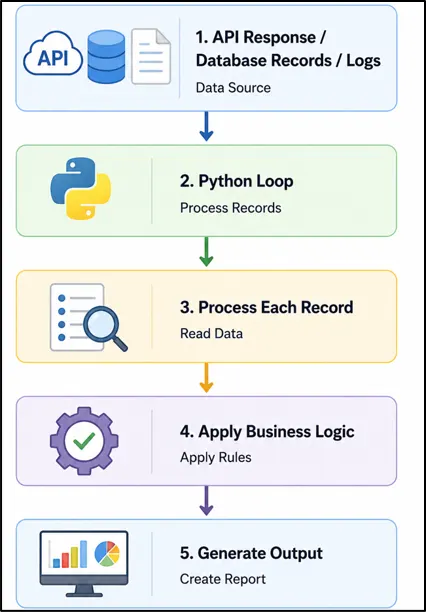
IV. Backend Data Processing Workflow
Backend Data Processing Workflow showing how Python loops process API responses, database records, and log files to generate reports.
This workflow appears in many real-world backend applications and demonstrates why loops are such an important Python programming concept.
15. Mini Project: Customer Order Processing System
Problem Statement
An online store receives multiple customer orders every day.
The system needs to:
- Process all orders
- Calculate total revenue
- Count completed orders
- Count pending orders
- Generate a summary report
Sample Data
orders = [
   {"id": 101, "amount": 250, "status": "Completed"},
   {"id": 102, "amount": 180, "status": "Pending"},
   {"id": 103, "amount": 450, "status": "Completed"},
   {"id": 104, "amount": 120, "status": "Pending"},
   {"id": 105, "amount": 300, "status": "Completed"}
]
Expected Output
Total Revenue: 1000
Completed Orders: 3
Pending Orders: 2
Solution
orders = [
   {"id": 101, "amount": 250, "status": "Completed"},
   {"id": 102, "amount": 180, "status": "Pending"},
   {"id": 103, "amount": 450, "status": "Completed"},
   {"id": 104, "amount": 120, "status": "Pending"},
   {"id": 105, "amount": 300, "status": "Completed"}
]

total_revenue = 0
completed_orders = 0
pending_orders = 0

for order in orders:

   total_revenue += order["amount"]

   if order["status"] == "Completed":
       completed_orders += 1
   else:
       pending_orders += 1

print("Total Revenue:", total_revenue)
print("Completed Orders:", completed_orders)
print("Pending Orders:", pending_orders)
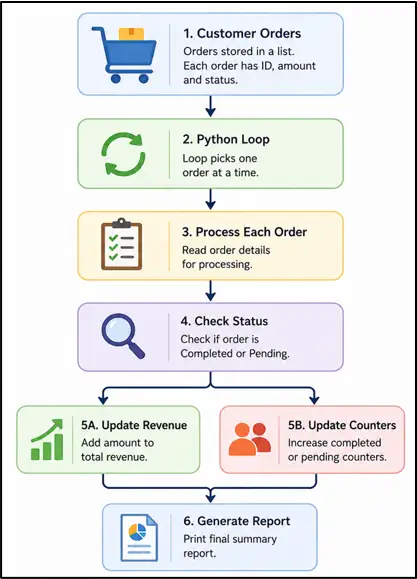
In this code, the program uses a Python for loop to process multiple customer orders stored in a list of dictionaries. During each iteration, the loop reads one order, adds its amount to the total revenue, and checks whether the order is completed or pending.
This decision-making logic is powered by conditional statements. If you'd like to learn them in depth, explore the
Python If, Elif, Else tutorial next.
By the end of the loop, the program calculates the total revenue, counts completed orders, and counts pending orders automatically. This is a practical Python loop example for beginners that demonstrates how loops are used in real-world e-commerce and backend applications to process and analyze business data efficiently.
Skills Learned:
This project helps beginners understand how Python loops process and analyze real-world data. It combines lists, dictionaries, and conditional statements to perform useful business operations automatically.
While building this project, you'll learn how to calculate totals, count records, apply business logic, and generate summary reports. These are common skills used in backend applications, APIs, automation scripts, and data-processing systems.
Customer Order Processing System:
Figure: Python Customer Order Processing System workflow showing how loops process orders, calculate revenue, track order status, and generate reports.
16. Common Mistakes Beginners Make When Using Loops
Learning loops is relatively straightforward, but small mistakes can cause programs to behave unexpectedly. Understanding these common errors will help beginners write more accurate and reliable Python code.
I. Forgetting Indentation
Incorrect
for i in range(5):
print(i)
for i in range(5):
    print(i)
Explanation
Python uses indentation to identify which statements belong inside a loop. If indentation is missing or incorrect, Python raises an error and the program will not run.
II. Creating an Infinite While Loop
Incorrect
count = 1

while count <= 5:
    print(count)
Explanation
The value of count never changes, so the condition always remains True. As a result, the loop continues running indefinitely.
Correct
count = 1

while count <= 5:
    print(count)
    count += 1
Explanation
Updating the variable inside the loop ensures that the condition eventually becomes False, allowing the loop to stop correctly.
III. Choosing the Wrong Loop Type
Less Suitable
index = 0

while index < len(names):
    print(names[index])
    index += 1
for name in names:
    print(name)
Explanation
Beginners sometimes use a while loop when a for loop provides a simpler and more readable solution. Choosing the right loop makes code easier to understand and maintain.
IV. Misunderstanding range()
for number in range(5):
    print(number)
Output
0
1
2
3
4
Explanation
A common beginner mistake is expecting range(5) to include the number 5. In Python, the stop value is always excluded from the generated sequence.
Quick Tip
Whenever a loop behaves unexpectedly, check three things first:
- Is the indentation correct?
- Does the loop condition eventually become False?
- Is the range() stop value being used correctly?
These simple checks can help solve many common loop-related errors.
17. Best Practices for Writing Loops
After learning how loops work, the next step is learning how to write loops that are easy to understand and modify. Small improvements in coding style can make programs cleaner and reduce mistakes as projects become larger.
The following practices are commonly used by experienced Python developers and can help beginners develop good coding habits from the start.
I. Avoid Deep Nesting
Less Readable
for student in students:
    for subject in subjects:
        for exam in exams:
            print(student, subject, exam)
Explanation
When loops are nested too deeply, code becomes harder to read and debug. Whenever possible, keep loop structures simple and avoid unnecessary levels of nesting.
II. Use Comments for Complex Logic
for score in scores:

    # Check whether the student passed
    if score >= 50:
        passed += 1
Explanation
If a loop performs an important calculation or decision, a short comment can help explain the purpose of the code. This makes future maintenance easier.
III. Use Descriptive Output While Testing
for task in tasks:
    print("Processing:", task)
Explanation
During development, descriptive output helps track what the loop is doing. This makes it easier to identify issues when debugging programs.
IV. Remove Temporary Debug Statements
for task in tasks:
    print(task)   # Debugging only
Explanation
Many beginners leave temporary print statements inside loops after testing. Before finalizing a program, remove unnecessary debugging output to keep the code clean.
Important Tip
A good loop should be:
- Easy to read
- Easy to debug
- Easy to modify
If another developer can understand the loop quickly, you're usually following good coding practices.
18. Python Loops Interview Questions
I. What Is a Loop in Python?
A loop allows Python to execute the same block of code multiple times automatically. It helps developers perform repetitive tasks without writing duplicate code.
II. What Is the Difference Between a For Loop and a While Loop in Python?
A for loop is commonly used when working with a sequence of values, while a while loop continues running until a specified condition becomes False.
III. How Do You Loop Through a List in Python?
A list can be iterated using a for loop, which retrieves one item at a time. This is one of the most common ways to process multiple values in Python.
IV. How Do You Loop Through a String in Python?
Strings can be iterated character by character using a for loop. This technique is useful when analyzing, searching, or processing text data.
V. What Is the Purpose of the range() Function in Python?
The range() function generates a sequence of numbers that can be used inside loops. It is often used when a loop needs to execute a specific number of times.
VI. What Is an Infinite Loop in Python?
An infinite loop occurs when a loop condition never becomes False. As a result, the loop continues running indefinitely until it is stopped manually.
19. Frequently Asked Questions (FAQ)
I. Can We Use Multiple Loops in the Same Python Program?
Yes. A Python program can contain multiple loops, and each loop can perform a different task. Larger applications often use several loops to process different types of information.
II. Is range() Only Used With For Loops?
The range() function is most commonly used with for loops, but it can also be converted into a list or used wherever a sequence of numbers is needed.
III. Do Loops Improve Coding Efficiency?
Yes. Loops reduce code duplication and allow the same logic to run multiple times automatically. This makes programs shorter, easier to manage, and less error-prone.
IV. Can a Loop Contain If Statements?
Yes. Loops and conditional statements are often used together. This allows a program to make decisions while processing different values during each iteration.
V. What Is Iteration in Python?
Iteration is the process of moving through items one at a time inside a sequence. Every time a loop processes a new item, a new iteration occurs.
VI. Why Does Python Start range(5) From 0?
Python uses zero-based indexing, which means counting typically starts at 0. For this reason, range(5) generates the numbers 0 through 4.
VII. What Topics Should I Learn After Python Loops?
After mastering loops, a good next step is learning Python Functions, File Handling, Exception Handling, Modules, and Object-Oriented Programming (OOP). These topics build directly on the concepts learned in loops.
VII. How Do You Loop Through a Dictionary in Python?
After mastering loops, most beginners move on to
Python Functions Basics , where they learn how to organize reusable code and build larger applications more efficiently.
20. Final Thoughts
Python loops may seem simple at first, but they are one of the building blocks of programming. Once you become comfortable using loops, many coding problems become easier to solve because you can work with multiple values using the same logic.
The most important thing is not memorizing loop syntax. Instead, focus on understanding when a loop is needed and how it helps simplify a task. That skill will be useful in every stage of your Python learning journey.
If you're just getting started, try creating small programs of your own. Experiment with different inputs, modify the examples from this tutorial, and challenge yourself to solve simple problems using loops. Each project will strengthen your confidence and improve your problem-solving ability.
With a solid understanding of Python loops, you're now ready to explore topics such as Python Functions, File Handling, Modules, and Object-Oriented Programming. These concepts build naturally on what you've learned here and will help you continue growing as a Python developer.