
Complete Beginner-Friendly Guide with Examples (2026)
1. Introduction
When beginners start learning Python, one of the first concepts they encounter is variables. However, variables alone are not enough. To use variables effectively, you also need to understand the type of data stored inside them.
This is where Python data types become important.
Every value in Python belongs to a specific data type. Whether you store a number, text, True/False value, or a collection of items, Python uses data types to understand how that information should be stored and processed.
Many beginners initially focus only on writing code that works. But as applications become larger, understanding Python data types becomes essential for debugging, data processing, automation, backend development, and software engineering.
In this practical Python data types tutorial for beginners, you will learn the most important Python data types through simple examples, real-world use cases, and beginner-friendly explanations.
Instead of memorizing definitions, the goal is to understand how Python data types are actually used in modern software development.
2. What Are Data Types in Python?
A data type defines the kind of value stored inside a variable.
For example, a person's age is a number, while a person's name is text. Python treats these values differently because they belong to different data types.
Example:
age = 25

name = "Pardeep"
Here:
- 25 is an integer data type
- "Pardeep" is a string data type
Python automatically identifies the data type based on the assigned value.
This behavior is one of the reasons Python is considered beginner-friendly.
Without data types, Python would not know how to perform calculations, compare values, process text, or store information correctly.
3. Why Data Types Matter in Real-World Python Development
Data types help Python store and process information correctly. Choosing the right data type improves code readability, reduces bugs, and makes applications easier to maintain.
As applications grow, developers rely on different data types to handle text, numbers, collections, and structured data efficiently.
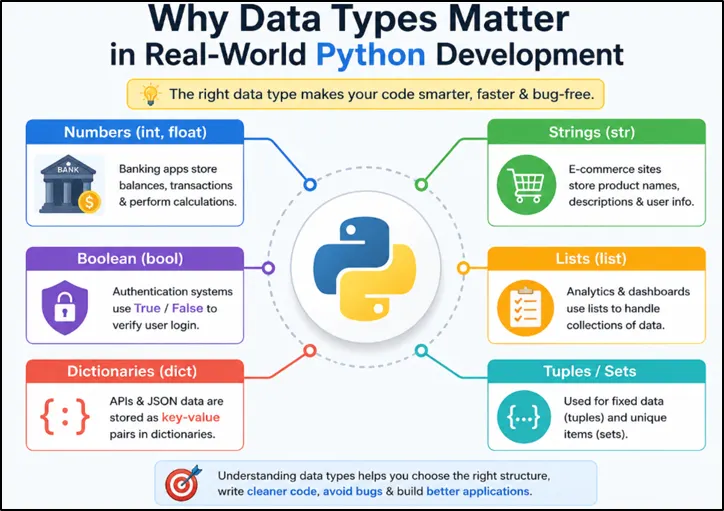
Figure: How Different Python Data Types Are Used in Real-World Software Development.
4. Numeric Data Types in Python
Python supports multiple numeric data types.
The most common ones are:
- Integer
- Float
- Complex Number
Let's understand each one.
4.1 Integer Data Type in Python
An integer is a whole number without any decimal point. Integers can be positive, negative, or zero.
Examples:
age = 25
year = 2026
temperature = -5Output:
25
2026
-5
Integers are commonly used to store whole numbers in Python applications.
Developers frequently use integers for counting users, tracking inventory levels, storing identification numbers, calculating totals, and generating analytics reports where decimal values are not required.
Example
employees = 250

print(employees)Output:
250
4.2 Floating-Point Numbers in Python
A float is a numeric data type used to store numbers that contain a decimal point. It is commonly used when greater precision is needed than whole numbers can provide.
Example
price = 99.99

print(price)
Output
99.99
Explanation
In this example, 99.99 is a float because it contains a decimal value. Python automatically recognizes and stores it as a floating-point number.
Floats are commonly used for prices, measurements, percentages, temperatures, scientific calculations, and other values that include fractional parts.
Real-World Example
temperature = 36.5

print(temperature)
Output
36.5
Explanation
Since the temperature includes a decimal value, a float is the appropriate data type. Similar values are frequently used in weather systems, healthcare applications, financial software, and data analytics platforms.
4.3 Complex Numbers in Python
Python also supports complex numbers.
A complex number contains:
- real part
- imaginary part
Example:
number = 3 + 4j

print(number)Output:
(3+4j)
Complex numbers are primarily used in engineering, signal processing, scientific computing, and advanced mathematics, where calculations often involve both real and imaginary values.
Most beginners rarely use complex numbers in everyday Python programming, but it is useful to understand that Python provides built-in support for them.
5. Text Data Type in Python
The string data type in Python is used to store text information. A string can contain letters, numbers, symbols, or even complete sentences enclosed inside single quotes (' ') or double quotes (" ").
Strings are one of the most frequently used Python data types because almost every application works with text in some form. Usernames, email addresses, search queries, chatbot messages, file names, and website content are all stored as strings.
Example
name = "Python"

print(name)
Output
Python
Explanation
In this example, "Python" is a string value assigned to the variable name. When printed, Python displays the text exactly as it is stored.
Understanding Python strings is important because text processing is a major part of backend development, automation scripts, web applications, APIs, and AI-powered systems.
5.1 Common String Operations
Python provides many built-in functions and methods for working with strings.
Finding String Length
text = "Python"

print(len(text))
Output
6
Explanation
The len() function returns the total number of characters in a string. Here, the word "Python" contains six characters.
Converting Text to Uppercase
text = "python"

print(text.upper())
Output
PYTHON
Explanation
The upper() method converts all characters in a string to uppercase. This is commonly used while processing user input, search keywords, and text validation.
5.2 Escape Sequences in Python Strings
Sometimes developers need to insert special characters inside strings. Python provides escape sequences for this purpose.
Example
print("Hello\nWorld")Output
Hello
World
Explanation
The \n escape sequence creates a new line. Instead of printing both words on the same line, Python displays them on separate lines.
Escape sequences are commonly used while formatting reports, generating text files, and displaying structured output.
5.3 Raw Strings in Python
Normally, Python treats characters like \n and \t as escape sequences. A raw string tells Python to treat every character literally.
Example
path = r"C:\Users\Pardeep"

print(path)
Output
C:\Users\Pardeep
Explanation
The r before the string creates a raw string. Python does not interpret backslashes as special characters and displays the path exactly as written.
Raw strings are commonly used when working with file paths, regular expressions, and system configuration values.
5.4 f-Strings in Python
f-strings provide a clean and modern way to insert variable values directly into text.
Example
name = "Alex"

print(f"Hello {name}")
Output
Hello Alex
Explanation
The f before the string tells Python to replace the value inside curly braces {} with the corresponding variable value.
f-strings improve readability and are widely used for creating dynamic messages, reports, notifications, and application output.
If you want to learn Python strings in detail, including string methods, formatting techniques, interview questions, and real-world examples, explore our complete Python Strings Tutorial for Beginners.
6. Sequence Data Types in Python
A sequence data type stores multiple values in a specific order. Unlike a single variable that holds one value, sequence data types allow developers to organize and work with collections of related data.
Python provides three commonly used sequence data types:
- Lists
- Tuples
- Range
Understanding these data types is important because modern Python applications frequently work with collections of information such as users, products, tasks, records, and reports.
6.1 Lists in Python
A list stores multiple values inside square brackets [].
Example
languages = ["Python", "Java", "C++"]

print(languages)
Output
['Python', 'Java', 'C++']
Explanation
In this example, the list stores three programming languages in a single variable. Lists are mutable, which means developers can add, remove, or update values after creation.
Lists are commonly used for:
- shopping carts
- task management applications
- product catalogs
- dashboards
- student records
If you want to learn lists in detail, including list methods, comprehensions, interview questions, and real-world examples, explore our complete Python Lists Tutorial.
6.2 Tuples in Python
A tuple stores multiple values just like a list, but its contents cannot be modified after creation.
Example
coordinates = (10, 20)

print(coordinates)
Output
(10, 20)
Explanation
Here, the tuple stores two coordinate values. Because tuples are immutable, they help protect data that should remain unchanged during program execution.
Tuples are commonly used for:
- geographic coordinates
- fixed application settings
- configuration values
- database records
For a complete explanation with examples and interview questions, read our Python Tuples Tutorial.
6.3 Range Data Type in Python
The range() function generates a sequence of numbers automatically.
Example
for number in range(5):
print(number)
Output
0
1
2
3
4
Explanation
The range(5) function generates numbers starting from 0 up to 4. The ending value 5 is not included.
The range data type is widely used in loops when developers need to repeat a task multiple times, process records, or generate numeric sequences automatically.
Understanding lists, tuples, and range provides a strong foundation for working with collections of data in Python and prepares beginners for more advanced programming concepts later.
7. Mapping Data Type in Python
The primary mapping data type in Python is the dictionary.
A dictionary stores information using key-value pairs, where each key acts like a label and each value stores the associated data. This makes dictionaries an efficient way to organize and access structured information.
Example
student = {
    "name": "Pardeep",
    "age": 25
}

print(student["name"])
Output
Pardeep
Explanation
In this example, "name" and "age" are keys, while "Pardeep" and 25 are their corresponding values.
Instead of remembering the position of data, developers can access information using meaningful names such as "name" or "age". This makes code easier to read, understand, and maintain.
For example, imagine storing student information in a school management system. Using keys like "name", "grade", and "email" is much clearer than trying to remember the position of each value in a list.
Dictionaries are heavily used in:
- API responses
- JSON data processing
- backend development
- configuration settings
- machine learning and AI applications
Because modern applications often work with structured data, dictionaries are one of the most important and frequently used Python data types.
If you want to learn dictionary methods, comprehensions, interview questions, and real-world examples in detail, explore our complete Python Dictionary Tutorial.
8. Set Data Types in Python
A set is a Python data type used to store a collection of unique values. Unlike lists, sets do not allow duplicate items.
Sets are useful when developers only care about unique data and want to remove repeated values automatically.
Example
numbers = {1, 2, 2, 3, 3, 4}

print(numbers)
Output
{1, 2, 3, 4}
Explanation
In this example, the values 2 and 3 appear twice. However, when Python creates the set, duplicate values are automatically removed.
This behavior makes sets extremely useful when working with data that may contain repeated entries.
For example, if a website stores thousands of user interests, tags, or categories, developers can use sets to quickly remove duplicates and keep only unique values.
Sets are commonly used for:
- removing duplicate values
- membership testing
- data filtering
- analytics processing
- comparing collections of data
Because of their fast lookup performance, sets are often used when developers need to check whether a value already exists in a collection.
8.1 Frozen Sets in Python
A frozenset is an immutable version of a set. Once created, its contents cannot be modified.
Example
values = frozenset([1, 2, 3])

print(values)
Output
frozenset({1, 2, 3})
Explanation
In this example, Python creates a frozen set containing three values.
Unlike a normal set, you cannot add, remove, or update elements after creation. This helps protect data that should remain unchanged throughout program execution.
Frozen sets are less common in beginner projects but are sometimes used in configuration settings, security-related applications, and situations where data must remain constant.
Understanding sets and frozen sets helps developers choose the right Python data type when working with unique collections of data.
9. Boolean Data Type in Python
The Boolean data type in Python represents one of two possible values: True or False.
Although Boolean values look simple, they play a very important role in programming because they help applications make decisions. Whenever a program needs to determine whether a condition is satisfied or not, Python uses Boolean values behind the scenes.
Example
is_logged_in = True

print(is_logged_in)
Output
True
Explanation
In this example, the variable is_logged_in stores the value True, indicating that a user is successfully logged into the application.
Boolean values are commonly used whenever a program needs to answer simple questions such as:
- Is the user logged in?
- Is the password correct?
- Does the product exist?
- Is the payment successful?
The answer to these questions is usually either True or False.
Example
age = 18

print(age >= 18)
Output
True
Explanation
Here, Python checks whether the value of age is greater than or equal to 18. Since the condition is true, Python returns True.
This type of comparison is very common in real-world applications. For example, websites may check whether a user meets the minimum age requirement, whether a login attempt is valid, or whether a product is available before displaying certain features.
In simple terms, Boolean values act like decision-makers inside Python programs. They help applications choose what action to perform based on whether a condition is true or false.
10. Binary Data Types in Python
Most Python data types such as strings, integers, and lists are designed for working with human-readable information. However, computers also need to process raw binary data while handling files, images, videos, network communication, and data transmission.
For these situations, Python provides special binary data types called bytes and bytearray.
Beginners do not use binary data types very often, but it is useful to know that they exist because many modern applications work with binary information behind the scenes.
10.1 Bytes in Python
The bytes data type stores binary data and is immutable, which means its contents cannot be changed after creation.
Example
data = b"Python"

print(data)
Output
b'Python'
Explanation
The letter b before the text tells Python to store the value as bytes instead of a normal string.
A simple way to think about bytes is that they represent data in a format computers can process efficiently.
Developers often work with bytes while reading files, downloading images, handling network requests, and processing data received from external systems.
Developers often work with bytes while reading files, downloading images, handling network requests, and processing data received from external systems.
10.2 Bytearray in Python
A bytearray is similar to bytes, but it is mutable, which means its contents can be modified after creation.
Example
data = bytearray(b"Python")

print(data)
Output
bytearray(b'Python')
Explanation
In this example, Python creates a mutable sequence of bytes. Unlike the bytes data type, developers can update, add, or remove values inside a bytearray when needed.
This flexibility makes bytearray useful when applications need to process or modify binary data dynamically.
Although most beginners will spend more time working with strings, numbers, lists, and dictionaries, understanding bytes and bytearray helps build a stronger foundation for advanced topics such as file handling, networking, cybersecurity, and system programming later in your Python journey.
11. NoneType in Python
Python provides a special value called None, which represents the absence of a value. In simple terms, None means that a variable currently does not contain any meaningful data.
Unlike 0, an empty string "", or False, the value None specifically indicates that no value has been assigned yet.
Example
result = None

print(result)
Output
None
Explanation
In this example, the variable result exists, but it does not store any actual data. Python uses None to indicate that the value is currently unavailable or not yet defined.
A simple real-world example is a user profile system. When an application starts, user information may not be loaded yet.
user = None
This tells Python that no user data is currently available.
As the program runs, the variable can later store actual information:
user = "Karen"Developers commonly use None when data is not available yet, when a value will be assigned later, or when a function has nothing meaningful to return.
Although None looks simple, it is widely used in real-world Python applications because it provides a clear way to represent the absence of data instead of using random placeholder values.
12. Mutable vs Immutable Data Types in Python
One of the most important concepts for Python beginners is understanding the difference between mutable and immutable data types.
In simple terms, a mutable object can be changed after it is created, while an immutable object cannot be changed.
If you understand this behavior, then it will help to write better code and avoid many common programming mistakes.
Quick Comparison: Mutable vs Immutable Data Types in Python
Before looking at examples, here's a quick comparison of mutable and immutable Python data types.
Understanding which objects can be modified after creation helps beginners avoid common programming mistakes and write more predictable Python code.
| Data Type | Mutable or Immutable? | Example |
| List | Mutable | [1, 2, 3] |
| Dictionary | Mutable | {"name": "Alex"} |
| Set | Mutable | {1, 2, 3} |
| Bytearray | Mutable | bytearray(b"Python") |
| Integer | Immutable | 25 |
| Float | Immutable | 99.99 |
| String | Immutable | "Python" |
| Boolean | Immutable | True |
| Tuple | Immutable | (1, 2, 3) |
| Frozenset | Immutable | frozenset({1, 2, 3}) |
| NoneType | Immutable | None |
12.1 Mutable Data Types in Python
Mutable data types allow their contents to be modified after creation.
Common mutable data types include lists, dictionaries, sets, and bytearrays.
Example
numbers = [1, 2, 3]

numbers.append(4)

print(numbers)
Output
[1, 2, 3, 4]
Explanation
In this example, the list initially contains three values. After calling the append() method, Python adds 4 to the existing list.
The original object changes successfully, which means lists are mutable.
Since lists can be modified after creation, they are a common example of a mutable data type.
12.2 Immutable Data Types in Python
Immutable data types cannot be modified after creation.
Common immutable data types include integers, floats, booleans, strings, tuples, and frozensets.
Example
name = "Python"

new_name = name.replace("P", "J")

print(name)
print(new_name)
Output
Python
Jython
Explanation
Many beginners expect the original string to become "Jython", but that is not what happens.
The replace() method creates a completely new string and stores it in new_name. The original string remains unchanged because strings are immutable.
This behavior helps protect data from accidental modification and makes programs more predictable.
13. Checking Data Types in Python
While learning Python, developers often need to verify the type of data stored inside a variable. Python provides built-in functions that make this process simple.
The two most commonly used functions are:
- type()
- isinstance()
13.1 Using type()
The type() function returns the exact data type of a value.
Example
name = "Python"

print(type(name))
Output
<class 'str'>
Explanation
In this example, Python identifies that the variable name contains a string and returns str.
Developers commonly use type() while debugging programs and verifying data received from external sources.
13.2 Using isinstance()
The isinstance() function checks whether a value belongs to a specific data type.
Example
age = 25

print(isinstance(age, int))
Output
True
Explanation
Here, Python checks whether the variable age is an integer. Since the condition is true, Python returns True.
Many developers prefer isinstance() because it is more flexible and commonly used in production applications.
14. Type Conversion in Python
In Python, different types of data are used for different purposes. However, there are many situations where you need to convert data from one type to another before working with it. This process is known as type conversion or type casting.
For example, when a user enters a value in a form, Python usually receives it as a string. If you want to perform mathematical calculations, you must first convert that string into a numeric data type such as an integer or float.
Python provides several built-in functions that make type conversion simple and beginner-friendly.
14.1 Converting a String to an Integer
The int() function converts a string containing a number into an integer.
Example
age = "25"

print(int(age))
Output
25
Explanation
In this example, the value "25" is stored as a string. The int() function converts it into an integer so that it can be used in calculations and arithmetic operations.
14.2 Converting an Integer to a String
The str() function converts a value into a string.
Example
score = 100

print(str(score))
Output
100
Explanation
Although the output looks the same, the value is now a string. This conversion is commonly used when displaying numbers inside messages, reports, web pages, or application interfaces.
14.3 Converting an Integer to a Float
The float() function converts a value into a floating-point number.
Example
number = 25

print(float(number))
Output
25.0
Explanation
Python adds a decimal point and converts the integer into a float. This is useful when working with percentages, measurements, scientific calculations, and financial data.
14.4 Converting Values to Boolean
The bool() function converts values into either True or False.
Example
print(bool(1))
print(bool(0))
Output
True
False
Explanation
Python treats most non-zero values as True and zero as False. This behavior is widely used in conditions, loops, validation checks, and decision-making logic.
Why Is Type Conversion Important?
Type conversion is one of the most commonly used Python concepts in modern software systems. Developers regularly use it when working with:
- User input forms
- Mathematical calculations
- Automation scripts
- APIs and JSON data
- Data analysis and processing workflows
Understanding how to convert data types correctly helps beginners write more reliable Python programs and avoid common errors when handling different kinds of data.
Important Point:
Why Do We Use int(), str(), float(), and bool() If Python Automatically Detects Data Types?
One question many beginners ask is:
"If Python automatically detects data types, why do developers still use int(), str(), float(), and bool()?"
The answer is that Python automatically detects the data type only when a value is first created.
Example:
age = 25
name = "Pardeep"
price = 99.99
Here, Python automatically recognizes that age is an integer, name is a string, and price is a float. Developers do not need to specify the data type manually.
However, in business applications, data often needs to be converted from one type to another before processing.
Example
age = "25"

print(int(age) + 5)
Output
30
Explanation
In this example, "25" is stored as a string because it is enclosed in quotes. Python cannot perform mathematical operations directly on a string value.
The int() function converts the string into an integer so that calculations can be performed correctly.
Similarly:
- str() converts data into text
- float() converts data into decimal numbers
- bool() converts data into True or False values
These functions are used for type conversion, not for defining data types manually.
A simple way to remember this is:
Python automatically detects data types when values are created, but functions like int(), str(), float(), and bool() help developers convert existing data into the format needed for calculations, processing, validation, and display.
15. Common Beginner Mistakes with Python Data Types
Learning Python data types is relatively straightforward, but many beginners make small mistakes that can lead to unexpected errors and debugging challenges. Understanding these common issues early will help you write cleaner, more reliable Python code.
Let's look at some of the most common Python data type mistakes and how to avoid them.
15.1. Mixing Strings and Numbers
One of the most common beginner errors is trying to combine a string and a number directly.
Example
age = "25"

print(age + 5)
Output
TypeError
Explanation
In this example, age is stored as a string, while 5 is an integer. Python does not automatically combine different data types in arithmetic operations.
Correct Approach
age = "25"

print(int(age) + 5)
Output
30
By converting the string to an integer using int(), Python can perform the calculation correctly.
15.2. Forgetting That Strings Are Immutable
Many beginners assume that string methods modify the original string.
Example
name = "Python"

name.replace("P", "J")

print(name)
Output
Python
Explanation
Strings in Python are immutable, which means they cannot be changed after creation. Methods such as replace() return a new string instead of modifying the existing one.
Correct Approach
name = "Python"

name = name.replace("P", "J")

print(name)
Output
Jython
15.3. Assuming Lists Remove Duplicates Automatically
Another common misconception is that Python lists automatically remove duplicate values.
Example
numbers = [1, 1, 2, 2]

print(numbers)
Output
[1, 1, 2, 2]
Explanation
Lists preserve duplicate values and maintain the order of items.
If you need unique values only, a set is often a better choice.
numbers = {1, 1, 2, 2}

print(numbers)
Output
{1, 2}
15.4. Confusing Tuples and Lists
Beginners often use tuples and lists interchangeably, even though they serve different purposes.
Remember:
- Lists are mutable, meaning items can be added, removed, or modified.
- Tuples are immutable, meaning their values cannot be changed after creation.
Use a list when your data needs to change frequently. Use a tuple when the data should remain fixed and protected from accidental modifications.
Why Understanding These Mistakes Matters
Most Python data type errors happen because developers misunderstand how different data types behave. By learning these common beginner mistakes early, you can avoid frustrating bugs, improve code readability, and build a stronger foundation for advanced Python programming.
As you continue learning Python, always pay attention to the type of data stored in your variables and choose the most appropriate data type for the task.
16. How Data Types Are Used in Real Software Development
When learning Python, beginners often see simple examples such as storing a name in a string or a number in an integer. While these examples help you understand the basics, real-world software applications use multiple Python data types together to store, process, and manage information efficiently.
Every application you use today- whether it's an online store, weather app, social media platform, or learning portal- relies heavily on data types behind the scenes.
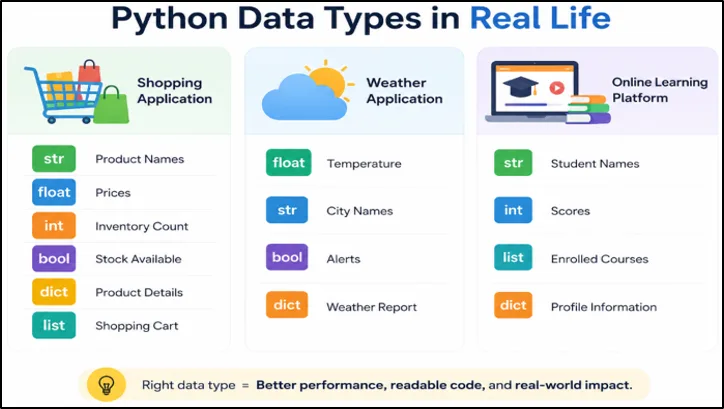
Figure: How Python Data Types Are Used in Real-World Software Applications.
Example 1: E-Commerce or Shopping Application
A shopping application needs different types of data to manage products and orders.
For example:
- Strings store product names such as "Wireless Mouse.
- Floats store prices such as 29.99.
- Integers track inventory counts such as 150.
- Booleans indicate whether a product is in stock (True or False).
- Dictionaries store product details such as name, price, and category.
- Lists manage shopping cart items selected by customers.
By combining these data types, developers can build systems that handle thousands of products efficiently.
Example 2: Weather Application
Weather apps process large amounts of real-time data every day.
For example:
- Floats store temperature values such as 78.5.
- Strings store city names such as "Houston".
- Booleans indicate whether weather alerts are active.
- Dictionaries organize weather reports including temperature, humidity, and wind speed.
Using the correct data types helps weather applications display accurate information quickly.
Example 3: Online Learning Platform
Learning platforms also depend on multiple Python data types.
For example:
- Strings store student names and course titles.
- Integers store quiz scores and lesson counts.
- Lists maintain enrolled courses.
- Dictionaries store student profile information and learning progress.
These data structures help platforms manage thousands of students and courses efficiently.
Why Understanding Data Types Matters
Choosing the right Python data type is an important skill for every developer. It helps improve performance, reduces bugs, and makes code easier to understand and maintain.
As you progress from beginner projects to real-world applications, you'll discover that software development is not about using a single data type. Instead, it's about combining strings, numbers, booleans, lists, dictionaries, and other structures to solve practical business problems.
A strong understanding of Python data types provides the foundation for working with APIs, databases, web applications, automation tools, data analysis projects, and modern AI applications.
17. Mini Project: User Registration Data Processor
Problem Statement
In real-world software development, applications rarely work with a single data type. A user registration system, for example, must handle names, ages, email addresses, and course selections at the same time.
This mini project demonstrates how different Python data types can work together to store and organize user information in a structured way.
Code
name = "Arun"
age = 25
email = "Arun@example.com"
courses = ["Python", "AI", "Data Science"]

profile = {
    "name": name,
    "age": age,
    "email": email,
    "courses": courses
}

print("User Profile")
print("Name:", profile["name"])
print("Age:", profile["age"])
print("Email:", profile["email"])
print("Courses:", ", ".join(profile["courses"]))
Output
User Profile
Name: Arun
Age: 25
Email: Arun@example.com
Courses: Python, AI, Data Science
profile["email"]
Explanation
This simple project shows how multiple Python data types are combined inside a real application.
The program uses:
- A string to store the user's name.
- An integer to store the user's age.
- A list to store enrolled courses.
- A dictionary to organize all user information in one place.
Instead of keeping every value in separate variables, the dictionary groups related data into a single profile structure. This makes the information easier to manage, update, and retrieve later.
For example, when the program needs the user's email address, it can access it directly using:
profile["email"]
This approach is similar to how modern applications manage:
- User profiles
- Customer records
- Employee information
- Student databases
- Dashboard data
What Beginners Should Learn From This Project
One of the most important lessons in Python programming is that software applications rarely use a single data type in isolation. Real-world programs combine strings, integers, lists, dictionaries, booleans, and other data types to solve practical problems.
By understanding how these data types work together, beginners can build stronger foundations for web development, automation, APIs, databases, data analysis, and AI applications.
18. Frequently Asked Questions About Python Data Types
1. What are Python data types?
Python data types define the kind of value stored in a variable, such as numbers, text, or collections. They help Python understand how data should be stored and processed.
2. What are the main data types in Python?
The most commonly used Python data types are Integer, Float, String, Boolean, List, Tuple, Set, Dictionary, and NoneType. Each data type is designed for storing specific kinds of information.
3. Why are data types important in Python?
Data types help Python handle data correctly, reduce programming errors, and improve code readability. Choosing the right data type also makes applications more efficient.
4. What is dynamic typing in Python?
Python uses dynamic typing, which means you do not need to declare a variable's data type manually. Python automatically determines the data type when the program runs.
5. What is the difference between mutable and immutable data types in Python?
Mutable data types can be changed after creation, while immutable data types cannot. For example, lists are mutable, whereas strings and tuples are immutable.
6. How do you check the data type of a variable in Python?
You can use the type() function to find the exact data type or isinstance() to verify whether a variable belongs to a specific data type. Both are commonly used for debugging and validation.
19. Final Thoughts
Python data types are one of the most important foundations of programming.
At first, they may look like simple concepts used for storing numbers or text. However, once you start building larger applications, you quickly realize that every program depends on choosing the right data type for the right task.
Integers help with calculations. Strings help process text. Lists organize collections of information. Dictionaries store structured data. Booleans help applications make decisions.
The better you understand Python data types, the easier it becomes to learn advanced topics such as backend development, APIs, automation, data analysis, machine learning, and artificial intelligence.
Do not try to memorize every data type immediately.
Instead:
- practice small examples
- modify code yourself
- experiment with different data types
- build mini projects
- observe how data changes during execution
Over time, these small exercises will build strong programming fundamentals and make future Python concepts much easier to understand.
Keep practicing.
Keep experimenting.
And most importantly, focus on understanding how data is stored and processed inside Python programs. That understanding will help you become a more confident developer in the long run.