1. Introduction
If you are learning Python in 2026, understanding Python strings is one of the most important skills you can develop. Strings are used almost everywhere in modern Python development, from backend systems and APIs to automation workflows and AI-powered applications.
No matter what type of Python project you build, handling text efficiently becomes a core part of real-world software development.
Many beginner tutorials only focus on basic syntax and simple printing examples. But practical Python development goes far beyond that.
In real applications, developers constantly work with:
-
API responses, JSON parsing, validation logic, automation scripts, AI prompts, and text normalization
This is one of the biggest reasons Python string interview questions are still commonly asked in technical interviews for freshers and junior developers.
When I first started learning Python, strings looked like one of the easiest topics. But while working on backend projects, APIs, automation tools, and AI workflows, I realized how heavily modern software systems depend on strong string handling skills.
Even debugging production issues sometimes comes down to understanding how text data is processed internally.
In this practical Python strings tutorial for beginners, you will learn Python strings through real-world backend examples, API handling, automation workflows, AI-oriented use cases, and interview-focused coding problems.
Instead of memorizing syntax blindly, this guide focuses on practical learning that helps you build real programming confidence and understand how strings are used in modern software development
2. Python Strings Cheat Sheet
I. Create string: "text"
II. Length: len(text)
III. Access character: text[0]
IV. Slice string: text[0:5]
V. Reverse string: text[::-1]
VI. Lowercase conversion: text.lower()
VII. Remove leading/trailing spaces: text.strip()
VIII. Split string: text.split(",")
IX. Join list into string: " ".join(words)
X. Replace text: text.replace("a", "b")
XI. Validation check: username.isalnum()
XII. Substring check: "Bearer" in token
XIII. JSON parsing: json.loads(response)
XIV. Normalization: value.strip().lower()
This quick Python strings cheat sheet is useful for backend development, working with APIs, building AI applications, interview preparation, and quick revision of important Python string concepts commonly used in real-world development.
3. Why Python Strings Matter in Real-World Development
When beginners start learning Python, strings usually look like a very basic topic.
At first, most people think strings are only used for printing text or storing names inside variables.
But once you start building real applications, you quickly realize how important string handling actually becomes in modern software development.
In backend systems, APIs constantly send and receive text data. Authentication tokens, usernames, passwords, API responses, chatbot messages, logs, JSON payloads, and validation rules all depend heavily on strings.
Even AI applications work extensively with strings. Prompts sent to large language models, chatbot conversations, user instructions, and generated responses are all processed as text internally.
I personally understood the importance of Python strings much later while working on backend workflows and automation scripts. Small tasks like cleaning API responses, validating user input, renaming files automatically, or formatting JSON data required strong string manipulation skills almost every day.
Some common real-world examples include:
-
APIs returning JSON responses as text
-
backend applications validating usernames and passwords
-
automation scripts processing filenames dynamically
-
chatbots handling user messages continuously
-
AI systems generating prompts and responses using strings
This is exactly why experienced developers pay close attention to Python string handling. A strong understanding of strings not only helps in interviews but also makes backend development, automation, and AI-related programming much easier in real projects.
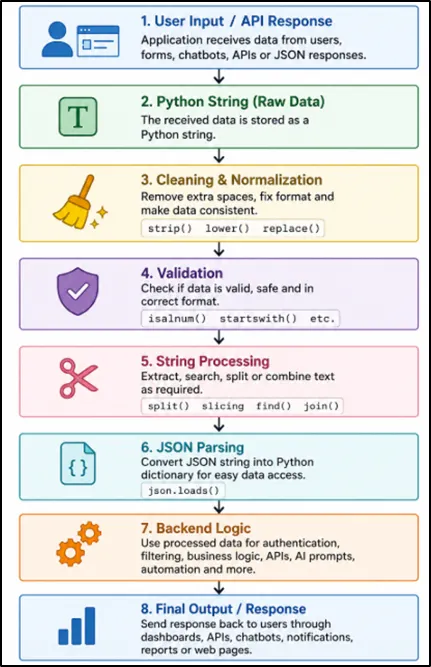
4. How Python Strings Work in Real Backend Applications
Explanation of the Flowchart
1. User Input / API Response:
Modern Python applications receive text data from users, forms, APIs, chatbots, and JSON responses. This data usually enters the system as Python strings.
2. Python String (Raw Data):
Python stores the received input as raw string data. At this stage, the text may contain extra spaces, uppercase letters, or inconsistent formatting.
3. Cleaning & Normalization:
Python cleans the data using methods like strip(), lower(), and replace() to remove extra spaces and maintain consistent formatting before processing.
4. Validation:
After cleaning, Python validates the input using methods like isalnum() and startswith() to check whether the data is safe and properly formatted.
5. String Processing:
Python then processes the text using methods like split(), slicing, find(), and join() to extract, search, organize, and transform data efficiently.
6. JSON Parsing:
APIs often return JSON data as strings. Python converts that JSON string into a dictionary using json.loads() for easier data access and processing.
7. Backend Logic:
After processing the data, backend systems perform operations like authentication, filtering, automation, AI prompt handling, and business logic execution.
8. Final Output / Response:
Finally, the application sends clean responses back to users through dashboards, chatbot replies, API responses, reports, or notifications.
5. Real-World Backend & API Examples
One of the biggest reasons Python strings matter is because modern applications constantly process text data.
Example: Processing API Response
import json

response = '''
{
    "status": "success",
    "amount": 499,
    "currency": "USD"
}
'''

data = json.loads(response)

print(data.get("status"))
print(data.get("amount"))
Output
success
499
Explanation:
This example shows how Python handles JSON data received from APIs in real backend applications. The API response first comes as a string, and json.loads() converts that string into a Python dictionary so we can access values easily.
The data.get() method safely extracts information like status and amount without crashing the program if a key is missing. Developers commonly use this while processing external data, chatbot responses, AI workflows, and structured application data.
In real backend applications, developers also use the Python Exception Handling Guide to safely manage API errors and invalid responses.
Why This Matters
In real backend applications:
- APIs send JSON as strings
- Python converts them into dictionaries
- backend systems extract values safely
- .get() prevents errors if keys are missing
This becomes useful in real-world applications such as payment systems, authentication APIs, analytics platforms, dashboards, and modern AI-powered applications where large amounts of text data are processed continuously.
6. Python String Basics Explained Simply
A Python string is a sequence of characters enclosed inside quotes.
Strings can contain letters, numbers, symbols, spaces, and even emojis, which makes them extremely useful for handling real-world text data in modern Python applications.
Example
name = "Karan"
print(name)
Output
Karan
7. How to Create Strings in Python
city = 'New York'
Double Quotes
language = "Python"
Triple Quotes
text = """
Python is beginner friendly.
Python is powerful.
"""
Triple quotes are useful for multiline strings.
8. Visual Mental Model of Python Strings
One of the biggest beginner mistakes is trying to memorize strings without understanding how they behave internally.
Think of a Python string like a sequence of boxes.
Example
word = "Python"
Index: 0 1 2 3 4 5
Chars: P y t h o n
Negative Indexing
Index: -6 -5 -4 -3 -2 -1
Chars: P y t h o n
This visual understanding makes indexing, slicing, and backend text processing much easier.
9. String Indexing in Python
String indexing in Python helps developers access individual characters from text using their position numbers called indexes.
It is one of the most important Python string concepts used in backend development, APIs, data processing, and real-world automation projects.
Example
word = "Python"

print(word[0])
print(word[1])
print(word[5])
Output
P
y
n
10. String Slicing in Python
String slicing in Python helps developers extract specific parts of text efficiently using index ranges.
Syntax
string[start:end]
Example
text = "PythonDeveloper"

print(text[0:6])
Output
Python
11. Reverse String Using Slicing
Reversing a string using slicing is one of the simplest and fastest ways to manipulate text in Python.
The -1 in text[::-1] tells Python to move through the string backward one character at a time. This is why the string gets reversed, making it a very fast and popular technique used in Python interview questions, backend processing, and text manipulation tasks.
text = "Python"
print(text[::-1])
Output
nohtyP
This is one of the most common Python interview questions.
12. len() Function in Python Strings
The len() function calculates the total number of characters inside a string.
Example
text = "Python"
print(len(text))
Output
6
The len() function is heavily used in:
- password validation
- APIs
- backend systems
- form validation
- data processing
13. Using the in Keyword in Python Strings
The in keyword checks whether a substring exists inside another string.
Example
auth_header = "Bearer xyz123token"

if "Bearer" in auth_header:
    print("Valid Token")
Output:
Valid Token
This is heavily used in:
- APIs
- backend authentication
- filtering logic
- validation systems
14. Important Python String Methods Explained
Python string methods are not just beginner concepts - they are used everywhere in real-world Python development. From backend APIs and authentication systems to automation scripts, AI applications, and JSON data processing, developers constantly use string methods to clean, validate, and transform text data efficiently.
If you want to become a confident Python developer, understanding important Python string methods is extremely important. These methods help freshers and junior developers write cleaner code, process API responses, validate user input, handle backend workflows, and build practical Python projects used in modern software development.
upper()
The upper() method converts all characters into uppercase and is commonly used in backend systems, reports, logging, and text formatting applications.
name = "python"
print(name.upper())
lower()
The lower() method converts text into lowercase and is heavily used in email normalization, login systems, backend validation, and API data processing workflows.
email = "ADMIN@GMAIL.COM"

print(email.lower())
Output:
admin@gmail.com
This is Useful for:
- email normalization
- login systems
- backend validation
lower() vs casefold()
- lower() performs basic lowercase conversion
- casefold() performs stronger international text normalization
Example
text = "PYTHON"
print(text.casefold())
Output:
python
Explanation:
The lower() method is commonly used for normal lowercase conversion in everyday Python programs. The casefold() method works similarly but handles international text and special characters more accurately in multilingual applications.
In this example, both convert "PYTHON" into "python", so the output looks identical. But in real-world backend systems, AI applications, and global platforms, casefold() provides better text comparison for different languages and international characters.
Important Point
casefold() becomes useful in:
- multilingual systems
- AI applications
- international platforms
strip() vs lstrip() vs rstrip()
- strip() removes spaces from both sides
- lstrip() removes spaces from the left side
- rstrip() removes spaces from the right side
Example
text = "   Python   "

print(text.strip())
print(text.lstrip())
print(text.rstrip())
Explanation:
In this example, strip() removes spaces from both sides, lstrip() removes spaces only from the left side, and rstrip() removes spaces only from the right side of the string.
These methods are heavily used in:
- backend validation
- APIs
- form handling
- automation scripts
replace()
The replace() method helps developers modify or update specific parts of a string without changing the original text manually.
text = "I love Java"
print(text.replace("Java", "Python"))
Output:
I love Python
Explanation:
In this example, Python replaces the word "Java" with "Python" and creates a new updated string. This type of string replacement is heavily used while cleaning API responses, processing user input, generating reports, and formatting dynamic content.
split()
The split() method breaks a string into smaller parts using a separator and converts the data into a Python list.
text = "Python,Java,C++"

print(text.split(","))
Output:
['Python', 'Java', 'C++']
Explanation:
In this example, Python splits the text wherever it finds a comma , and creates a list containing "Python", "Java", and "C++".
This is used heavily in:
- APIs
- CSV processing
- automation scripts
- backend applications
If you want to understand how Python stores and processes multiple items after using split(), read our Python Lists - Basics.
join()
The join() method combines multiple items into a single string using a separator.
languages = ["Python", "Java", "C++"]

print(" - ".join(languages))
Output
Python - Java - C++
Explanation
In this example, Python joins all programming languages using " - " as the separator and creates one formatted string. This type of string formatting is commonly used while generating logs, API responses, chatbot messages, and dynamic reports.
find()
The find() method searches for a specific word or substring inside a string and returns its starting position.
text = "Python Backend"

print(text.find("Backend"))
Output
7
Explanation
In this example, Python searches for the word "Backend" inside the string and returns the index position where the word starts.
title()
The title() method converts the first letter of every word into uppercase and improves text formatting automatically. It is commonly used in dashboards, reports, profile systems, forms, and backend applications to display clean and professional-looking text.
name = "paramdeep singh"
print(name.title())
Output
Paramdeep Singh
Explanation
In this example, Python converts "paramdeep singh" into properly formatted title case text.
isalnum()
The isalnum() method checks whether a string contains only letters and numbers without spaces or special characters.
Example
username = "admin123"

print(username.isalnum())
Output
True
Explanation
In this example, the username "admin123" contains only alphabets and numbers, so Python returns True. This type of validation is commonly used while creating login systems, signup forms, backend APIs, and authentication workflows.
startswith() and endswith()
The startswith() and endswith() methods help developers check whether a string begins or ends with specific text.
url = "https://google.com"
print(url.startswith("https"))
Output
True
Explanation
In this example, Python checks whether the URL starts with "https". Since the condition is true, Python returns True.
Developers commonly use this while processing URLs, validating file formats, handling API endpoints, and checking secure web requests.
15. String Validation Techniques
String validation is one of the most important real-world uses of Python strings in backend development and modern web applications.
Developers use string validation techniques to verify usernames, emails, passwords, API inputs, and user-generated data before processing it inside applications.
Example: Username Validation
username = input("Enter Username: ").strip().lower()

if username.isalnum():
    print("Valid Username")
else:
    print("Invalid Username")
Explanation
This example shows how Python validates usernames before allowing users to log into an application or submit data to a backend system. First, input() takes the username from the user, strip() removes unwanted spaces, and lower() converts everything into lowercase for consistent validation.
The isalnum() method then checks whether the username contains only letters and numbers. If the condition is true, Python prints "Valid Username"; otherwise, it prints "Invalid Username".
Developers commonly use this approach while working with:
- login systems
- APIs
- FastAPI applications
- authentication systems
- web forms
16. String Comparison Pitfall
String comparison in Python is case-sensitive, which means uppercase and lowercase letters are treated differently during comparison.
Example
print("apple" > "Banana")
Output
True
Explanation
In this example, Python compares the strings "apple" and "Banana" character by character using ASCII and Unicode values internally. Since lowercase "a" has a higher ASCII value than uppercase "B", Python considers "apple" greater than "Banana" and returns True.
This type of string comparison logic is commonly used in backend filters, sorting systems, authentication workflows, APIs, and search-related applications where text comparison accuracy becomes important.
17. Python String Formatting
Python string formatting helps developers create clean, readable, and dynamic text outputs in real-world applications.
18. Using f-Strings in Python
f-strings are the modern and recommended formatting approach. From practical development experience, they make Python code cleaner, easier to debug, and faster to write.
Example
name = "Jason"
age = 25

print(f"My name is {name} and I am {age} years old")
Output
My name is Jason and I am 25 years old
Explanation
In this example, Python uses an f-string to insert variable values directly inside the text using curly braces {}. Instead of manually combining strings and variables, f-strings make the code cleaner, faster, and much easier to read.
This modern formatting approach is widely used in APIs, AI applications, backend logging, chatbot systems, automation workflows, and dynamic report generation because it improves both readability and developer productivity.
19. Strings in AI Prompt Engineering
Modern AI applications heavily depend on Python strings to generate prompts, process user input, and create dynamic responses intelligently.
Example
user_name = "Pardeep"
topic = "Python APIs"

prompt = f"Explain {topic} to {user_name} in simple terms."

print(prompt)
Output
Explain Python APIs to Pardeep in simple terms.
Explanation
In this example, Python uses an f-string to create a dynamic AI prompt by inserting the user name and topic directly into the text. Instead of writing static prompts manually, developers can generate personalized and flexible prompts automatically using variables.
This type of string formatting is widely used in prompt engineering, chatbot systems, AI summaries, RAG applications, AI agents, and modern generative AI workflows where applications continuously generate text dynamically.
20. Real API and JSON Parsing Example
Most modern software platforms exchange structured information using JSON responses, making JSON parsing an essential Python skill for beginners. Learning JSON parsing helps freshers understand how modern software projects process structured data dynamically.
Python converts those strings into dictionaries for processing.
Example
import json

response = '{"name": "Pardeep", "role": "Developer"}'

data = json.loads(response)

print(data["name"])
Output
Pardeep
Explanation
In this example, the JSON response first comes as a normal string containing user information like name and role. The json.loads() function converts that string into a Python dictionary so developers can easily access values using keys such as "name" and "role".
This type of JSON parsing is widely used while processing external data, building intelligent applications, handling chatbot responses, working with AI systems, and developing modern Python-based software projects.
21. String vs List vs Bytes
String, List, and Bytes are three important Python data types used in real-world software development for handling text, collections of data, and binary information.
Understanding the difference between them helps freshers work more confidently with backend systems, file handling, JSON processing, automation scripts, and modern Python applications.
A String stores normal text data, a List stores multiple items together, and Bytes store raw binary data commonly used in files, images, videos, and network communication.
Learning these differences early makes backend development and data processing much easier later.
22. String Immutability Explained Simply
Python strings are immutable.
This means:
- strings cannot change in place
- every modification creates a new string
- original strings remain unchanged
Example
text = "Python"
new_text = text.replace("P", "J")

print(text)
print(new_text)
Output
Python
Jython
Explanation
In this example, the original string "Python" is not modified directly. Instead, the replace() method creates a completely new string "Jython" and stores it inside the variable new_text, while the original string remains unchanged.
This behavior is called string immutability, and it is heavily used in modern Python development because it improves data safety, reduces accidental changes, and helps developers manage text processing more reliably in large applications.
23. Performance Tip for Beginners
Many beginners combine strings repeatedly inside loops without realizing that it can slow down Python programs later. Every time you use += with strings, Python creates a completely new string object in memory, which becomes inefficient when working with large amounts of text data.
Slow Approach
result = ""

for word in words:
   result += word
This approach works for small programs, but it becomes slower when processing:
- large text data
- chatbot responses
- AI prompts
- reports
- logs
- generated content
because Python keeps creating new strings repeatedly.
Better Approach
The join() method is much faster and more memory efficient because Python combines all pieces together in a single operation instead of creating multiple new strings again and again.
Simple Rule for Freshers
If you are building:
- AI prompts
- chatbot messages
- email bodies
- automation scripts
- generated reports
- large text outputs
store all text pieces inside a list first and use join() once at the end.
From practical backend and automation experience, this small habit helps developers write cleaner, faster, and more scalable Python code in industry-level projects.
24. Common Python String Mistakes Beginners Make
Many freshers learn Python string methods quickly, but small mistakes in string handling often create bugs later in live applications.
Understanding these common Python string mistakes early helps beginners write more maintainable code, debug faster, and work more confidently with backend systems, automation scripts, AI applications, and modern Python projects.
1. Forgetting That Index Starts from 0
One of the most common beginner mistakes is assuming Python starts counting from 1 instead of 0.
text = "Python"
print(text[1])
Output
y
NOT P.
This happens because Python indexing always starts from 0. So:
- P is at index 0
- y is at index 1
Understanding indexing properly becomes very important while working with string slicing, text processing, automation scripts, and interview questions.
2. Confusing split() and join()
Many beginners mix up split() and join() because both methods work with text and lists.
A simple way to remember them is:
- split() breaks one string into multiple parts
- join() combines multiple items into one string
text = "Python,Java,C++"

print(text.split(","))
Output
['Python', 'Java', 'C++']
This type of string processing is heavily used while working with CSV files, generated content, AI responses, and structured text data.
3. Ignoring Extra Spaces in User Input
Extra spaces are one of the most common reasons validation systems fail unexpectedly.
username = "   Pardeep   "

print(username.strip())
The strip() method removes unnecessary spaces from both sides of the text and helps keep data clean and consistent.
This becomes especially useful while processing:
- signup forms
- search inputs
- chatbot messages
- generated reports
- user-generated content
4. Skipping Proper User Input Validation
Many beginners directly use user input without checking whether the data is valid or safe. This can later create bugs, unexpected errors, or incorrect data inside real-world Python applications.
username = "admin123"

print(username.isalnum())
The isalnum() method checks whether the username contains only letters and numbers. This type of validation helps developers process user input more safely and reliably in modern backend systems, authentication workflows, and web applications.
5. Forgetting Strings Are Immutable
Another common beginner mistake is assuming strings change directly in memory.
text = "Python"

new_text = text.replace("P", "J")

print(text)
print(new_text)
The original string remains unchanged because Python strings are immutable. Every modification creates a completely new string internally.
Understanding string immutability becomes important later while building scalable applications and optimizing performance.
25. Backend-Focused Python Interview Question
Extract Token from Authorization Header
Modern backend applications and secure APIs use authentication tokens to verify whether a user is allowed to access an application or service. Understanding how Python extracts and processes tokens is very important for freshers learning backend development, FastAPI, authentication systems, and real-world API workflows.
This type of Python string manipulation question is also commonly asked in backend developer interviews because it tests:
- string handling
- indexing
- splitting text
- practical backend understanding
Example
header = "Bearer abc123xyz"

token = header.split(" ")[1]

print(token)
Output
abc123xyz
Step-by-Step Explanation
In this example, the variable header contains two parts:
Bearer abc123xyz
Here:
- "Bearer" represents the authentication type
- "abc123xyz" represents the actual authentication token
The split(" ") method tells Python to break the text wherever it finds a space " ".
After splitting, Python creates a list like this:
['Bearer', 'abc123xyz']
Now:
- index [0] contains "Bearer"
- index [1] contains "abc123xyz"
So when we write:
token = header.split(" ")[1]
Python extracts only the token part and stores it inside the variable token.
Finally, print(token) displays:
abc123xyz
Why This Is Important in Real Projects
This type of token extraction is heavily used in:
- backend authentication systems
- JWT token validation
- FastAPI applications
- secure REST APIs
- login systems
- protected web applications
Whenever users log into an application, servers often send authentication tokens inside headers. Backend developers use string methods like split() to extract and validate those tokens before allowing access to protected resources.
This is a very good example for freshers because it connects Python string methods with real backend development instead of only teaching theory.
26. Real-World Python String Programs for Beginners
Practicing small Python string programs is one of the fastest ways for freshers to improve problem-solving skills and understand how string methods work in real coding scenarios.
These beginner-friendly Python string programs are commonly asked in interviews and help developers build stronger logic, debugging confidence, and text-processing skills.
Reverse a String in Python
Problem Statement
Write a Python program to reverse a string without using loops manually. This is one of the most common Python string interview questions asked for beginner Python developers.
text = "Python"

print(text[::-1])
Output
nohtyP
Explanation
This program reverses the string using Python string slicing. The [::-1] syntax tells Python to move backward through the string one character at a time, which automatically reverses the text.
This type of string manipulation is commonly used in text processing, automation scripts, data transformation, and coding interview questions where developers need to process text efficiently.
Count Vowels in a String
Problem Statement
Write a Python program to count how many vowels are present inside a string. This type of string-processing problem helps beginners improve looping and condition-handling skills.
text = "Python Developer"

count = 0

for char in text.lower():
   if char in "aeiou":
       count += 1

print(count)
Output
5
Explanation
This program checks every character inside the string one by one and counts vowels like a, e, i, o, and u. The lower() method converts all characters into lowercase so Python can compare letters consistently.
This type of logic is useful while working with text analysis, search systems, AI-generated content, chatbot processing, and beginner-level Python interview questions.
Check Palindrome in Python
Problem Statement
Write a Python program to check whether a word is a palindrome or not. A palindrome is a word that reads the same from both forward and backward directions.
word = "madam"

if word == word[::-1]:
   print("Palindrome")
Output
Palindrome
Explanation
In this example, Python reverses the word using string slicing and compares it with the original word. Since both values are the same, Python prints "Palindrome".
This is a very popular beginner-friendly Python interview question because it helps freshers understand string comparison, slicing, logical thinking, and condition handling in a practical way.
Remove Spaces from a String
Problem Statement
Write a Python program to remove all spaces from a string. This type of string-cleaning logic is very common while processing user input and structured text data.
text = "Python Developer"

print(text.replace(" ", ""))
Output
PythonDeveloper
Explanation
This program removes all spaces from the string using the replace() method. Python searches for every space " " and replaces it with an empty string "".
This type of string cleaning is commonly used while formatting usernames, cleaning text data, processing generated content, and preparing structured data for modern Python applications.
27. Best Practices for Working with Python Strings
Learning Python string methods is important, but writing clean and professional code is equally important for new developers. Following simple Python string best practices helps developers write more readable, secure, and beginner-friendly code used in real-world backend applications and modern software projects.
1. Use Meaningful Variable Names
Problem Statement
Many beginners use short variable names like x, a, or data, which makes code difficult to understand later. Using meaningful variable names makes Python code cleaner and easier to read for both developers and teams.
Wrong Approach
x = "Python"
Better Approach
language_name = "Python"
Explanation
In the first example, the variable name x does not explain what the value actually represents. But in the second example, language_name clearly tells readers that the variable stores the name of a programming language.
Good variable naming improves:
- code readability
- debugging
- teamwork
- project maintenance
This becomes extremely important in backend development, automation projects, and large Python applications where multiple developers work on the same codebase.
2. Use f-Strings for Cleaner Formatting
Problem Statement
Many beginners combine strings manually using +, which makes code messy and harder to read. Modern Python projects prefer f-strings because they make dynamic text formatting much simpler and cleaner.
Older Style
name = "Pardeep"

print("Hello " + name)
Better Modern Approach
name = "Pardeep"

print(f"Hello {name}")
Explanation
The f-string automatically inserts variable values directly inside the text using curly braces {}. This makes the code shorter, easier to understand, and more professional.
From practical development experience, f-strings save a lot of time while creating dynamic messages, reports, AI prompts, generated content, and user-facing text outputs.
3. Always Clean User Input
Problem Statement
User input often contains extra spaces, uppercase letters, or inconsistent formatting. Beginners usually forget to clean the data before processing it, which later creates validation issues and unexpected bugs.
Example
username = "   PARDEEP   "

clean_username = username.strip().lower()

print(clean_username)
Output
pardeep
Explanation
The strip() method removes unnecessary spaces from both sides of the text, while lower() converts everything into lowercase for consistent processing.
This small habit helps developers process user input more safely and accurately while working with forms, login systems, search functionality, chatbot messages, and structured text data.
4. Validate Data Before Using It
Problem Statement
One of the biggest beginner mistakes is directly trusting user input without checking whether the data is valid. Real-world applications always validate data before processing it.
Example
username = "admin123"

print(username.isalnum())
Output
True
Explanation
The isalnum() method checks whether the string contains only letters and numbers. If special characters or spaces exist, Python returns False.
Validation helps developers:
- prevent invalid input
- reduce bugs
- improve reliability
- handle text data safely
This type of validation logic is extremely common in login systems, signup forms, search systems, and modern web applications.
5. Avoid Hardcoding Sensitive Information
Problem Statement
Beginners sometimes directly store passwords, API keys, or secret tokens inside Python strings. This is considered a bad security practice because sensitive information can accidentally become visible to others.
Wrong Approach
password = "mypassword123"
Better Approach
Store sensitive information securely using:
- environment variables
- configuration files
- secret managers
Explanation
Hardcoding passwords or secret keys directly inside code can create major security risks in production systems. Professional developers always store sensitive data securely instead of exposing it inside programs.
This becomes very important while building backend systems, authentication workflows, AI tools, and cloud-based applications where security matters significantly.
28. Mini Real-World Python Project: Smart Email Intelligence Validator
Problem Statement
In this project, we build a smart Python email validation system that not only checks whether an email is valid, but also cleans the input, extracts useful information, identifies personal or business email types, masks sensitive data for privacy, and generates a structured summary.
This project helps python learners understand how Python string methods are used in real-world backend development, authentication systems, user onboarding workflows, CRM applications, automation projects, and modern software development environments.
Approach
First, we clean the email using strip() and lower() so extra spaces and uppercase letters do not create validation problems. Then we check whether the email contains @, ., and only one @ symbol.
After that, we split the email into username and domain, validate both parts, detect the email type, mask the username for privacy, and finally print a structured summary that looks closer to production-style output.
Code
email = input("Enter email address: ").strip().lower()

personal_domains = ["gmail.com", "yahoo.com", "outlook.com", "hotmail.com"]

is_valid = True
message = ""

if len(email) < 6:
   is_valid = False
   message = "Email is too short."

elif email.count("@") != 1:
   is_valid = False
   message = "Email must contain exactly one @ symbol."

elif "." not in email:
   is_valid = False
   message = "Email must contain a domain extension like .com or .org."

else:
   username, domain = email.split("@")

   if len(username) < 2:
       is_valid = False
       message = "Username part is too short."

   elif "." not in domain:
       is_valid = False
       message = "Domain is not valid."

   elif domain.startswith(".") or domain.endswith("."):
       is_valid = False
       message = "Domain cannot start or end with a dot."

   else:
       if domain in personal_domains:
           email_type = "Personal Email"
       else:
           email_type = "Business Email"

       masked_username = username[0] + "***" + username[-1]
       masked_email = masked_username + "@" + domain

       print("Email Status: Valid")
       print("Username:", username)
       print("Domain:", domain)
       print("Email Type:", email_type)
       print("Masked Email:", masked_email)

if not is_valid:
   print("Email Status: Invalid")
   print("Reason:", message)
Sample Input
Enter email address: Naman.Arora@company.com
Output
Email Status: Valid
Username: naman.arora
Domain: company.com
Email Type: Business Email
Masked Email: n***a@company.com
Explanation
This project starts by cleaning the email using strip() and lower(), which is very important because users often enter extra spaces or capital letters in real forms. This makes the input consistent before validation begins.
The program then checks common email problems like short length, missing @, multiple @ symbols, missing domain extension, and invalid domain format. These checks make the project feel much closer to real backend validation instead of a basic beginner example.
After validation, the email is split into two useful parts: username and domain. This is a practical use of Python split() because many real systems need to separate user identity from company or email provider information.
The project also detects whether the email is personal or business based on the domain. This feature is useful in CRM systems, lead generation tools, signup forms, business dashboards, and automation workflows.
Finally, the program creates a masked email like n***a@company.com to protect user privacy. This adds a production-level touch because real applications often hide sensitive user data in logs, dashboards, and reports.
Why This Project Is Valuable for Freshers and Junior Developers
This project teaches practical Python string handling through strip(), lower(), count(), split(), startswith(), endswith(), indexing, string concatenation, and conditional logic.
After learning Python strings and mini projects, many beginners start learning object-oriented programming through our Python Classes and Objects Tutorial to build larger real-world Python applications.
29. Frequently Asked Questions About Python Strings
1. Are Python strings important for backend development?
Yes. Strings play an essential role in backend development for processing user input, handling JSON data, authentication systems, APIs, chatbot responses, and text-based workflows. Strong string handling skills help freshers build more practical and production-ready Python applications.
2. Are Python string interview questions important for freshers?
Absolutely. Python string interview questions are very common in fresher coding rounds because they test logical thinking, text processing skills, loops, conditions, and problem-solving ability in a simple and practical way.
3. Why are Python strings important in AI and machine learning?
Modern AI applications continuously process prompts, responses, chat messages, summaries, and text data using Python strings. Understanding string manipulation becomes very useful while working with prompt engineering, AI agents, chatbots, and generative AI projects.
4. Can Python strings help in API and JSON handling?
Yes. Most APIs send and receive data in JSON format, which is processed using Python strings before converting it into dictionaries or structured data. This is why Python string methods are extremely useful for API development and backend applications.
5. What is the best way to practice Python string programs for beginners?
The best way is to solve small real-world Python string problems like email validation, palindrome checking, text cleaning, token extraction, and JSON parsing. These beginner-friendly projects improve coding confidence, debugging skills, and interview preparation.
30. Pro Tip for Beginners
When practicing Python strings, always try modifying examples yourself instead of only reading outputs. Small experiments help developers understand string behavior much faster than memorizing syntax.
31. Final Thoughts
Many beginners think Python strings are just a small topic used for printing text. But once you start building real projects, you quickly realize that strings are everywhere in modern software development. From authentication systems and automation workflows to AI tools and data processing pipelines, Python strings become part of your daily development workflow.
If your Python string fundamentals become strong, learning advanced topics like backend development, FastAPI, AI engineering, automation, and prompt engineering becomes much easier later. That is why experienced developers always focus on building strong programming foundations first instead of rushing directly into frameworks and tools.
If you are confused about what to learn after Python strings, follow our
Complete Python Developer Roadmap 2026.
The best way to master Python strings is not by memorizing methods blindly. Real improvement happens when you:
- practice small coding problems
- modify examples yourself
- debug real errors
- build mini projects
- work with JSON data
- process user input
- experiment with automation scripts
Even small beginner-friendly Python string projects can significantly improve your logical thinking, debugging confidence, and problem-solving ability. Over time, these small improvements help freshers become confident developers who can understand real-world backend workflows and modern software systems more comfortably.
One thing I personally realized while working on backend and automation projects is that developers who understand string handling properly usually write more readable code, debug issues faster, and work more confidently with structured data.
So do not worry about learning everything immediately. Start small, stay consistent, and focus on understanding how Python works internally. That practical understanding is what separates beginners who only watch tutorials from developers who can actually build real applications confidently.
Keep practicing.
Keep building.
Keep experimenting.
And most importantly, give yourself enough time to grow step by step.