
But in real-world systems, API calls fail, timeout, return invalid data, and break your application.
In this guide, you will not only learn how to use Python Requests, but also how to build production-ready API integrations with retry logic, validation, logging, and real-world architecture.
By the end of this guide, you will think like a senior engineer, not just a beginner.
1. Introduction
In modern software systems, when you talk about APIs, then it is not just a feature - they are the basic building foundation of how applications communicate and scale.
When you start talking about any production system today like:
• an AI platform
All of these depend heavily on API interactions.
Let me simplify it by taking an example, when you:
• fetch user data from a database service
In all these scenarios, you are making API calls behind the scenes.
If you talk about beginner-level tutorials, they mainly show how to send a request and print a response.
As a senior software engineer, your responsibility is not only to call APIs, but you should also be able to build robust, fault-tolerant, and reliable API integrations that can handle:
• network issues
To handle all of these problems, the Python Requests library is used and is very powerful.
It provides a simple interface for HTTP calls and it can also support production-grade API communication patterns.
Based on my experience, we will go beyond basic syntax and cover the following topics:
• How API communication actually works
Quick Summary
If you don’t have much time, then let me write some quick takeaways for a developer:
• The Python Requests library is the most widely used tool for making HTTP calls in Python-based applications.
Your production systems must always include:
• Timeouts (to avoid hanging requests)
In this Python Requests guide, we are going to cover all the topics which you need to act as a senior software engineer, like:
• Call APIs using Python Requests (GET, POST, etc.)
2. What is an API? (Simple Explanation with Real Example)
An API (Application Programming Interface) is a structured contract that allows different software systems to communicate with each other in a standardized and predictable way.
In simple words, an API is a bridge between two systems — one system sends a request and the other system sends back a response.
Instead of directly accessing databases or internal logic, applications interact through APIs to ensure security, scalability, and loose coupling.
In real-world systems, you don’t build applications as a single block.
They are divided into multiple services like:
• user experience
Finally, all these services need to communicate with each other as well.
If you aren’t going to use APIs, then:
• services can’t exchange data
Due to this, APIs are the backbone of modern systems.
Real Example
Let us try to understand this with a simple payment system.
When a user makes an online payment, then your system doesn’t handle everything internally.
Instead, it calls multiple APIs to handle different tasks:
• Payment API: It verifies and processes the transaction
Overall, the complete flow looks like below:
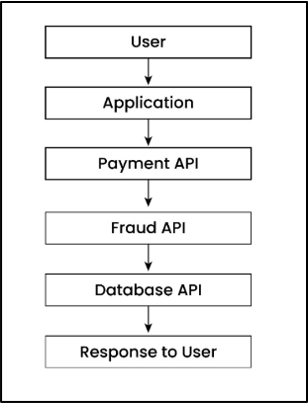
As you can see, each step depends on the API response.
What Actually Happens (Behind the Scenes)
When you call an API:
• Your application sends a request (URL + data)
3. What is the Python Requests Library?
The Python Requests library is a high-level HTTP client that simplifies API communication by allowing your Python application to send requests and receive responses in a clean and readable way.
Why This Matters
This becomes especially important when building real-world applications where reliability, performance, and simplicity matter.
If you use low-level libraries like socket, http.client or even urllib, then you need to manually handle multiple things like:
• socket connections
It would also increase complexity and chances of errors.
On the other side, the Requests library solves this problem and provides multiple benefits like:
• abstracting low-level networking
So, you don’t need to write lengthy networking code (of 20–30 lines), you only need to write just one line.
Example: Basic API Call
import requests
response = requests.get("https://api.github.com")
print(response.status_code)
Explanation
Important Point
Most of the beginners think that API = URL, but this is not true. In real production systems, APIs are dependencies, so your system depends on them to work.
Your system is only as strong as the APIs it depends on.
4. Why Requests is Better than urllib
In Python language, we can call APIs in following ways:
• Requests
But if you are working in a real-time project, then you should choose the right library, because if you choose the wrong one, then it would increase complexity, bugs, and your maintenance efforts.
Let us try to understand this with an example:
Example – Using Requests:
import requests

requests.get("https://api.github.com")
Using urllib:
from urllib import request

request.urlopen("https://api.github.com")Explanation:
• urllib is a low-level built-in library.
With urllib, you need to handle response reading manually, and JSON parsing is also not automatic, and finally your code becomes larger and harder to read.
With Requests, it becomes simple and clean to write API calls, and JSON responses are also handled easily using response.json(), and you can also manage errors effectively.
In production systems, developers prefer tools that reduce complexity and handle edge cases automatically. Requests helps you to build reliable and scalable API integrations.
5. How to Install Requests Library
(Using pip and Virtual Environment)
Before making any API call, first you need to install the Requests library.
Based on my experience, best practice is to install (Requests library) in an isolated environment so that dependency conflicts could be avoided in real-world projects.
Let us now learn how to install Requests library using pip and virtual environment:
You should use the following command:
pip install requestsThis command installs the Requests library using pip (Python package manager) globally or in your current environment.
In real-world Python projects, you should never install libraries directly on the system.
Best practice is you should always use a virtual environment.
If you are not familiar with this setup, you can learn step-by-step how to create a Python virtual environment and manage dependencies properly in real-world projects.
Different projects may require different versions of the same library. For example, let’s say that there are two different projects, Project A and Project B, and both require different versions of Requests library as shown below:
• Project A → Requests 2.x
If you install Requests library globally, then versions can conflict and both projects can break.
The best practice is to use a virtual environment, as it solves this problem by creating an isolated space for each project.
Let us now create a virtual environment so that all dependencies are installed (in a safe way) inside the project.
(i) Create Virtual Environment:
This command is used to create a separate environment for your project:
python -m venv venvvenv is the folder name where all dependencies will be stored.
Once a virtual environment is created, it is essential to activate environment, because it ensures that all libraries are installed inside that environment only.
Below is the command used to activate the environment on Mac/Linux and Windows OS:
Mac/Linux:
source venv/bin/activateWindows:
venv\Scripts\activateOnce a virtual environment is activated, then your terminal is now inside the virtual environment.
Once environment is activated, after that you can install Requests library safely:
pip install requestsIt would install the Requests library and this installation is now isolated and it won’t affect other projects.
Once Requests library is installed, then you should also verify if it is working correctly or not.
Example:
import requests
print(requests.__version__)Explanation:
If a version number prints (like 2.x.x), it means Requests library is installed successfully.
On the other side, if you see an error, then Requests library is not installed properly.
My advice is you should always verify installation before starting any development. This would avoid runtime errors later.
6. Your First API Call in Python
(GET Request Example)
It is time to understand first API call in Python, and the most common way to fetch data from an API is using a GET request.
Please note that a GET request is used (by developers) when he/she wants to retrieve data from a server without modifying anything.
Let me share a simple example with 3–4 lines of code:
Example:
import requests

response = requests.get("https://api.github.com")

print(response.status_code)
print(response.json())Explanation:
Next, requests.get() method is used to send a GET request to the given URL, which is the API endpoint.
This request goes to the server and is processed by API, and finally API sends back a response. The response is stored inside the response variable as a Response object.
After that, response.status_code gives the HTTP status code (200 means success), and in the last statement, response.json() converts the API response into a Python dictionary so that we can easily read and use it in our program.
My advice is you should never assume API success. One should always check with the following written code:
if response.status_code == 200:
    data = response.json()
Your API can fail anytime due to various reasons like network issues, server downtime, or invalid requests.
7. Understanding HTTP Methods
(GET vs POST vs PUT vs DELETE)
In simple words, HTTP methods define what action you want to perform on an API.
Please note that each API request uses a method which tells the server what to do.
Now that you understand how to make your first API call, the next step is to understand how APIs know what action to perform.
Common HTTP Methods
(i) GET: This method is used to retrieve data from the server.
import requests

# GET
requests.get("https://api.example.com/users")

# POST
requests.post("https://api.example.com/users", json={"name": "Amit"})
# PUT
requests.put("https://api.example.com/users/1", json={"name": "Amit updated"})
# DELETE
requests.delete("https://api.example.com/users/1")Explanation:
After that, requests.put() method updates existing user data with id = 1 to {"name": "Amit updated"}.
Finally, requests.delete() method is used to remove the user with id = 1 from the server.
Please note that these four API methods perform CRUD operations (Create, Read, Update and Delete) on data in real-world applications.
8. How to Send GET Requests with Parameters
Sometimes, you don’t just call an API, you also need to send extra data to customize the response.
These extra values are called query parameters.
import requests

params = {
    "q": "Python",
    "sort": "stars"
}

response = requests.get("https://api.github.com/search/repositories", params=params)

print(response.json())Explanation:
After that, this dictionary is passed as params argument to requests.get() method. Requests library automatically converts these parameters into a URL query string and sends them to the API.
On the other side, API processes these parameters and returns the filtered data, which is then converted into a Python dictionary using response.json().
In real projects, query parameters is an important topic which is mainly used in multiple ways like filtering the data, searching, sorting and pagination.
9. How to Send POST Requests with JSON Data
A POST request is used when you want to send data to an API to create a new resource.
• Important point to note that POST sends data in the request body.
Let us understand it with the help of an example:
Example:
import requests

data = {
    "name": "Amit",
    "role": "AI Architect"
}

response = requests.post("https://api.example.com/users", json=data)

print(response.status_code)
print(response.json())Explanation:
Important point to note here is that this dictionary is automatically converted into JSON format by Requests library and sends it in the request body.
On the other side, this data is received by API and processed (like creating a new user), and a response is sent back to client which can be accessed using response.json().
In real projects, POST requests are used for multiple purposes like user registration, form submission, creating records and sending data to services.
10. Inspecting API Responses (Status Code, Headers and Content)
Once you start building real systems, understanding response metadata becomes important.
It includes multiple things like status code, headers and content, which help you understand what happened (if you look it deeply).
import requests

response = requests.get("https://api.github.com")

print(response.status_code)
print(response.headers)
print(response.text)Explanation:
After that, the first print() statement is used to print the HTTP status code returned by the API.
Let me share few common values here:
• 200 → success
You should always check this first, as it tells whether your API call worked or failed.
The second print() statement is used to print the headers of the response and it contains metadata.
Example:
• content-type → It tells format (like JSON, HTML etc.)
In production, developers use this information for debugging, authentication and rate limiting.
The third print() statement is used to print the actual content returned by the API as a string. This is raw response data. Examples are:
• JSON data
Please note that even if the response is JSON, response.text gives it as a string (not Python dictionary).
But my advice would be that you should always use response.json() because it automatically converts the JSON response into a Python dictionary which is easy to read and work with in your code.
11. Handling Errors and Exceptions in API Calls
(Timeout, Try-Except, Validation)
In real-world systems, handling API failures is critical for building stable and reliable applications.
So, it becomes very important to handle errors properly so that the application remains stable and reliable.
If you are new to this concept, I highly recommend understanding how exception handling works in Python in detail before implementing production-level API logic
If you are not going to handle these properly, then:
• your program may crash
Always remember that it is more important to handle failures (in production systems) than making the API call itself.
Now, it is time to see all these scenarios, let us discuss each one by one.
a) Handling Timeout:
When your application calls an API, then it should not wait forever to get a response. In this case, it becomes very important to handle timeouts so that your system should remain fast and reliable.
response = requests.get(url, timeout=5)Explanation:
If the server doesn’t respond in 5 seconds, then it throws a timeout error.
In short, above line of code is used to fetch data from API and it also ensures that your program doesn’t get stuck waiting forever.
b) Using Try-Except (Safe Execution)
When you call APIs, then errors can happen anytime due to any reason. So if you want to keep your program safe and prevent from crashes, then you should always use try-except.
try:
    response = requests.get(url, timeout=5)
    response.raise_for_status()
    data = response.json()

except requests.exceptions.RequestException as e:
    logging.error(f"API Error: {e}")
data = NoneExplanation:
First, requests.get(url, timeout=5) method is called (inside the try block) to send a request to the API.
response.raise_for_status() checks if the API returned an error (like 404 or 500) or not. If an error is returned, then it raises an exception.
If there is no exception, then response.json() converts the response into a Python dictionary so that you can use the data easily.
On the other side, if any error occurs, then the except block catches it and prints the error message, and sets data = None.
c) Response Validation
Even if your API call succeeds, then you should always validate the response before using it so that unexpected errors can be avoided later.
if response.status_code == 200:
    data = response.json()
else:
print("Invalid response")Explanation:
If response is valid, then response is converted into a usable Python format.
Otherwise, else block is executed and "Invalid response" message is printed.
12. Working with Headers and Authentication (API Keys, Tokens, Security):
In real-world, most of the APIs are protected and require authentication before accessing it.
You cannot access APIs directly. You must send credentials using headers.
If you are not authenticated:
• API will simply reject your request
One of the major benefits of Authentication is only valid users and systems can access the API.
What are Headers?
It is an extra information that is sent along with your request. Mainly, it contains following information:
• authentication details
import requests
import os
url = "https://api.example.com/data"
# Get secrets from environment variables (secure way)
api_key = os.getenv("API_KEY")
token = os.getenv("API_TOKEN")

headers = {
    "x-api-key": api_key,
    "Authorization": f"Bearer {token}"
}
try:
    response = requests.get(url, headers=headers, timeout=5)
    response.raise_for_status()
    data = response.json()
    print(data)

except requests.exceptions.RequestException as e:
logging.error(f"API Error: {e}")Explanation:
Environment variables are values stored outside your code so that sensitive data (like API keys and tokens) are not exposed in code.
API key and token are fetched using os.getenv() method. Please note that this is a secure and standard way that is used in real-world applications to handle credentials.
These values are sent in headers, which are extra information attached to the API request.
Please note that here f"Bearer {token}" formats the token in standard Authorization format.
"Bearer" is the authentication type and token is the actual value, and both are separated by space so that server can read and validate it.
After that API request is made using requests.get() and code is written inside try-except block to handle any unexpected errors safely.
Internally, once your request goes to the API server, then server reads API key and token and validates the credentials. If credentials are valid, then data is returned by server, otherwise server returns 401 Unauthorized error.
Always remember that never expose secrets (API key and token) in your code. From security aspect, you should always use environment variables.
13. Real-World Example: Calling a Public API
In this section, we will see a real-world example of calling a public API that is used in real systems.
import requests

url = "https://api.openweathermap.org/data/2.5/weather"

params = {
    "q": "Delhi",
    "appid": "YOUR_API_KEY",
    "units": "metric"
}

try:
    response = requests.get(url, params=params, timeout=5)
    response.raise_for_status()
    data = response.json()

    print("City:", data["name"])
    print("Temperature:", data["main"]["temp"], "°C")
    print("Weather:", data["weather"][0]["description"])

except requests.exceptions.RequestException as e:
logging.error(f"API Error: {e}")Explanation:
The "q": "Delhi" parameter specifies the city for which we want weather data.
"appid": "YOUR_API_KEY" is used to identify and authorize request.
"units": "metric" ensures that temperature is returned in Celsius.
So, in short we are telling API what data we want, who we are and in what format the response should be returned.
After that requests.get() is used to get data from server.
The first print statement returns the city name from the API response.
It accesses "name" key and prints it.
Example:
After that second print statement returns the temperature.
It first goes inside "main" (weather details) and then gets "temp" value. This gives the temperature in Celsius.
Example:
Finally, the third print statement returns the weather condition.
Here, "weather" is a list (array) and [0] gets the first item and "description" gives the weather condition (like clear sky).
Example:
From my experience working in IT industry, public APIs like weather, payments and maps are widely used in real systems. So, as a developer, you should always handle API key securely and errors (like timeout, failure etc.).
14. Best Practices (How to Build Systems Correctly)
Based on my experience, here are few important best practices to use Python Requests in production systems.
If you follow these practices, then it would help you build API integrations that are reliable, scalable and secure.
In production system, you should never use print() method for errors. You should always use logging so that you can handle following things:
• API failures
This would help you a lot in debugging and monitoring applications.
As a Python developer, you should never store API keys or tokens directly in your code, as it would expose sensitive data directly.
Best practice is to use environment variables to keep secrets secure, because it prevents data leaks when code is shared or deployed.
You should always remember that API can fail temporarily (anytime) due to network or server issues.
If you had implemented retry mechanism, then it helps by calling API again automatically.
(IV) Use session for Better Performance:
One should always use Session (instead of calling requests.get() every time).
It reuses connections and makes your API calls faster. This is very important point especially when you make multiple API calls.
You should never call any API without timeout.
If you don’t mention timeout, then your application may hang if API is slow. This would help you prevent system failures and keeps your application responsive.
One thing to note is that all your production API calls should be safe, reliable and secure.
If you would follow these best practices, then it would make your system stable.
15. Production-Level API Integration in Python
Introduction
In real-world applications, API integration is not just about calling an endpoint. It involves handling failures, validating data, retrying intelligently, and organizing code in a structured way.
In this guide, we will build a complete production-level API system step by step so that even beginners can understand how real engineers design scalable and reliable applications.
Problem: Without Proper Design
Before building the system, let’s first understand the problem with basic API calls.
In many beginner examples, APIs are called directly without handling errors or failures. This works for small tests but breaks in real systems.
Let’s see a simple example.
import requests
Explanation
This code looks simply, but it is not suitable for production use. It directly calls the API without checking if the request fails, times out, or returns invalid data. If anything goes wrong, the system can crash or behave unexpectedly.
There is no retry logic, no timeout handling, and no validation. Everything is hardcoded, which makes it difficult to maintain and scale. In real-world applications, this approach is risky and should be avoided.
Let us now visualize how a production-level API system is structured before writing the code.
Project Structure
Before writing code, we organize the project so that each file has a clear responsibility.
Instead of writing everything in one file, we divide the code into folders like config, client, service, and validation.
This structure is built using core concepts of Python modules and packages, which allow developers to organize code into reusable and scalable components in real-world applications.
This makes the system clean and scalable.
Below is the final production-level structure.
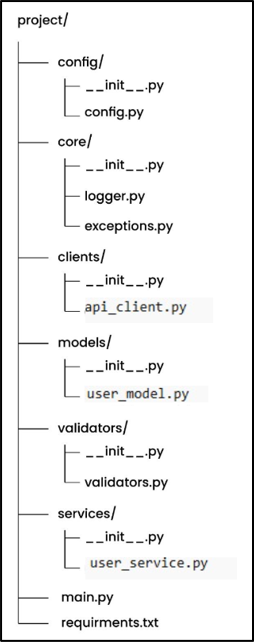
In this structure, we separate code based on responsibility so that each part of the system does one job. Config handles environment values, clients manage API calls, and core contains shared logic like logging and exceptions.
We also have models for structured data, validators for checking responses, and services for business logic. The __init__.py files make each folder a module so imports work properly. This structure makes the system clean, scalable, and easy to understand.
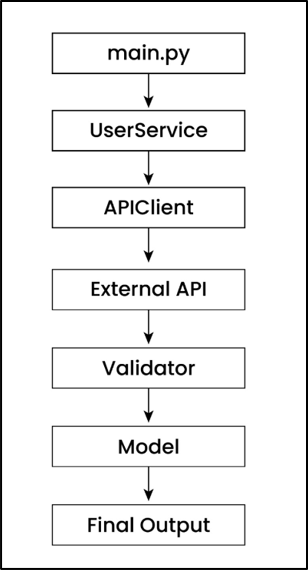
This diagram shows how data flows through the system from start to end. The request starts from main.py, goes through the service layer, and then reaches the API client where the actual API call is made.
Once the response is received, it is validated and converted into a structured model before returning the final output. Config, logging, and exception handling work in the background to make the system reliable and production-ready.
What is __init__.py?
Each folder contains an empty __init__.py file so that Python treats it as a module. This allows us to import files easily across folders.
This is a small file but very important for project structure.
# __init__.py (empty file)Explanation
In simple terms, it helps Python understand that all files inside the folder belong together. This makes the project more stable and production-ready.
Before calling APIs, we remove hardcoded values so that the system becomes flexible.
We store API URL, timeout, retry count, and delay in one place so they can be reused across the project.
This makes the system easy to manage and change.
import os

BASE_URL = os.getenv("API_BASE_URL", "https://api.github.com")
TIMEOUT = int(os.getenv("API_TIMEOUT", 5))
RETRIES = int(os.getenv("API_RETRIES", 3))
RETRY_DELAY = int(os.getenv("API_RETRY_DELAY", 2))
Explanation
In this code, we are defining configuration values using environment variables. Instead of hardcoding values inside the code, we use os.getenv() to read them dynamically from the system.
If the environment variable is not set, Python uses the default value. This makes the system flexible and safe for both development and production. In simple terms, this allows us to change behavior without modifying the code.
2. Logging (logger.py)
In production systems, it is important to track what is happening inside the application.
Instead of using print statements, we use logging so that all events are recorded properly.
This helps in debugging and monitoring the system.
import logging

logging.basicConfig(
    level=logging.INFO,
    format="%(asctime)s | %(levelname)s | %(message)s",
    filename="app.log",
    filemode="a"
)
Explanation
Here we configure logging so that all important messages are saved in a file. This allows us to track application behavior even after it stops running.
The format includes timestamp, log level, and message, which makes debugging easier. In simple terms, logging helps you understand what is happening inside your system in real-world scenarios.
3. Custom Exceptions (exceptions.py)
In real applications, we should not use generic errors for everything.
Instead, we define custom exceptions so that we can handle different error cases clearly.
This makes the system more readable and maintainable.
class APIError(Exception):
    pass

class APITimeoutError(APIError):
    pass

class APIConnectionError(APIError):
    pass
Explanation
In this code, we define custom exception classes for different types of API failures. This helps us understand exactly what kind of error occurred.
Instead of handling all errors in the same way, we can now treat timeout, connection, and API errors differently. In simple terms, this improves error handling and makes debugging easier.
4. Data Model (user_model.py)
Instead of working with raw API data, we define structured models.
This ensures that data always follows a fixed format and reduces errors.
It also improves code readability.
from dataclasses import dataclass

@dataclass
class User:
    id: int
    name: str
Explanation
In this code, we define a user model using a data class. This converts API response data into a structured object instead of a plain dictionary.
This makes the code cleaner and easier to understand. It also ensures that required fields are always present, which reduces bugs and improves reliability.
5. API Client (api_client.py)
Now we build the core component that handles API calls.
This includes retry logic, timeout handling, and connection reuse for better performance.
This is the most important part of the system.
import requests

import logging

import time

from config.config import BASE_URL, TIMEOUT, RETRIES, RETRY_DELAY

from core.exceptions import APITimeoutError, APIConnectionError, APIError


class APIClient:

    def __init__(self):

        self.session = requests.Session()


    def get(self, endpoint):

        url = f"{BASE_URL.rstrip('/')}/{endpoint.lstrip('/')}"


        for attempt in range(1, RETRIES + 1):

            try:

                logging.info(f"[Attempt {attempt}] Calling: {url}")


                response = self.session.get(url, timeout=(3, TIMEOUT))

                response.raise_for_status()


                return response.json()


            except requests.exceptions.Timeout:

                logging.warning("Timeout occurred")

                time.sleep(RETRY_DELAY * attempt)

                if attempt == RETRIES:

                    raise APITimeoutError()


            except requests.exceptions.ConnectionError:

                logging.warning("Connection issue")

                time.sleep(RETRY_DELAY * attempt)

                if attempt == RETRIES:

                    raise APIConnectionError()


            except requests.exceptions.HTTPError as e:

                logging.error(f"HTTP error: {e}")

                raise APIError(str(e))
Explanation
In this code, we are building a production-level API client. We use requests.Session() so that connections are reused, which improves performance and reduces latency.
We also implement retry logic with exponential backoff, which means delay increases after each failure. This prevents overloading the API and makes the system more stable. In simple terms, this ensures reliable and efficient API communication.
6. Response Validation (validators.py)
Before using API data, we must validate it.
This ensures that the response contains expected fields and correct format.
It helps avoid errors later in the system.
def validate_user_response(data):

    if not isinstance(data, dict):

        raise ValueError("Invalid response format")


    if "id" not in data or "name" not in data:

        raise ValueError("Missing required fields")


    return data
Explanation
In this code, we check whether the API response is valid before using it. First, we ensure the response is a dictionary.
Then we verify required fields like id and name. If something is missing, we raise an error. In simple terms, validation ensures that only correct and expected data flows into the system.
7. Service Layer (user_service.py)
Now we connect API calls with business logic.
This layer acts as a bridge between API client and application logic.
It keeps the system clean and maintainable.
from clients.api_client import APIClient

from validators.validators import validate_user_response

from models.user_model import User


class UserService:

    def __init__(self, client=None):

        self.client = client or APIClient()


    def get_user(self, user_id):

        data = self.client.get(f"users/{user_id}")

        validated = validate_user_response(data)


        return User(**validated)
Explanation
In this code, we create a service layer that uses the API client to fetch data. Instead of calling APIs directly, we use this layer to manage business logic.
We also validate the response and convert it into a structured model. In simple terms, this keeps the system organized and ensures clean data flow.
8. Main File (main.py)
Finally, we connect everything and run the application.
This file acts as the entry point of the system.
It triggers the entire flow.
import core.logger
from services.user_service import UserService

def main():
    service = UserService()

    try:
        user = service.get_user(1)
        print(user)

    except Exception as e:
        print("Error:", e)

if __name__ == "__main__":
    main()
Explanation
We also handle errors using try-except so the system does not crash. In simple terms, this file controls the execution and ties everything together.
requirements.txt
This line goes inside your requirements.txt file.
It means that Requests library should be installed and version should be 2.31.0 or higher
Note: This line defines the external dependency required for the project. It ensures that the correct version of the request’s library is installed so that the code runs consistently across different environments. Built-in modules like os and logging are not included because they are already part of Python.
Beginner vs Production Code
In this section, let’s quickly understand the difference between how beginners write API code and how production systems are designed.
This will help you clearly see why we followed this structured approach in this project.
|
Beginner Approach |
Production
Approach |
|
Direct API call |
Structured architecture |
|
No retry |
Retry with backoff |
|
No validation |
Strict validation |
|
print() |
Logging system |
|
Hardcoded values |
Config-based setup |
In beginner-level code, APIs are usually called directly without handling failures or validating responses. This works for small examples but becomes risky in real-world applications where APIs can fail or return unexpected data.
In production systems, we design the code in a structured way by adding retry logic, validation, logging, and configuration management. This makes the system more reliable, scalable, and easier to maintain. In simple terms, production code is designed not just to work, but to handle real-world problems.
Final Thoughts
In this guide, we started with a simple API call and gradually transformed it into a production-level API integration using clean architecture and real-world best practices. We added important components like retry logic, timeout handling, response validation, structured logging, and proper configuration management to make the system more reliable and scalable. Instead of writing code that just works, we focused on building a system that can handle failures, adapt to different environments, and remain easy to maintain as it grows. In simple terms, this is how modern production systems are designed, and understanding this approach will help you build robust and professional applications in Python.
16. Real failure scenarios in API calls
(Timeout, Rate Limits, Invalid JSON, Server Errors):
In real-world production systems, I have seen that API failures happen on a regular basis and this is a normal behavior. Please understand that a strong application is not the one that works when everything is fine, but the one that works continuously even when your APIs fail.
Let us now discuss a few high-impact failure scenarios based on my experience in IT industry.
High-Impact Failure Scenarios (Real Production Cases):
1. Timeout (Slow or Unresponsive API):
In this scenario, APIs take too long to respond. This can happen due to network latency or server overload etc.
So, your system keeps waiting, means your application is stuck waiting for API response and as a result, thread gets blocked, other tasks can’t execute and due to this, overall performance gets dropped.
Rate limiting means APIs restrict how many requests you can send in a given time. Normally, this is done to prevent overload and ensure the fair usage of resources.
If you send too many requests, then API returns 429 Too Many Requests error and your requests start failing and, in this scenario, your system would stop working properly.
So, one should reduce unnecessary API calls and properly implement rate limiting on client side.
APIs don’t always return perfect data. Sometimes API response can be in wrong format, invalid JSON or incomplete data.
In this scenario, when API response is not correct, then parsing may fail, key access may break (data["key"]) and sometimes your application may crash as well.
I have also seen that if wrong data is used by your application, then it can also lead to wrong business decisions as well. Few examples are — wrong prediction done by AI system or wrong price is shown (for a product) on a website.
So, one should always validate response before using it.
In this scenario, sometimes the API server itself fails internally.
Even if you send a correct request, sometimes server may not respond properly due to internal failure.
Let me write down few common server errors here:
• 500: It is an internal server error, due to something broken inside server
My advice is that you should always handle server errors using retry (try again after delay) or fallback (use backup or default value), as this will make your system more reliable.
In this scenario, API rejects your request due to authentication issues. Even if your code is correct, still access would be denied.
Let me write down few authentication errors:
• 401: It is an Unauthorized error due to invalid or missing credentials
In simple words, this error is shown because you don’t have sufficient permissions or there is a restricted resource access. So, you are recognized but access is denied.
Final Takeaway
All production systems are built so that they can handle failures as well, not only success.
You should always design your API integration to handle scenarios like:
• timeout
17. Senior Engineer Insights (Idempotency, Sync vs Async, Circuit Breaker, Observability):
In real-world production systems, calling an API is not about sending a request. When senior engineers design systems, they ensure that system should be resilient, scalable and failure-aware.
These are the things that differentiate a beginner from a production-ready engineer.
In real systems, your API calls can fail due to timeouts, network issues or server errors, so system automatically retries the same request.
If your APIs are not designed in a proper way, then it can lead to serious issues like duplicate payments, multiple orders or inconsistent data, which has direct impact on business and user trust.
Idempotency means calling the same API multiple times should produce the same result, not duplicate actions.
For example, a payment API should charge only once even if the request is retried and an order API should not create multiple orders for the same request. This would ensure that your APIs are safe for retries and production-ready.
Let us try to understand this with the help of a simple but relevant example here.
Example:
processed_requests = set()

def process_payment(request_id, amount):
    if request_id in processed_requests:
        return "Payment already processed"

    # Process payment (dummy logic)
    print(f"Charging ₹{amount}")

    processed_requests.add(request_id)
    return "Payment successful"


# First call
print(process_payment("req123", 100))

# Retry (duplicate request)
print(process_payment("req123", 100))
Explanation:
Every time a payment request comes, it should have a unique request_id, which acts like a transaction reference. Next, a function process_payment(request_id, amount) is defined which takes request ID and amount as input so that system can process each payment in a safe way.
After that, inside the function, the line if request_id in processed_requests checks whether this request was already handled or not. If request_id already exists, then it means it is a duplicate request, so in that case, system doesn’t process the payment again and it simply returns a message "Payment already processed".
On the other side, if your request is new, then your payment is processed and message is printed and in last, request_id is also added to the set so that it can be marked as completed.
My request is, please understand this logic completely, as this is used in real systems to avoid duplicate transactions and maintain data consistency.
a) Sync API Calls:
In synchronous (sync) API calls, the system sends a request and waits until it gets a response before doing anything else.
This is simple and easy to understand but synchronous API calls can slow down the system, because everything is blocked while waiting for a response.
Let me show a relevant example for better understanding. For example, in a payment processing system, when you click "Pay" button, the system must wait for confirmation (success or failure) before moving ahead, otherwise it can create incorrect transactions.
import requests
response = requests.get("https://api.example.com/payment")
print("Payment status:", response.status_code)
print("Next step executed after payment response")Explanation:
During this wait time, no other line is executed and complete program is blocked. Once API response is received, then print("Payment status") statement gets executed followed by next line.
In asynchronous (async) API calls, the system sends a request and doesn’t wait for response. In parallel, it continues doing other tasks as well.
This behavior helps to improve the system performance and makes the system faster and scalable.
Let me show here a simple example. For example, when sending an email, the system can trigger the email in background and continue other operations without further waiting for the email to be delivered.
import asyncio

async def send_email():
    print("Sending email...")
    await asyncio.sleep(2)  # simulate delay
    print("Email sent")

async def main():
    asyncio.create_task(send_email())  # runs in background
    print("Continue other work without waiting")

asyncio.run(main())Output:
Note: Output order may vary slightly because async tasks run in parallel.
In this program, there are two main tasks: main() and send_email(). When asyncio.run(main()) is called, it starts the event loop. An event loop is the controller that manages all async tasks.
Before explaining further, let’s understand three important terms here:
a) asyncio – It is a Python library which is used to write asynchronous programs. Technically, it provides tools like event loop, tasks and scheduling which are used to run multiple operations efficiently.
b) async – It is used before a function (async def). In simple words, it tells Python that this function can run asynchronously and can pause/resume without blocking.
c) await – It is used inside an async function. It means “pause this function here and give control back to event loop until result is ready”.
First asyncio.run(main()) is called, it starts the event loop. An event loop is the controller that manages all async tasks. Inside main(), asyncio.create_task(send_email()) creates a separate task for send_email() and it also registers it with the event loop.
After scheduling this task, main() continues its execution immediately and prints the next line without waiting. This shows how multiple tasks are managed by the event loop.
Now, the event loop runs tasks one-by-one, but switches between them when it sees await. When send_email() function runs and reaches at await asyncio.sleep(2), it pauses itself and control is given back to the event loop.
The event loop can then run other tasks instead of waiting. After 2 seconds, the event loop resumes send_email() from where it stopped and completes it.
This switching happens because of await, which makes the program non-blocking and allows multiple tasks to progress efficiently.
In real systems, if a particular API or service keeps failing due to timeouts or any error and your system may keep calling that API or service again and again, then it can cause various problems like slow performance, resource waste and even system crash as well.
The circuit breaker pattern prevents this by stopping calls to a failing service after a certain threshold. It fails fast and protects system resources rather than retrying continuously.
Technically, the circuit breaker operates in three states:
• Closed
In Closed state, requests are allowed and failures are monitored. Once failures exceed a threshold, then it moves to another state Open state where all calls are blocked.
After a cooldown period, it enters Half-Open state where few requests are allowed. If those requests succeed, then it goes back to Closed state, otherwise it returns to Open state where it blocks all requests.
Important point to note that this pattern provides multiple benefits (mentioned below), especially in microservices architecture:
• System stability
Netflix also uses a circuit breaker when it calls services for recommendations. If the service starts failing continuously, then it stops sending further requests.
Instead of crashing at this time, it returns fallback data like popular or cached content.
This is done to ensure that system performance should remain fast and a user should get a smooth experience as well.
In real systems, when APIs fail or become slow, then most of the time, developers don’t have any idea what is happening inside the system. That is why debugging becomes difficult and it delays issue resolution as well.
If you don’t have visibility, then it becomes hard to understand whether the issue’s root cause is server, network or data.
To handle this scenario, we add observability by adding:
• logging (to track events)
It helps in a clear way to see what is happening during execution.
Let us understand it further with the help of code.
import requests
import logging
import time

logging.basicConfig(level=logging.INFO)

url = "https://api.example.com/data"

start_time = time.time()

try:
    logging.info("Calling API...")

    response = requests.get(url, timeout=5)

    response.raise_for_status()

    data = response.json()
    logging.info(f"Success | Status: {response.status_code}")

except requests.exceptions.RequestException as e:
    logging.error(f"API Error: {e}")

end_time = time.time()

latency = end_time - start_time

logging.info(f"Response Time: {latency:.2f} seconds")Explanation:
In next line, we configure logging using logging.basicConfig(level=logging.INFO), which means all logs of level INFO and above (INFO, WARNING, ERROR) will be printed. As we have not mentioned any filename, so all logs will be shown in console, it won’t be saved in a file.
Next, we store the API URL and store the start time using time.time() to measure latency (response time).
Next, inside the try block, we log "Calling API..." using logging.info() method and it indicates that the request is starting. Then requests.get() is used (with a timeout of 5 seconds) so that program does not wait forever if your API is slow.
The next line response.raise_for_status() checks for any HTTP errors (like 404 or 500), and if any error occurs, then it raises an exception. If there is no HTTP error and everything is successful, then response.json() converts the response into usable Python data and we log the success status in next line.
On the other side, if anything fails (due to timeout, network issue or server error), then error is caught by except block using RequestException and logs it using logging.error() and it prevents crashing the program.
After the API call, we also capture end time and also calculate latency (or response time) and it tells us how long the API took to respond. Finally, we log this response time as a metric.
If you see the above code carefully, then multiple important points are given below:
a) Logging: It shows what is happening
Together all these three gives us full observability into the system.
18. Common Mistakes (What NOT to Do)
When working with APIs using Python Requests, many developers focus only on getting the response but ignore real-world production challenges.
1. Not using timeout (application hangs)
When you don’t define a timeout, your API call can wait forever if the server is slow or not responding.
2. Not handling errors properly (crashes in production)
If you don’t use try-except blocks, even a small API failure can crash your application.
Good developers always handle errors gracefully so the system continues to run smoothly.
3. Using print() instead of logging
Using print() is fine for testing, but in real-world applications, you won’t be able to track issues later.
Logging helps you monitor, debug, and maintain systems effectively in production environments.
4. Hardcoding API keys in code
Writing API keys directly in code is a big security risk and can expose sensitive data.
Always use environment variables or secure config files to protect your credentials.
5. Not validating API response
Many developers assume API will always return correct data, which is not true in real scenarios.
Always check status code and validate response data before using it in your application.
6. Calling APIs without retry logic
APIs can fail temporarily due to network issues or server overload.
Without retry logic, your system may fail instantly instead of recovering automatically.
In production systems, even a small mistake can break the entire system
19. Frequently Asked Questions (FAQ)
1. How to call an API using Python Requests for beginners?
Ans: One can call an API using requests.get() or requests.post() method by passing the API URL.
Ans: GET method is used to retrieve data from an API, while POST method is used to send data to the server.
Ans: One can use timeout to avoid waiting forever and try-except block is used to handle errors safely.
Ans: You should send headers with authentication details in secured APIs. And headers are always passed as dictionary using header parameter.
For example, "Authorization": "Bearer TOKEN" tells API who you are.
Ans:
a) You should always use timeout, validation and logging to make API calls safe.
20. Summary: Python Requests Tutorial
In this guide, we learned how you can use Python Requests library to call APIs using GET and POST requests in simple and real-world scenarios.
• What is an API
Once these basics are clear, then we moved to real-world concepts and covered following topics:
• How to handle errors using timeout and try-except block
Once these real-world concepts are covered or understood completely, then we covered production-level best practices as mentioned below:
• How to avoid hardcoding using environment variables
By applying these concepts, you are not just learning how to call APIs, but how to design reliable, scalable, and production-ready systems.
This is what differentiates a beginner from a real-world engineer.
Learn more in our “Python JSON Handling" chapter.