1. Introduction
When Python programs are small, it is easy to write everything inside a single file. But as your program grows larger, it becomes difficult to keep all the logic in one file and also maintain it well.
This problem is solved by Python developers using modules and packages.
In simple words:
• A Python module is a single Python file that contains reusable code.
• A Python package is a folder containing multiple modules organized together.
As a Python developer, it provides you multiple benefits like:
• It helps to scale systems easily.
• It helps you to maintain clean architecture.
• You can reuse code in multiple projects.
• It also helps you to organize large applications.
In my professional IT experience, I have used it in many areas like:
• To develop backend web systems.
• Machine learning projects.
• Data pipelines to separate tasks such as data extraction, data transformation, and data loading.
• Enterprise software to divide the system into well-structured components like authentication, billing, reporting, etc.
If you want to learn and build Python applications for production, then you must learn modules and packages.
Based on my experience, I would try to cover all essential topics in this guide and keep everything simple so that you can learn maximum in a limited amount of time.
Python modules and packages are fundamental concepts used in building scalable applications, backend systems, machine learning pipelines, and large enterprise software.
It is also helpful to know how Python programs are executed, because modules are imported and used during program execution.
Let us now start by understanding what a Python module is.
2. What is a Python Module?
A Python module is simply a .py file that contains multiple things like variables, functions, or classes which can be reused in other Python programs.
As a Python developer, you don't need to rewrite the same code again and again.
Instead of writing the same logic repeatedly, we create modules and import them whenever needed (based on the requirement).
Example: Using a Built-in Module
There are multiple built-in modules in Python such as:
• math
• random
• datetime
Please note that these built-in modules help you to perform multiple common tasks and you don't need to write everything from scratch.
Code Example 1:
import random

number = random.randint(1,10)
print("Random number:", number)
Output :
Random number: 7
Explanation :
In this code, first we have imported a module called random, and this module is used to generate random values.
After that, we have called a function randint() which basically generates a random integer between 1 and 10.
At last, that number is printed using the print statement.
Please note that randint() generates a different number on each run.
Code Example 2 :
import math

result = math.sqrt(25)
print("Square root:", result)
Output :
Square root: 5.0
Explanation :
In this code as well, first we have imported the math module, and this module contains many mathematical functions.
Next, we used the sqrt() function to calculate the square root of 25.
Intentionally, I am rewriting the same thing here - instead of writing our own square-root algorithm, we have reused the built-in math module.
And this is one of the biggest advantages of Python modules.
3. Ways to Import Modules in Python
There are multiple ways to import modules in Python.
If you want to contribute as a Python developer in large projects, then it is very important to understand these methods because modules and libraries are often used in real-time Python projects.
3.1 Importing an Entire Module
In this method, a complete module is imported, which means all functions, variables, and classes inside that module become available.
If you need to access them, then you can access them using the module name as a prefix.
General Syntax :
import module_name
If you want to use anything from the module, then you can write:
module_name.function()
module_name.variable
This approach is common in production systems because it provides clarity about where a function is coming from.
Let’s see the following example.
Example :
import datetime

today = datetime.date.today()
print("Today's date:", today)
Output :
Today's date: 2026-03-11
Explanation :
In this example, first we have imported the datetime module, and this module is used for working with dates and time.
Also, note that datetime.date.today() returns the current date.
Since we have imported the entire module, we must use the module name before accessing its functions.
Here, date is a class which is defined inside the datetime module in Python.
3.2 Importing Specific Functions
Sometimes, you don’t need to import the entire module.
You only need a specific function or class from that module.
In such scenarios, you can import a specific function, which makes your code shorter.
Syntax :
from module_name import function_name
Once you have imported a function, you can call that function directly without using the module name.
Example :
from random import randint

number = randint(1,5)
print("Random number:", number)
Output :
Random number: 4
Explanation :
In this example, we have only imported the randint() function from the random module.
After that, randint(1,5) generates a random number between 1 and 5.
An important point to note is that since we have imported only the randint function, that is why we have called the function directly as:
randint(1,5)
instead of writing:
random.randint(1,5)
Also, it makes your code cleaner and shorter.
3.3 Using Alias for Modules
Sometimes a module name can be long or frequently used.
In Python, you can also create an alias (short name) for a module that makes your code easy to write and read.
This is done using the keyword as.
Syntax :
import module_name as alias_name
Now you can access the module using the short alias name.
Aliases are very commonly used in data science and machine learning based projects.
For example :
import numpy as np
import pandas as pd
Let’s now see an example.
Example :
import datetime as dt

current_time = dt.datetime.now()
print("Current time:", current_time)
Output :
Current time: 2026-03-11 10:45:12
Explanation :
In this example, first we have renamed the datetime module as dt.
Instead of writing:
datetime.datetime.now()
we have written:
dt.datetime.now()
Please note that there is a
datetime class inside the
datetime module.
Summary :
In short, there are 3 ways to import modules in Python.
| Method | Syntax | Usage |
| 1. Import entire module | import module | You can access using module.function |
| 2. Import specific function | from module import function | You can call function directly |
| 3. Import with alias | import module as alias | You use short name |
4. Creating Your Own Python Module
In Python, developers normally create their own modules so that they can organize reusable code.
If you don't want to write the same functions again and again in different programs, then it is better to place them inside a separate Python file and reuse them whenever needed.
This will improve code organization and maintainability of large applications.
Step 1: Create a Module
First, create a Python file named:
calculator.py
Keep the following code inside calculator.py
def add(a,b):
    return a + b

def subtract(a,b):
    return a - b
So, this file is a module and it basically contains two functions:
• add() – It adds two numbers
• subtract() – It subtracts two numbers
Step 2 :
Now, we will create another Python file where we will use this module.
Code :
import calculator

result = calculator.add(10,20)
print("Result:", result)
Output :
Result: 30
Explanation :
In this example, first we have imported a module calculator, which we have created in Step 1.
Because we have already imported the entire calculator module, we can access its functions using:
calculator.add()
And this function add (10,20) returns 30, which is printed as an output.
This is a good example of modular programming, in which a large program is divided into small reusable modules.
In my IT career, I have used this approach multiple times to keep my projects clean, scalable, and easier to maintain.
5. What is a Python Package?
A Python package is a folder that contains multiple Python modules.
When you work in large projects, then it becomes difficult to keep all code in one file, as it becomes difficult to manage everything in a single file.
So, Python packages help developers to group related modules together in a structured way.
So, a package is a folder that contains multiple modules.
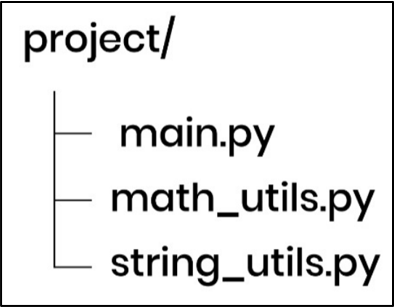
Let me share an example of a typical structure of a package here.
Example Package Structure:
Explanation:
In this example, the project folder acts as a Python package because it groups multiple files.
• math_utils.py – It is a module that contains mathematical functions such as addition, multiplication, etc.
• string_utils.py – It is a module that contains functions for string processing like converting text to uppercase or removing spaces.
• main.py – This is the main program that imports and uses these modules.
In this way, developers manage large projects in an easy way and reuse their code efficiently, and this structure is widely used in:
• backend systems
• machine learning projects
• enterprise software development
Note: We have used math_utils.py and string_utils.py modules as examples only. Python doesn't provide these files by default.
6. Understanding __init__.py
A file called __init__.py is used to tell Python that a directory should be treated as a package.
When Python sees this file (__init__.py) inside a folder, it understands that the folder contains Python modules that can be imported.
Let us now see a package structure example as shown below:
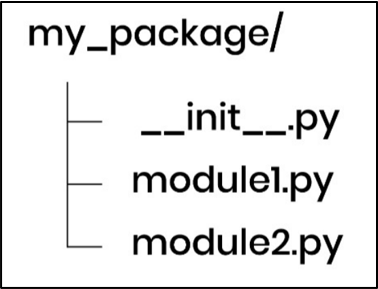
In this example, please understand two important things:
• my_package – It is a Python package because __init__.py is defined in the directory.
• module1.py and module2.py – These are the modules inside the package my_package.
Modern Python (Python 3.3+) can treat folders as packages even without __init__.py, but many developers still include it because it helps them in these ways:
• Control what modules are exposed
• Simplify imports and improve developer experience
• Initialize package configuration
That is why you would see
__init__.py in most production Python projects, even though modern Python versions don't strictly require it.
7. Python Import System Deep Dive (How Python Finds Modules)
Python developers use import statements on a daily basis, but very few developers understand the real logic of how Python actually finds and loads modules.
Normally, if an import statement fails, then the following error is shown to developers:
ModuleNotFoundError: No module named 'mymodule'
If you understand how Python searches for modules, it would help you debug these problems in a faster way and you would be able to design better project structures.
When Python executes an import statement, it searches for the module in the following order:
Python Module Search Order (Import Resolution Flow)
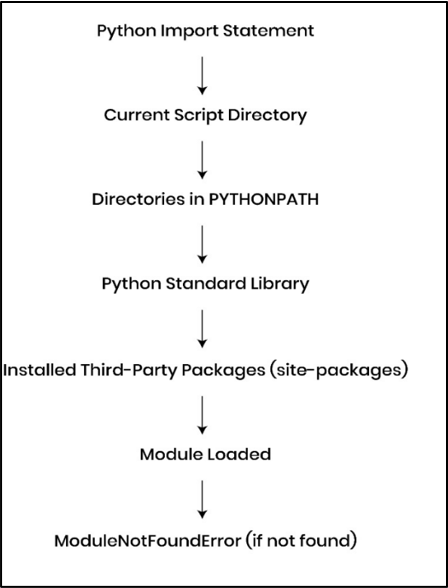
The above diagram shows the internal workflow that Python follows when it resolves an import statement. As a developer, If you understand this flow clearly, it will help you debug import errors quickly and organize project structures more effectively in production applications.
Inspecting Python Import Paths Using sys.path:
import sys

for path in sys.path:
    print(path)
Explanation :
This code prints all directories where Python searches for modules when executing import statements.
These paths include the current script directory, PYTHONPATH entries, the Python standard library, and installed third-party packages.
Internally, Python stores these paths inside sys.path, and the import system checks these directories sequentially to resolve module imports.
Module Caching in Python Import System:
Python also uses a module caching mechanism that helps improve performance during the import process.
Example :
import math
import math
import math
Explanation :
Even if a module is imported multiple times, Python loads it only once. After the first import, Python stores the module inside sys.modules, which acts like a cache. If the same module is imported again, Python reuses the cached module instead of loading it again.
This improves performance and ensures that the module code is not executed multiple times during program execution.
Once you write the import statement and execute the program, then Python starts searching for the requested module in the following order:
• Current script directory - the folder where the Python program is running
• Directories listed in the PYTHONPATH environment variable
• Python Standard Library directories
• Installed third-party packages (for example packages installed using pip)
If the searched module is not found in any of these locations, then Python raises the following error:
ModuleNotFoundError
Important Points
a) PYTHONPATH : PYTHONPATH is an environment variable that tells Python where to search for modules.
Example :
export PYTHONPATH=/home/user/custom_modules
Now, Python will search that folder when importing modules.
b) Standard Library : These are the built-in modules that come with Python like:
• math
• os
• sys
• datetime
c) Third-party packages : These are external libraries which are installed using tools like pip.
Example :
pip install numpy
Once numpy is installed, you can write the following statement in your program to import the numpy module:
import numpy
It is very important to understand how the Python language resolves imports because it helps developers in many ways:
• You can design package structures properly
• You can organize large projects correctly
• You can debug ModuleNotFoundError in an efficient way
• You can manage dependencies more efficiently in production applications
This knowledge would definitely help you when you start working with:
• large applications
• AI based projects
•
backend services
8. Using Third-Party Python Packages
Python has a very large ecosystem of third-party libraries which are created by developers around the world.
These third-party libraries help Python developers to build applications in a faster way, and there is no need to write everything from scratch.
Let me write down a few popular Python packages here:
• requests – It is used for calling APIs
• numpy – It is used for numerical computing
• pandas – It is used for data analysis
• flask – It is used for building web applications
One can install these packages (libraries) using a tool called pip.
Installing a Python Package :
You can install a Python package using the pip tool.
This tool allows developers to install Python libraries from the Python Package Index (PyPI).
pip install requests
This command is used to download the requests library from the internet so that it can be used inside a Python program.
Once the package is installed, you can import and use it inside your Python code as shown below.
Example :
import requests

response = requests.get("https://api.github.com")

print(response.status_code)
Output :
200
Explanation :
In this example, first we have imported the requests package.
After that, an HTTP request is sent to the GitHub API using the function requests.get(), and the response variable contains the response object returned from the server.
Next, the HTTP status code is printed using response.status_code.
The value 200 means the request was successful.
Similarly, other libraries can be installed using the pip tool.
In real applications, it is common to call APIs using packages like requests, and this is widely used in:
• web applications
• data pipelines
• machine learning systems
•
AI based applications
9. Real Production Project Structure
(Mini Project Example)
Now we will see, with the help of a simple example, how Python modules and packages are organized in a real backend application.
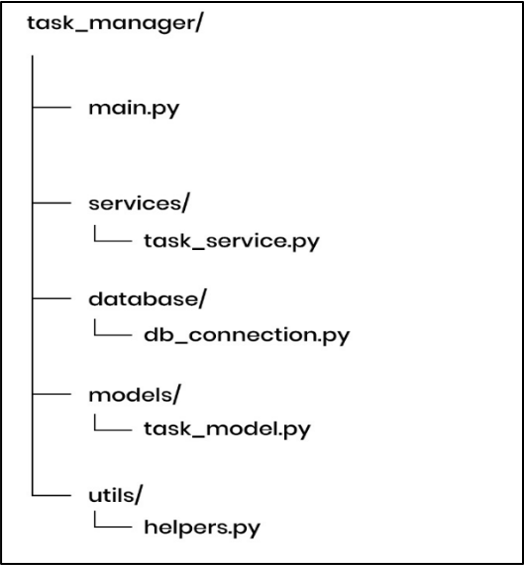
Example of a Project Structure:
Explanation :
It is a typical real Python project structure which shows how an application is organized into modules and each part has a clear responsibility.
Execution Flow of the Python Project:
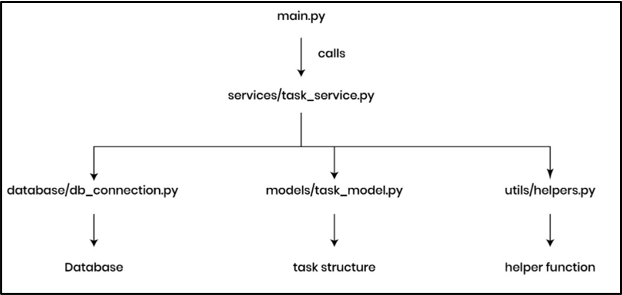
The above diagram shows how different modules interact in a real Python application. The main.py file starts the program and calls the service layer, which then interacts with database modules, data models, and utility functions to complete the task.
Let us discuss each part one by one.
• main.py : It is the main entry point of the application and execution of the program is started from this file and it calls the different services of the system.
• services/ : It contains the business logic of the application. For example, task_service.py may have different functions to create, update, or delete tasks.
• database/ :This folder is used to manage database-related operations. The file db_connection.py is used to connect with the database.
• models/ : This folder mainly contains data models or data structures which are used in the application. For example, task_model.py may define the structure of a task object.
• utils/ :This folder generally contains helper functions which are used in multiple parts of the application. A few examples are formatting data or common helper logic, etc.
To better understand the above project structure, let us now implement a small example.
This modular design helps developers to build scalable and maintainable applications.
Example Code :
1. database/db_connection.py :
def connect_db():
    print("Database connected successfully")
Explanation :
This module simulates a database connection. In real projects, this file contains logic to connect with databases like MySQL, MongoDB, or PostgreSQL.
But here we are simply printing a message to demonstrate the connection step.
2. models/task_model.py :
class Task:
    def __init__(self, title):
        self.title = title
Explanation :
This module defines the Task model and it represents a task object in the application.
Models are used to structure data in a consistent format. In real systems, models are often mapped to database tables.
3. utils/helpers.py :
def format_task_title(title):
    return title.strip().title()
Explanation :
In this function, format_task_title() is used to clean and format the task title before storing or displaying it.
4. services/task_service.py :
This layer basically contains the business logic and typically coordinates with multiple modules.
from database.db_connection import connect_db
from models.task_model import Task
from utils.helpers import format_task_title
def create_task(title):

    connect_db()

    formatted_title = format_task_title(title)

    task = Task(formatted_title)

    print("Task created:", task.title)
Explanation :
As discussed, this module basically contains the business logic of the overall application.
The function create_task() first connects to the database, then it formats the task title and after that it creates a task object with the help of the constructor and finally the result is printed.
In short, this service layer is coordinating with multiple modules.
5. main.py :
from services.task_service import create_task

create_task("learn python modules")
Output :
Database connected successfully
Task created: Learn Python Modules
Explanation :
This is the entry point of the application and program execution starts from here.
As you can see, first we have imported the create_task() function from the service layer and then a call is made to the function create_task() to create a new task.
Conclusion :
In short, this example shows how Python modules and packages can help you organize large applications into smaller and manageable components and in this way one can easily maintain and scale an application.
10. Common Mistakes with Python Modules
The following is a list of common mistakes that developers normally do while working with Python modules.
If you understand these mistakes, then it would help you as a developer to avoid import errors and organize your code more effectively.
a) ModuleNotFoundError : It is a common mistake that freshers often make when they try to import modules that Python cannot locate due to:
• incorrect file location
• wrong module name
• incorrect import paths
b) Circular Imports : It occurs when two or more modules import each other and it creates a dependency loop during the import process.
Example :
moduleA.py
import moduleB
moduleB.py
import moduleA
Explanation :
In this example, Python first starts loading moduleA. While executing moduleA, Python encounters the statement import moduleB, so it begins loading moduleB. While loading moduleB, Python again encounters import moduleA.
Since moduleA is already in the process of being loaded, Python finds a partially initialized version of moduleA, which creates a circular dependency.
This situation can lead to import errors or partially initialized modules.
So, a better approach is to reorganize the modules or move shared code into a separate module.
c) Incorrect Module Import Path : Sometimes developers use incorrect import paths while importing modules from packages.
Suppose your project structure is like:
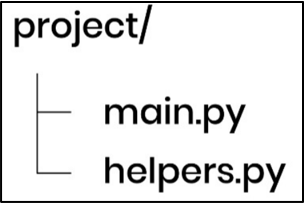
But in your program you write:
import utils.helper
Then in that case Python will raise an error because the package structure does not contain utils.helper.
d) Naming Conflict with Standard Library Modules : Sometimes junior developers (especially) name their files the same as Python’s built-in modules.
Examples:
math.py
random.py
This can override the standard library module and it causes unexpected errors during import time.
11. Best Practices for Python Modules and Packages
We will now discuss a few best practices for Python modules and packages that would make your code easy to manage once your application grows.
• Each module should handle one specific functionality because it makes your code easier to understand and maintain.
• You should choose clear and descriptive names for your modules and packages so that developers can easily understand what the module contains.
• You should always keep related modules in a package, as this would help you to maintain a clean project architecture.
•
You should use __init__.py to expose only important functions, as this approach keeps the package interface clean and easy to use.
12. Python Modules vs Packages
In Python, modules and packages are closely related with each other, yet they serve different purposes in organizing code.
The below given table shows the key differences between these two:
| Feature | Module | Package |
| Definition | A single Python file containing code | A directory having multiple Python modules |
| Purpose | Its purpose is to reuse variables, functions, and classes | It is used to organize related modules into a structured way |
| Example | math.py | utils/ |
13. Understanding __name__ == "__main__" in Python Modules
Every Python file has a special variable called __name__.
When a Python file is run directly, Python sets the following:
__name__ = "__main__"
When the same file is imported as a module, then Python sets the following:
__name__ = "module_name"
Let’s now try to understand it with an example for better clarity.
Example: example.py
def greet():
    print("Hello from module")

if __name__ == "__main__":
    print("This file is running directly")
    greet()
Let’s now discuss two different scenarios.
Case 1: Run the file directly
python example.py
Output:
This file is running directly
Hello from module
Case 2: Import the file in another program
import example
Output:
(no output)
In this case, Python sets:
__name__ = "module_name"
and it makes the condition (__name__ == "__main__") false (as you are importing a file), so that block does not run.
14. Python Modules and Packages Interview Questions
a) What is __init__.py and why is it important in Python packages?
Ans: In simple words, __init__.py is a file that tells Python to treat a directory as a package.
It is also used to initialize package configuration and control what modules are exposed.
b) What is the difference between import module and from module import function?
Ans: • import module: It imports the complete module in your program and you can access its functions using the module name.
• from module import function: It is used to import specific functions directly into the current namespace.
c) What is PYTHONPATH and when do developers use it in Python projects?
Ans: It is an environment variable which is used to add additional directories to Python’s module search path.
It is mostly used when working with custom packages outside the default project directory.
d) What is module caching in Python import system?
Ans: When a module is imported for the first time, Python loads it into memory and stores it in sys.modules (which acts like a cache memory).
If the same module is imported again, then Python uses the cached version of the module.
15. Frequently Asked Questions (FAQ)
a) What are Python modules used for?
Ans: Python modules allow developers to organize reusable code into separate files so that it can be imported into other programs as per need.
Python modules help to break a large program into small and manageable components.
b) What is the difference between a module and a package in Python?
Ans: Let’s understand each one-by-one:
A module is a single file that contains variables, functions, and classes.
A package is a directory that contains multiple related modules which are organized together.
c) Why do developers use modular programming in Python?
Ans: Modular programming provides many benefits like:
• It improves readability
• It is easier to maintain
• One can use the same code in multiple programs without rewriting it
Note: Modules and packages are part of modular programming.
d) Where does Python search for modules when importing them?
Ans: Python searches for modules in the following given order:
• Current project folder
• Directories in PYTHONPATH
• Python Standard Library
• Installed third-party packages
This order helps Python to find a module in a fast way during program execution time.
16. Summary
In this guide, we have seen how you can organize your code in a clean and structured way using modules and packages.
We also discussed module imports, the structure of a package, Python’s import system, and how you can use third-party libraries in real projects.
From my own experience, this modular architecture is used in every Python project to keep the code scalable and manageable.
When your application grows large, then modules and packages help teams to organize code logically and it avoids confusion as well.
My advice would be to practice these concepts while building even small projects so that you can understand how real production applications are structured.
After you master modules and packages, then it would be much easier for you to design scalable and maintainable Python applications.
Learn more in our “Python Virtual Environments" chapter.