
1. Introduction to JSON in Python
2. Understanding JSON Structure and Data Types
a) JSON Syntax Explained (Objects, Arrays, Values)
import json

json_string = '''
{
"name": "Sachin",
"age": 24,
"is_active": true,
"skills": ["Python", "AI"],
"city": "Delhi"
}
'''

data = json.loads(json_string)
print(data)Output:
b) Supported Data Types in JSON
import json

json_string = '''
{
    "name": "Dinesh",
    "age": 30,
    "is_active": true,
    "salary": null,
    "skills": ["Python", "AI"]
}
'''

data = json.loads(json_string)

print(type(data["name"]))
print(type(data["age"]))
print(type(data["is_active"]))
print(type(data["salary"]))
print(type(data["skills"]))
Output :
|
JSON Type |
Python Type |
|
string |
Str |
|
Number |
Int/
float |
|
boolean |
bool |
|
null |
None |
|
Array |
list |
Always remember that JSON supports very limited data types, but Python automatically converts them into powerful native objects and it becomes very easy to process API responses, handle backend data, and build real-world applications.
c) Common JSON Syntax Mistakes
import json

invalid_json = '''
{
    name: "Raj",
    "age": 41,
}
'''

data = json.loads(invalid_json)
Explanation
import json

valid_json = '''
{
    "name": "Raj",
    "age": 41
}
'''

data = json.loads(valid_json)
print(data)
Explanation
3. Working with JSON in Python (json Module Basics)
a) Importing the json Module
import jsonWith the help of above statement, we are loading Python’s built-in json module, which provides two important functions as shown below:
b) Convert Python Dictionary to JSON (json.dumps)
import json

data = {
    "name": "Hitesh",
    "age": 35,
    "skills": ["Python", "AI"]
}

json_data = json.dumps(data)

print(json_data)Output:
c) Convert JSON to Python Dictionary (json.loads)
import json

json_string = '{"name": "Rajat", "age": 41}'

data = json.loads(json_string)

print(data)Explanation:
Now we can access values like:
print(data["name"]) # RajatIn simple words, json.loads() function is used when you receive JSON data from APIs or external systems and want to process it in Python.
d) Difference Between load vs loads
This is a very common confusion for beginners. Let us understand each in simple way:
• json.load(): It is used to read JSON data directly from a file and converts it into a Python dictionary for easy use.
• json.loads(): It is used to read JSON data from a string and converts it into a Python dictionary so you can process it in your code.
import json

with open("data.json", "r") as file:
    data = json.load(file)

print(data)
In this example, we are reading JSON data directly from a file and it is converted into a Python dictionary for easy use.
Example 02: json.loads()
json_string = '{"name": "Raj"}'

data = json.loads(json_string)
In this example, we are reading JSON from a string and it is converted into a Python dictionary so you can process it in your code.
In simple words:
• load = file: It is used when JSON data is stored in a file
• loads = string: It is used when JSON data is in string format
4. Writing JSON Data to File in Python
After working in multiple real-world Python applications, I have seen that we often need to store data permanently, such as saving API responses, configuration files, logs, or user data.
JSON is the most commonly used format which is used for this purpose because it is simple, readable, and supported everywhere.
In this section, we will learn how to write JSON data to a file in Python step by step, along with formatting and handling errors like a real developer.
a) Save JSON to File Step-by-Step
In this part, we are going to do three things written below:
1. Creating Python data
2. Opening a file
3. Writing data into file in JSON format
Example:
import json

data = {

    "name": "Raman",

    "age": 44,

    "skills": ["Python", "AI"]

}

with open("data.json", "w") as file:

json.dump(data, file)Explanation:
In this example, first we have created a Python dictionary and stored it in a variable called data. After that, we have used open() function with "w" mode, which means write mode, to create or overwrite a file named data.json.
After that, we used json.dump() to convert the Python dictionary into JSON format and directly write it into the file.
Please note that with statement is very important here because it automatically closes the file properly, even if an error occurs.
In simple words, json.dump() function is used when you want to store Python data into a JSON file for future use.
b) Formatting JSON (indent, sort_keys)
Example:
import json

data = {
    "name": "Kamal",
    "age": 20,
    "skills": ["Python", "AI"]
}

with open("data.json", "w") as file:
json.dump(data, file, indent=4, sort_keys=True)Explanation:
c) Handling File Write Errors (Production Level)
import json

data = {"name": "Aman"}

try:
    with open("data.json", "w") as file:
        json.dump(data, file, indent=4)
    print("File written successfully")

except IOError as e:
print("Error while writing file:", e)Explanation:
5. Reading JSON Data from File in Python
a) Load JSON File Step-by-Step
import json

with open("data.json", "r") as file:
    data = json.load(file)

print(data)Explanation:
b) Handling Missing or Invalid Files (Very Important)
import json

try:
    with open("data.json", "r") as file:
        data = json.load(file)
    print(data)

except FileNotFoundError:
    print("File not found. Please check the file path.")

except json.JSONDecodeError:
print("Invalid JSON format in file.")Explanation:
c) Working with Large JSON Files (Advanced but Important)
import json

with open("large_data.json", "r") as file:
    data = json.load(file)

print(len(data))
Better Approach (Memory Efficient):
import json

with open("large_data.json", "r") as file:

    for line in file:

        data = json.loads(line)

        print(data)
Important Note: This approach works only when the file is in JSON Lines format (NDJSON), where each line is a valid JSON object. In real-world systems, large datasets are often stored in this format for efficient streaming and processing. For standard JSON files (single large object or array), you should use json.load() instead.
Explanation:
In the first approach, we have loaded the entire file into memory, which may not be efficient for very large files.
In the second approach, we have read the file line by line, which reduces memory usage and this approach is very useful when you start dealing with large datasets or streaming data.
In simple words, for small files use json.load(), but for large files use line-by-line processing so that performance issues could be avoided.
Real-World Insight:
JSON is widely used to store, read, and process data across systems, so it is very important to handle it properly. In real applications:
• Config files are read using json.load(): Most applications store important settings (like database URL, API keys, environment values) in JSON config files and in real applications, we use json.load()function to read these settings into Python so that the application can use them dynamically without hardcoding values.
• Logs and datasets can be very large: data is read line by line to save memory and improve performance.
• Error handling is mandatory in production systems: It ensures that your application does not crash due to missing files or invalid JSON.
6. JSON with APIs (Real-World Integration in Python)
Till now, we have understood how JSON works in Python. Now we will move one step ahead and see how JSON is actually used when you start working with APIs.
Please note that whenever you call an API like fetching user data, stock prices, or weather, the server always sends back a response, and most of the time, you receive a response in JSON format.
This concept is also commonly asked in Python and API-related interviews. So, please give your full attention to understand this concept clearly.
In this section, we will learn multiple things like how APIs return JSON, how to extract required values, and how to work with nested JSON step by step.
a) How APIs Return JSON Data
Let us first understand basics about API.
Whenever you send a request, the server returns a response, and most of the time, this data comes in JSON format.
Now let’s see how this JSON response is handled in Python.
import requests

response = requests.get("https://api.github.com")

data = response.json()

print(data)Explanation:
In this example, we used the requests library to call an API. If you want to learn API calls in depth, you can read this Python requests library guide. The response object contains data returned by the server.
When we use response.json(), Python automatically converts the JSON response into a Python dictionary.
In simple words, you can understand this like:
• API sends JSON
• Python converts it into dictionary
• Finally, we can use it like normal data
b) Extracting Data from API Responses
Once JSON data is converted into a Python dictionary, we can easily access and extract values using keys.
This works exactly like how we access data from a normal Python dictionary. Now let’s see it with a simple example to understand this clearly.
Example:
import requests

response = requests.get("https://api.github.com")

data = response.json()

print(data["current_user_url"])
print(data["authorizations_url"])Explanation:
In this example, we accessed values using keys just like a normal Python dictionary.
For example:
• data["current_user_url"]: It gives specific value
• data["authorizations_url"]: It gives another value
In simple words, once JSON is converted, it behaves like a dictionary, so you can do multiple things like:
• Access values
• Loop through data
• Filter information
c) Handling Nested API JSON Responses
When I first worked with API data, I found JSON was often nested, with dictionaries inside dictionaries or lists inside them.
Example:
data = {
    "user": {
        "name": "Vimal",
        "skills": ["Python", "AI"]
    }
}

print(data["user"]["name"])
print(data["user"]["skills"][0])Explanation:
In this example, we have a nested JSON structure where user is a dictionary. Inside this user, we have two keys: name and skills. You should also note that here, skills is a list, which means it contains multiple values (like Python and AI)
To access the data, we need to go step by step. First, we access the outer key user, then inside that we access name or skills. If it is a list like skills, then we use index to get the specific value (as shown in above example).
• APIs return data in JSON format: Most APIs send data in JSON, which is easy to read and widely used in Python backend development.
7. Handling JSON Errors and Exceptions in Python (Safe JSON Parsing Guide)
I have often realized that you can not always trust JSON data, as it is not always reliable. Sometimes it can be invalid, incomplete, or incorrectly formatted.
If you are not going to handle these situations properly, then your program may crash or behave unexpectedly.
In this section, we will learn how to handle JSON errors and exceptions in a safe way, which is important when you start working with APIs and production systems.
Safe JSON Handling Flow in Python
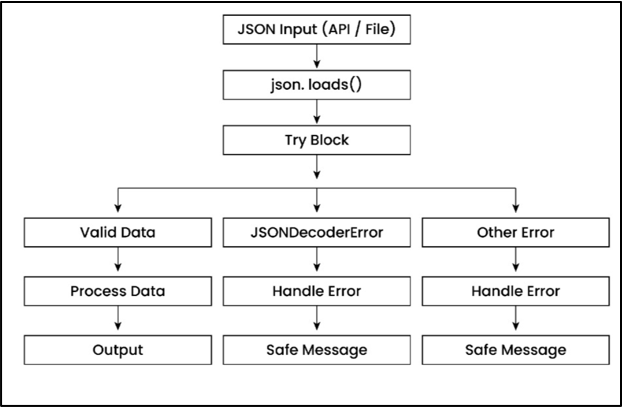
Now let us go one level deeper and understand how JSON errors are handled step-by-step in Python.
In this section, we will cover the main error, how to handle invalid JSON safely, and how to use try-except effectively in real scenarios.
a) JSONDecodeError Explained
When we try to convert an invalid JSON string using json.loads(), Python is not able to understand the format and throws an error called JSONDecodeError.
This issue normally comes when JSON syntax is wrong, like missing quotes or incorrect structure.
Example:
import json

invalid_json = '{"name": "Rajat", age: 45}'  # missing quotes around age

data = json.loads(invalid_json)
Explanation
In this example, the JSON format is incorrect because the key age is not in double quotes. So when Python tries to parse it, it throws a JSONDecodeError.
In simple words, this error means:
“Your JSON format is wrong, so Python cannot understand it.”
b) Handling Invalid JSON Safely
Most of the times, JSON data comes from APIs or external systems, so we cannot always trust it completely that it would be correct always.
Sometimes the data may be invalid or incorrectly formatted, which can break your entire program.
Best practice is, one should always validate JSON data and handle errors properly to keep your application safe and stable.
Let me show this with the help of an example for better understanding.
import json

invalid_json = '{"name": "Raman", age: 40}'

try:
    data = json.loads(invalid_json)
    print(data)

except json.JSONDecodeError:
print("Invalid JSON format. Please check the data.")Explanation:
In this example, we used a try-except block to handle invalid JSON safely. If the JSON is wrong, instead of crashing, the program shows a proper message.
In simple words, this is called safe JSON parsing, which is very important in production systems.
c) Using try-except for Safe Parsing
Let us now look at a slightly improved version where we handle both specific JSON errors and unexpected issues in a safer way.
This approach is normally used in production system and helps to make the program more robust and it also ensures that it can handle different types of errors without crashing.
Example:
import json

json_string = '{"name": "Sunil", "age": 35}'

try:
    data = json.loads(json_string)
    print("Data loaded successfully:", data)

except json.JSONDecodeError as e:
    print("JSON Error:", e)

except Exception as e:
print("Unexpected Error:", e)Explanation:
In this example, first we have stored JSON data in a string format so that Python can read it as text. Next, we have used json.loads() to convert this string into a Python dictionary after validating its structure.
Next, we use a try-except block to handle errors safely. If the JSON format is invalid, it catches JSONDecodeError, and for any other issue, it handles it using a general exception so that the program does not crash.
In interviews and real projects, companies don’t just check if you can write code. They also check whether your code can handle real problem scenarios like invalid data, failures, and unexpected situations.
• Handling invalid JSON: It shows you can manage bad data without breaking the system.
• Writing safe parsing logic: It ensures that your code validates data before using it.
• Using try-except effectively: It helps your program handle errors gracefully instead of crashing the entire program.
8. Validating JSON Data (Production-Level Practice in Python)
JSON validation is a very critical step before you start using any data inside your application.
External data can be inconsistent, incomplete, or incorrectly structured, which can lead to unexpected behavior in your code.
If you validate JSON early, it ensures that only correct and structured data flows through your system and it also makes your application more stable and reliable.
In this section, we will break down JSON validation step by step with practical examples so that you can apply it confidently in your projects.
a) Why JSON Validation is Important
When data comes from outside systems, it can have multiple issues like:
• Missing required fields
If we don’t validate the data, then even a small issue can cause runtime errors.
Let us try to understand problem first with the help of a simple example.
Example Problem:
user_data = {
    "username": "Rahul",
    "age": "twenty five"   # incorrect format
}

# Trying to use age as number
result = int(user_data["age"]) + 5
print(result)Explanation:
In this example, age should be a number, but it is stored as a string (as shown above). When we try to convert or use it, the program will fail.
In simple words, validation helps us catch problems early before they break the system.
b) Manual Validation Techniques
Since we have already understood the problem in the previous example, now let’s focus on how to solve it using simple validation techniques.
We can validate JSON data by checking required fields and ensuring correct data types before using it.
This would help us to prevent errors and ensures that your application works in a safe and controlled way.
Example:
order = {
    "id": 101,
    "amount": 250.75
}

if "id" not in order:
    print("Missing order id")

elif not isinstance(order["id"], int):
    print("Order id should be integer")

if "amount" in order and isinstance(order["amount"], (int, float)):
    print("Amount is valid")
Explanation
In this example, we are validating JSON data by checking both the structure and data types before using it in the program. This helps prevent runtime errors and ensures the data is safe to use.
First, the condition if "id" not in order: checks whether the required key exists. If the key is missing, it prints an error because the application depends on this value.
Next, we use isinstance() to check the data type. The condition isinstance(order["id"], int) ensures that "id" is an integer, and isinstance(order["amount"], (int, float)) ensures "amount" is a numeric value.
c) Preventing Bad Data in Systems (Production Thinking)
Based on my experience, I have seen that if you start writing validation logic in multiple places, then it makes your code messy and difficult to maintain.
As a best practice, you should always create structured and reusable validation so that the same logic can be used across the application.
This would help you to keep the system clean and also prevents bad or incorrect data from entering the system.
Example:
def check_product(data):
    if not data.get("title"):
        return "Title is required"

    if not isinstance(data.get("price"), (int, float)):
        return "Price must be a number"

    return "Valid data"


product = {"title": "Laptop", "price": 75000}

result = check_product(product)
print(result)Explanation:
In this example, we are validating product data by passing it into a function, where data is a Python dictionary containing key-value pairs like "title" and "price". This approach helps us centralize validation logic in one place.
Inside the function, data.get("title") is used to safely read the value. If "title" is missing or empty, it returns a meaningful message instead of breaking the program.
Next, we have used isinstance() with data.get("price") to ensure the value is a number (int or float). This prevents incorrect data types from being used in calculations or business logic.
Finally, if all checks pass, the function returns "Valid data", which means the input is safe to use in the system.
Please note that this approach makes the code reusable and easy to maintain by keeping validation logic in one place.
9. Pretty Print, Format, and Minify JSON in Python
When you start working with JSON in Python, then formatting is not only about looks. It directly affects multiple things like debugging, readability, and performance.
Based on different project needs, sometimes we want JSON to be clean and readable, and sometimes we want it to be compact and fast.
Let’s understand both approaches with different practical examples.
a) Pretty Print JSON for Debugging
When JSON comes from APIs, it is usually in a single line, which is difficult to read and understand for anyone.
I have seen this many times while working with APIs, where it becomes confusing to understand the structure at first.
So, first we format it using indentation to make it clean and easy to debug.
Example:
import json

api_response = {
    "user_id": 101,
    "profile": {
        "name": "Amit",
        "email": "amit@gmail.com"
    },
    "roles": ["admin", "editor"]
}

pretty_data = json.dumps(api_response, indent=4)

print(pretty_data)Explanation:
Here, first we have created api_response, which is a Python dictionary containing nested data like profile (a dictionary inside another dictionary) and roles (a list). This type of structure is very common in API responses, where data is not flat and comes in multiple levels.I have taken this particular example for your better understanding.
Then we used json.dumps(api_response, indent=4), where indent=4 formats the data with proper spacing and alignment. This would make each level of JSON clearly visible, so we can easily understand which data belongs where. Finally, when we print it, the output becomes clean and readable, which helps a lot during debugging.
Here you can clearly see that the data is properly indented (as shown above), and each level is easy to read and understand.
b) Minify JSON for Performance
When you send data over a network, size matters because larger data takes more time to transfer. I have seen that formatted JSON adds extra spaces, which increases payload size unnecessarily.
Let us now try to understand this concept with another example as shown below.
Example
import json

payload = {
    "product_id": 5001,
    "price": 1999,
    "in_stock": True
}

compact_data = json.dumps(payload, separators=(",", ":"))

print(compact_data)Explanation:
Here, you have a Python dictionary (payload) and you are converting it into JSON using json.dumps(). Normally, JSON adds spaces after commas and colons for readability, like "key": "value", which increases the size slightly.
Now, look at separators= (",", ":") carefully.
• The first part "," means how items are separated (between key-value pairs), and by default Python uses ", " (comma + space).
• The second part ":" means how key and value are separated, and by default it is ": " (colon + space).
In simple words, when you write (",", ":"), you are telling Python:
“Do not add any extra spaces, just use comma and colon directly.”
Because of this, the JSON becomes more compact like "key":"value" instead of "key": "value", which reduces size. Overall, you are removing unnecessary spaces which makes JSON smaller and faster to send over network.
c) Sorting Keys for Readability
Sometimes JSON keys are not in order, which makes it difficult to read or compare data.
So, if you want to make JSON clean and easy to understand, then you can sort them for better clarity.
Example:
import json

config = {
    "timeout": 30,
    "api_key": "XYZ123",
    "base_url": "https://example.com"
}

sorted_data = json.dumps(config, indent=2, sort_keys=True)

print(sorted_data)Explanation:
In this, you are using json.dumps(..., sort_keys=True), which tells Python to arrange all keys in alphabetical order. This means the JSON output will always follow a consistent structure.
This will help you in scenarios like comparing JSON outputs, debugging issues, or working with configuration files.
In simple words, sorted JSON is clean, organized, and always easier to manage.
Good developers always know when to use different JSON formats based on the situation:
• Pretty JSON: It is used during development time for easy debugging
From my experience, using the right format at the right time makes a big difference in readability and system performance.
10. Working with Complex and Nested JSON
By now, you have already learned how nested JSON works in earlier sections, so here I will not repeat the same basics again. Now, we will go one level deeper and focus on real-world patterns, where JSON is more complex and it requires a slightly different way of thinking while accessing and transforming data. My only objective is to teach you those scenarios that will help you in real projects in your career.
In many real scenarios like analytics data, e-commerce systems, or logs, JSON is not just nested but also mixed with lists, optional fields, and repeated structures. So, the goal here is to understand how to navigate, extract, and reshape such data in an efficient way.
a) Multi-Level JSON Parsing
In real projects, sometimes JSON data is deeply nested, and useful information is spread across multiple levels.
In such cases, we need to navigate step-by-step and extract the required values from different parts of the structure
Let us see this with the help of an example for better understanding.
Example
data = {
    "session": {
        "user": {
            "id": 501,
            "info": {
                "name": "Neha",
                "location": "Bangalore"
            }
        },
        "metrics": {
            "login_time": "10:30 AM",
            "device": "mobile"
        }
    }
}

user_name = data["session"]["user"]["info"]["name"]
device = data["session"]["metrics"]["device"]

print(user_name, device)
Output:
Neha mobile
Explanation
In this example, the JSON data is split into different logical sections like user and metrics, and the required values are not in one place. So instead of just going deep into one branch, we are extracting values from multiple paths inside the JSON.
In simple words, when JSON becomes complex, you should not think in one straight path, but you should pick the required values from different levels (based on need) after understanding the structure.
b) Handling Lists Inside JSON
Based on my experience, I have seen that many times JSON data contains multiple records stored inside a list.
In such cases, we need to iterate through each item and process them one by one instead of accessing just a single value.
Example:
data = {
    "transactions": [
        {"id": 1, "amount": 500},
        {"id": 2, "amount": 1200},
        {"id": 3, "amount": 300}
    ]
}

total = 0

for txn in data["transactions"]:
    total += txn["amount"]

print(total)Explanation:
In this example, we are looping through all items in the list and calculating the total amount. This is a very common pattern when working with financial data, reports, or API responses that return multiple records.
In simple words, when JSON contains a list, you often need to iterate through it and perform multiple operations like filtering, summing, or transforming values.
c) Transforming JSON Data
In many cases, the data we receive is not in the exact format we need for our application.
Based on my experience, I have seen that raw JSON data is often structured for storage or APIs, but not for direct use in business logic or reporting.
So, in those situations - we need to reshape or transform the data into a format that is easier to work with and more meaningful.
Example:
data = {
    "employees": [
        {"name": "Raj", "department": "IT"},
        {"name": "Amit", "department": "HR"},
        {"name": "Neha", "department": "IT"}
    ]
}

dept_map = {}

for emp in data["employees"]:
    dept = emp["department"]
    dept_map.setdefault(dept, []).append(emp["name"])

print(dept_map)Output:
{
"IT": ["Raj", "Neha"],
"HR": ["Amit"]
}
Explanation:
In this example, the original data is a list of dictionaries, where each dictionary represents one employee. This structure is fine for storing data, but not efficient when you want to access employee’s department-wise.
When the loop runs, each emp is one dictionary like {"name": "Raj", "department": "IT"}. We extract the department using emp["department"] and store it in dept. Then dept_map.setdefault(dept, []) checks if that department already exists as a key — if not, it creates a new empty list for it.
After that, .append(emp["name"]) adds the employee’s name to the correct department list. This process repeats for all employees, and gradually the dictionary builds a grouped structure.
• First iteration: department is IT, so it creates {"IT": ["Raj"]}
11. JSON vs Python Dictionary vs String
Many beginners often get confused between JSON, Python dictionary, and string because they look almost the same when printed.
But internally, they behave very differently, it is very important to understanding this difference between these, when you start working with APIs or external data.
So, I won’t repeat same definitions here. My focus would be to make you understand how they differ in usage and behavior inside Python.
Python Dictionary vs String (Clear Difference)
A Python dictionary is a real data structure, which means you can directly access values using keys, modify data, and perform operations. If you want to understand this better, you can explore Python dictionaries in detail.
Example:
data = {"name": "Raj", "age": 41}

print(data["name"])   # Works
On the other hand, when the same data is stored as a string, it becomes just text, and Python cannot understand its structure.
data = '{"name": "Raj", "age": 41}'

print(data["name"])   # Error
If I need to make it simpler then, dictionary is usable data, but string is just text.
Where JSON Fits in This
When you receive data from APIs or files, it usually comes in JSON format, but inside Python, it is first treated as a string.
To make it usable, we need to convert it into a dictionary using json.loads()function.
Complete Flow (in three steps) is given below:
1.	json_string = '{"name": "Raman"}'   # String

2.	data = json.loads(json_string)    # Dictionary

3.	print(data["name"])              # Now it works
Here, important point to remember is that your JSON data becomes useful only after converting it into a dictionary.
Key Understanding:
• String: It is just plain text and Python cannot directly use it as structured data.
• JSON: It is a structured data format used to exchange data between systems, but still treated as text in Python.
• Dictionary: It is a Python object that allows you to easily access and use data using keys.
This is why conversion is required before using the data inside Python programs.
End-to-End JSON Flow in Python Applications:
Let us now understand how JSON data actually flows inside a Python application from input to output. Below shown diagram shows you a complete picture of how data is received, processed, and sent back in real systems.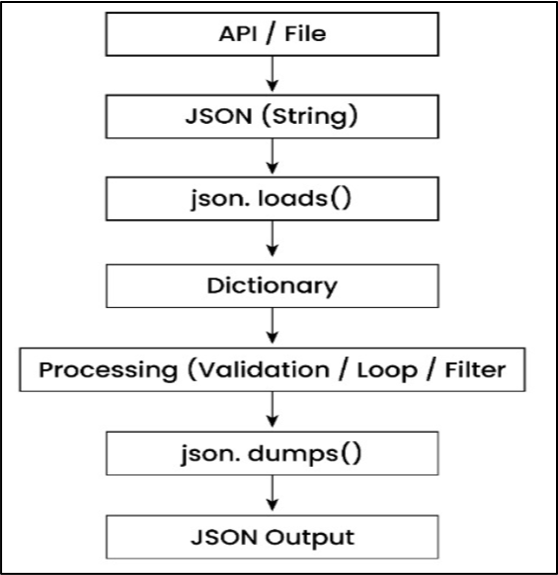
In a real application, data does not directly come as a Python dictionary. It usually starts its journey from an external source like an API, file, or database, where it is received in JSON format as a string. At this stage, the data is just text and cannot be used directly inside Python.
To make this data usable, we convert it using json.loads(), which transforms the JSON string into a Python dictionary. Once the data becomes a dictionary, we can easily access values, apply validation, run loops, filter records, or perform business logic based on our requirements. This is the stage where most of the actual processing happens in any backend system.
After processing the data, we often need to send it back to another system, store it in a file, or return it as an API response. For this, we convert the Python dictionary back into JSON format using json.dumps(), so that it can be shared across systems in a standard format.
12. Performance Optimization for Large JSON Data
As you have already seen how to handle large JSON files (in one of the earlier sections) and avoid loading everything into memory at once, so here I won’t repeat that same stuff again. Instead, at this time - we will go one level deeper and understand in simple way how to optimize JSON handling in a smarter way, where our main focus is not just on reading data, but how can we reduce unnecessary work, improve efficiency, and write better logic.
In many real projects, I have seen that when your JSON data becomes large, the real challenge for you is not only memory usage, but also how efficiently you process that data, because even small inefficiencies inside loops or conditions can slow down your program when the data size increases.
a) Memory Considerations (Smarter Usage)
When your JSON data becomes large, the problem is not just loading it, but how efficiently you handle it after loading. If you keep everything in memory and process it blindly, your program will become slow and heavy very quickly.
So instead of thinking about reading data, you should start thinking about keeping only what is needed and avoiding unnecessary work, which is the key to writing efficient code.
import json

filtered_names = []

with open("customers.json", "r") as file:
    for line in file:
        record = json.loads(line)

        if record.get("active"):
            filtered_names.append(record["name"])

print(filtered_names)Explanation:
In this example, first we are reading a JSON file step by step instead of loading everything at once, which is a good approach when the file is large. Next, for each line - we are converting the JSON text into a Python dictionary using json.loads(), so that we can work with it easily inside the code.
After that, we are checking if the customer is active using record.get("active"), and only if this condition is true, you are storing the name in the filtered_names list.
This means we are ignoring all unnecessary data and keeping only what is useful and it makes your code more efficient and cleaner.
b) Efficient JSON Processing Techniques
When you start working with large JSON data, performance is not just about how data is loaded, but how your code behaves inside loops when it runs thousands of times. Even small inefficiencies like repeated key access or unnecessary operations can slow down your program significantly without you noticing at first.
So instead of only focusing on logic, you should also focus on writing smarter code inside loops, where each step is optimized, because that is where most of the time is actually spent in real-world data processing.
Example (Reduce Repeated Work):
import json

with open("payments.json", "r") as file:
    for line in file:
        payment = json.loads(line)

        status = payment.get("status")

        if status == "completed":
print(payment.get("amount", 0))Explanation:
The `payments.json` file contains multiple payment records, where each line represents one JSON object with details like payment status and amount.
This type of structure is very common in real-world systems where transaction or log data is stored line by line for efficient processing.
Here, first we are reading the JSON file line by line instead of loading the entire file at once, which is a better approach when the data is large. For each line, we convert the JSON text into a Python dictionary using json.loads(), so that we can easily access and work with the data inside our program.
After that, we extract the status once and store it in a variable, so we don’t have to access it again and again inside the loop. Then we check if the payment is "completed" and print the amount, using .get() to safely handle cases where the key might be missing.
In simple words, we are writing optimized code by reducing repeated work, because instead of accessing payment.get("status") again and again inside the loop, we store it once in a variable and reuse it. Along with that, we are handling data safely using .get() and processing only what is required, which makes the code faster, cleaner, and more efficient for large datasets.
Till now, we focused on reducing repeated work and processing data efficiently, but there is one more important optimization that many developers miss.
This pattern is widely used in real-world systems where large JSON data needs to be processed efficiently without unnecessary overhead.
Another Optimization (Stop When Work Is Done)
Sometimes, you don’t need to process the entire JSON file, especially when you are only looking for a specific condition or record.
If you keep reading the full data even after finding what you need, it wastes both time and resources.
So in such cases, stopping early becomes a very effective optimization.
Example:
import json

with open("events.json", "r") as file:
    for line in file:
        event = json.loads(line)

        if event.get("type") == "critical":
            print("Critical event found:", event)
            break
Explanation:
Here, the events.json file contains multiple event records, where each line represents one JSON object, for example logs like user activity, system events, or error tracking data. This kind of structure is very common in real-world applications where large data is stored line by line instead of a single big JSON.
First, we are reading the file line by line, which is already an efficient way to handle large data. For each line, we convert the JSON text into a Python dictionary using json.loads(), so that we can check the values inside it.
After that, we check if the event type is "critical", and as soon as we find such a record, we print it and immediately stop the loop using break. This means we are not processing the remaining data unnecessarily. In simple words, instead of scanning the entire file, we stop as soon as our work is done, which saves time and improves performance, especially when working with large datasets.
13. Production-Level Project: JSON Order Processing API (E-commerce Example)
At a production level, JSON is not just data, it becomes the core communication layer between frontend, backend, and multiple services. In an e-commerce system like Amazon, every action such as placing an order, making a payment, or updating inventory flows through JSON APIs, and even if you make a small mistake in handling this data, then it can break the entire flow.
Now let us bring everything together and understand how JSON is used in a complete real-world project.
In this section, we will build a production-style e-commerce order processing flow, where you will see how JSON is validated, processed, and returned step-by-step, just like real APIs.
By the end of this section, you will be able to design a clean JSON workflow that can handle real-world scenarios like order processing, error handling, and API responses confidently.
a) JSON Data Flow in Real Systems
When a customer places an order, the frontend sends JSON data to the backend API. This data usually contains information like user details, items, and payment information required to process the order.
Example incoming JSON:
{
    "order_id": 101,
    "user": {
        "id": 5001,
        "name": "Raj"
    },
    "items": [
        {"product": "Laptop", "price": 80000},
        {"product": "Mouse", "price": 500}
    ],
    "payment_status": "completed"
}
In real systems, this data follows a structured flow:
First, data is received from frontend or API request, then it is validated it to ensure correctness, it is also transformed (if needed), then the business logic is processed, and finally a proper response is returned.
b) Validation, Model, and Response Pattern
Once JSON data comes into the system, the next step is to validate it before doing any processing.
In real applications, we do not directly process JSON data in one step. Instead, we follow a structured approach where we first validate the data, then business logic is applied, and finally a clean response is returned.
This approach ensures that errors are handled properly and the system always returns a predictable JSON output.
Before processing any data, we first check whether the required fields are present and valid. If something is wrong, we return a structured error message instead of breaking the program.
def validate_order(data):
    if "order_id" not in data:
        return {"error": "Missing order_id"}

    if not isinstance(data.get("items"), list):
        return {"error": "Items must be a list"}

    if data.get("payment_status") != "completed":
        return {"error": "Payment not completed"}

    return {"status": "valid"}
Explanation:
In this function, data is the order information that comes into the system, and it is a Python dictionary created from JSON using json.loads(). We start by checking if "order_id" is present, because this is a required field, and without it the order cannot be processed. Then we use data.get("items"), which safely reads the value without breaking the program if the key is missing.
After that, we use isinstance() to check whether "items" is a list, because an order can have multiple products and it must be in list format. We also check if "payment_status" is "completed" to make sure payment is done before processing the order.
In simple words, this function checks that the data is complete, in the correct format, and safe to use before moving ahead.
Step 2: Model (Business Logic)
Once the data is validated, we perform the actual business logic. In this case, we are calculating the total order amount by looping through all items.
def calculate_total(data):
    total = 0
    for item in data["items"]:
        total += item.get("price", 0)
    return total
Explanation:
In this function, we are calculating the total price of all items present in the order. We start by creating a variable total = 0, which will store the final amount after adding all product prices. Then we use a loop for item in data["items"], which goes through each product one by one.
Inside the loop, item represents a single product (like laptop or mouse), and we use item.get("price", 0) to safely read its price. If the price is missing, it returns 0 instead of causing an error. Then we keep adding each price to total. 👉 In simple words, this function loops through all items and adds their prices to calculate the final order amount in a safe way.
Step 3: Response (Consistent API Output)
After processing, we return a structured response in JSON format so that the frontend can easily understand the result.
def create_response(order_id, total):
    return {
        "order_id": order_id,
        "status": "confirmed",
        "total_amount": total
    }
Explanation:
In this function, first we are creating the final response that will be sent back to the frontend or API user. The function create_response( )takes two inputs, order_id and total, which were already processed earlier. Then we return a dictionary, which will automatically be converted into JSON when sending it as an API response.
Inside the return statement, we are structuring the output in a clean and consistent format. "order_id" helps identify the order, "status": "confirmed" shows that the order is successfully processed, and "total_amount" gives the final calculated price.
It combines validation, processing, and response handling in a structured way so that the system remains stable and predictable.
import json

order_json = '''{
    "order_id": 101,
    "user": {"id": 5001, "name": "Raj"},
    "items": [
        {"product": "Laptop", "price": 80000},
        {"product": "Mouse", "price": 500}
    ],
    "payment_status": "completed"
}'''

data = json.loads(order_json)

validation_result = validate_order(data)

if "error" in validation_result:
    print(json.dumps(validation_result, indent=2))
else:
    total = calculate_total(data)
    response = create_response(data["order_id"], total)
    print(json.dumps(response, indent=2))
Explanation:
Here, first we take the incoming JSON data and convert it into a Python dictionary using json.loads(), so that we can work with it inside our code. After that, we immediately validate the data using validate_order(data) to make sure required fields exist and the structure is correct before doing any processing.
Next, we check if validation failed by looking for "error" in the result, and if it exists, we return a proper JSON error response instead of breaking the program. This ensures that the frontend always gets a clean and consistent response, even when something goes wrong.
If the data is valid, we move to the business logic where we calculate the total amount and then create a structured response using create_response(). Finally, we return the result in JSON format, which shows how real-world APIs safely handle JSON data from input to output in a clean and controlled way.
c) Logging and Error Handling
import logging
logging.basicConfig(level=logging.ERROR)
try:
    result = validate_order(data)
    if "error" in result:
        logging.error(f"Validation failed: {result['error']}")
except Exception as e:
    logging.error(f"Unexpected error: {e}")
Explanation
Here, we are using Python’s logging module instead of print(), which is the standard approach in real applications. We have set the logging level to ERROR, which means only important issues will be recorded, keeping logs clean and focused on actual problems.
After that, we validate the JSON data, and if validation fails, we log a clear error message using logging.error(). This ensures that even if something goes wrong, the system does not crash, and the issue is properly recorded for debugging later.
In case of any unexpected error, we catch it using except Exception and log it as well, which makes the system more reliable. In simple words, logging helps you track issues in real time and is widely used in production systems where logs are sent to tools like monitoring dashboards for analysis.
At a beginner level, JSON is just a format. But, it has different meaning at a production level, JSON is how systems communicate, validate, recover from errors, and scale.
Once you understand this flow completely, then you can start building real-world systems.
14. Common Mistakes Developers Make with JSON
In my professional career, I have seen many developers make small mistakes while handling JSON, which may not show issues immediately but can break applications in real scenarios.
a) Not Validating JSON Data
Many developers directly use JSON data without checking if it is correct or complete, which can create issues later when data is missing or in the wrong format. In real systems, this can break your application or give incorrect results.
A very common mistake is assuming that every key will always be present in JSON, which is not true, especially when data comes from APIs. If a key is missing, your code may crash with errors like KeyError.
Some developers write code without proper error handling, assuming JSON will always be valid, which is risky in real-world applications. Invalid JSON or unexpected data can break your system if not handled properly.
Processing large JSON data without thinking about performance can slow down your application and increase memory usage. Many beginners load everything at once or process unnecessary data.
15. JSON vs XML vs YAML (Comparison Guide)
When working with data, you will often see formats like JSON, XML, and YAML, and at first, they may look different but serve a similar purpose. The real difference is in how simple they are to read, how fast they work, and where they are actually used.
I would not go into long explanations; the below comparison table below gives you a clear picture so you can quickly understand which format is better for your use case.
Quick Comparison Table:
|
Feature |
JSON |
XML |
YAML |
|
Structure |
Key-value pairs |
Tag-based
structure |
Indentation-based |
|
Readability |
Simple and clear |
Verbose and heavy |
Very clean and
human-friendly |
|
File Size |
Compact |
Larger due to tags |
Moderate |
|
Performance |
Fast |
Slower |
Fast |
|
Learning Curve |
Easy |
Medium |
Easy |
|
Best Use Case |
APIs and data
exchange |
Legacy systems and
structured data |
Configuration
files |
|
Example |
{"name": "Rajesh"} |
<name>Rajesh</name> |
name: Rajesh |
|
Popularity |
Very high |
Decreasing |
Growing in DevOps |
This table helps you quickly see the real difference between three formats - JSON, XML, and YAML without getting into confusion.
Once this is clear, it would be much easier for you to choose the right format based on what you actually need to build.
16. Interview Questions on JSON in Python
Ans: JSON (JavaScript Object Notation) is a lightweight format used to store and transfer data between systems, especially in APIs.
In Python, JSON is handled using the built-in json module. It allows us to:
Ans: Both functions are used to convert JSON data into Python objects, but they differ based on the input source:
Ans: Python provides two main functions to perform this conversion:
import json

# Python dictionary
user = {
    "username": "rahul123",
    "age": 30,
    "is_active": True
}

# Convert Python → JSON
json_data = json.dumps(user)
print("JSON Data:", json_data)

# Convert JSON → Python
python_data = json.loads(json_data)
print("Python Data:", python_data)
4. How do you handle invalid JSON data in Python?
Example:
import json

json_string = '{"price": "five hundred"}'  # wrong data type

try:
    data = json.loads(json_string)

    # Trying to use price as number
    total = int(data["price"]) + 100
    print("Total:", total)

except ValueError:
    print("Invalid data type for price. It should be a number.")

except json.JSONDecodeError:
    print("Invalid JSON format.")
5. How do you work with nested JSON data in Python?
We access it step by step using keys and indexes.
Example:
data = {"user": {"name": "Danny", "skills": ["Python"]}}

print(data["user"]["name"])
print(data["user"]["skills"][0])
17. Frequently Asked Questions (FAQ)
1. How to read JSON file in Python step by step?
Ans: If you want to read a JSON file in Python, first you should use open() with read mode and then json.load() to convert file data into a Python dictionary. This would allow you to access values using keys just like normal Python data.
2. How to convert JSON string to Python dictionary in Python?
Ans: You can use json.loads() to convert a JSON string into a Python dictionary. This is commonly used when you receive data from APIs or external systems.
3. Why am I getting JSONDecodeError in Python?
Ans: This error occurs when your JSON format is incorrect, such as missing quotes, extra commas, or invalid structure. Python cannot parse invalid JSON and throws this error.
In simple words, your JSON must follow strict rules, otherwise Python will not understand it.
4. How to pretty print JSON in Python for better readability?
Ans: You can use json.dumps() with indent parameter to format JSON with proper spacing. This makes it easy to read and debug complex or nested JSON data.
5. What is the difference between JSON and Python dictionary?
Ans: JSON is a data format that is used for transferring data, while a Python dictionary is a data structure used inside Python programs. JSON uses double quotes and is language-independent.
In simple words, JSON is for communication between systems, and dictionary is for working with data inside Python.
18. Final Summary
JSON handling in Python is not just about reading and writing data, but it is about understanding how data flows through your real systems like APIs, files, and backend services. If you handle JSON properly with validation, error handling, and efficient processing, then it would be easy for you to work with even complex and large datasets without slowing down application.
You should start implementing small practices like using .get() for safe access, formatting JSON for debugging, and processing only required data and I can confidently say that it can make a big difference in writing clean and reliable code. These improvements may look simple, but they directly impact system’s performance, readability, and how easily your code can be maintained over time.
If you want to achieve real value, then you should start thinking beyond syntax and focus on performance, safety, and structure while handling JSON data. Whether you are working with APIs, configuration files, or data pipelines, strong JSON handling would help you build scalable, stable, and production-ready applications.