
1. Introduction
Prerequisites: Before learning Python Exception Handling, you should have a basic understanding of Variables in Python, Numbers in Python, String - Basics, and Python Functions basics. It is also helpful to know Python File Handling, because many real-world runtime errors occur while working with files and user input.
2. What is Python Exception Handling?
Let’s understand it in a very simple and practical way.
Python exception handling means writing code that expects errors and also knows how to recover from them intelligently.
It helps developers handle problems safely while keeping the application running smoothly.
Once you will start working in real projects, then you will find that failures are normal, like:
• invalid input
• missing files
• network issues
But good developers write Python code in such a way that failures are handled gracefully instead of crashing.
If you want to build reliable and production-ready applications, then Python error handling is a critical concept.
3. Difference Between Errors and Exceptions in Python
Error
An error in Python is a problem in the code that prevents the program from running at all. Normally it happens before execution and a few examples are:
• SyntaxError
• IndentationError
Please note that you must fix the error in the code before you run your program.
Exception
An exception is a runtime problem that occurs while the program is running.
You can handle the exceptions using try and except blocks. Few examples of exceptions are:
• ValueError
• ZeroDivisionError
• FileNotFoundError
Please note that if there is an exception in your program, then you can recover from it gracefully instead of crashing.
Difference Between Errors and Exceptions in Python
| Feature | Error | Exception |
| When it occurs? | Before execution | During execution |
| Can be handled? | No | Yes |
| Example | SyntaxError, IndentationError | ValueError, ZeroDivisionError |
| Recoverable? | No | Often Yes |
4. Syntax Errors in Python
A syntax error occurs when Python parses your code and detects that it violates the language syntax rules.
Example
print("Hello Amit"SyntaxError: '(' was never closed
As you can see in the above example, there is no closing parenthesis, so Python cannot understand your code correctly.
Please note that you cannot handle syntax errors using try-except block because Python hasn't started the execution of the program.
5. Runtime Exceptions in Python
A runtime exception occurs after the program has started executing your code.
It happens when your code is syntactically correct but an unexpected situation occurs during execution time.
Example
m = 10
result = m / 0(ZeroDivisionError)
If you see the above written code carefully, the code is syntactically correct, but dividing a number by zero is mathematically invalid, so Python raises a runtime exception.
Please note that runtime exceptions can be handled using try-except blocks, so your program doesn't crash.
6. Basic Python try-except Example
The try-except block is the foundation of Python exception handling.
As a good practice, keep risky code inside the try block and handle expected errors inside the except block. This helps your program fail safely instead of crashing.
Example
m = 100

try:
    result = m / 0

except ZeroDivisionError:
print("Cannot divide by zero")Cannot divide by zero
Explanation
7. Python try-except-else-finally Explained
To write reliable Python applications, you should clearly understand how try, except, else, and finally work together.
In real projects, handling exceptions alone is not enough. You should control these scenarios when there is no error and what must always execute.
The below written structure gives you complete control over three scenarios:
• What must run during failure time
• What should run during success time
• What must run in all scenarios
Execution Flow of try - except - else - finally in Python

The above diagram shows the complete execution flow of Python exception handling using try, except, else, and finally blocks.
Example
try:
    n = 0
    res = 500 / n

except ZeroDivisionError:
    print("You cannot divide by zero")

else:
    print("Result:", res)

finally:
    print("Execution complete")
Output
Execution complete
Explanation
8. Catching Specific Exceptions in Python
In Python exception handling, the best practice is to always catch specific exceptions instead of a generic except block.
There are multiple reasons to catch specific exceptions:
• It makes debugging more precise.
• It prevents hiding unexpected bugs.
• It also improves your code readability.
• It improves production stability because catching everything generically can hide real problems.
So, it is always recommended to catch the most specific exception possible.
Catching specific exceptions means you handle only the errors you expect, while allowing unexpected issues to surface for proper debugging.
Example
try:
    num = int(input("Enter a number"))
    result = 100 / num

    my_list = [10, 20, 30]
    print(my_list[num])

except ValueError:
    print("Invalid input. Please enter a valid integer")

except ZeroDivisionError:
    print("You cannot divide by zero")

except IndexError:
    print("Index out of range. List does not have that position")
Explanation
An input is taken from the user, then division is performed and a list element is accessed. Also, input is converted to an integer.
If the user enters invalid data, then an exception ValueError is raised.
Next, if we divide 100 by input number 0, then Python raises an exception ZeroDivisionError.
Also, if the index is outside the list range, then an exception IndexError is raised.
As soon as an exception happens, Python immediately stops normal execution and jumps to the matching except block, which ensures controlled and predictable behavior.
9. Catching Multiple Exceptions in Python
In real-world applications, different types of runtime exceptions can occur, and in Python you can catch multiple specific exceptions in a single except block.
Here is a simple example.
Example
try:
    total = int("10") + int("twenty")

except (ValueError, TypeError) as e:
print("Error:", e)Error: invalid literal for int() with base 10: 'twenty'
Explanation
Here, Python successfully converts "10" into an integer, but fails when it tries to convert "twenty".
That failure raises a ValueError. Since ValueError is included in the except block, Python catches it and prints the actual error message.
This approach is useful when different exceptions need the same handling logic.
10. Catch-All Exception Handling
Sometimes you may not know in advance which error can occur, but you still want to prevent the program from crashing.
To handle this, we use the Exception class, which allows us to catch all standard runtime exceptions.
This is called catch-all exception handling. Use it carefully because it can hide unexpected errors and make debugging difficult.
Most of the time, developers prefer to catch specific exceptions like ValueError or ZeroDivisionError.
But in specific scenarios, a block of code can produce many types of errors, then in those scenarios you can use the general Exception class to handle all errors in a single place.
Example
try:
    num1 = int(input("Enter first number"))
    num2 = int(input("Enter second number"))

    result = num1 / num2

    print("Result:", result)

except Exception as e:
print("Something went wrong:", e)In this example, first we have defined a try block where Python asks the user to enter two numbers and we are also converting them to integers.
Next, Python divides the first number by the second number and prints the result.
If there is any error during input conversion or division operation, then that exception will be handled by the except block.
The statement except Exception as e catches most common program errors because many errors like ValueError and ZeroDivisionError come under the Exception class.
Please note that in the above program, we used `except Exception`, which catches most runtime errors such as ValueError and ZeroDivisionError, but it does not catch system-level exceptions like KeyboardInterrupt or SystemExit.
11. Raising Exception Using raise
In Python, we don't only catch runtime errors, we can also intentionally raise exceptions using the raise keyword.
In production systems, we use the raise keyword for the following scenarios:
• Input validation
• Business rule enforcement
• Prevent invalid system state
• To signal failure to higher-level functions
Example
try:
    age = -10

    if age < 0:
        raise ValueError("Age can't be -ve")

except ValueError as e:
    print(e)
Output
Explanation
In this program, first we have defined a try block where we have defined a variable age and assigned it a value -10.
Since age < 0 is true, so in the next line a ValueError exception is raised.
This exception is caught in the except block and stores the error message in variable e.
Finally, the error message is displayed:
Age can't be -ve
instead of terminating the program.
12. Re-Raising Exceptions in Python
In real systems, one layer may detect an error, log it, and then pass that error upward so that another layer can handle it properly.
This is called re-raising an exception.
Example
def read_file(filename):

    try:
        file = open(filename, "r")
        data = file.read()
        file.close()
        return data

    except FileNotFoundError as e:
        print("Logging error: File Not Found")
        raise
# Main application layer

try:
    read_file("data.txt")

except FileNotFoundError:
    print("Please check if the file exists before running the program")
Output
Please check if the file exists before running the program
Explanation
Here, the read_file() function tries to open a file. If the file is missing, FileNotFoundError is caught inside the function.
The function logs the issue and then uses raise to send the same exception back to the outer layer.
This keeps responsibilities clean: the lower layer detects the issue, and the higher layer decides how to respond.
13. Custom User-Defined Exceptions in Python
Sometimes built-in exceptions are not enough. In those cases, Python allows you to create custom exceptions for your own business rules.
This makes error handling more meaningful, readable, and domain-specific.
Why Create Custom Exceptions?
Custom exceptions can help us in many ways as written below:
• It helps to represent domain-specific errors.
• It improves your code readability.
• It separates your business logic errors from system errors.
• It makes large systems more structured.
Example: Custom Banking Exception
class InsufficientBalanceError(Exception):
    """
    Raised when withdrawal amount exceeds available balance
    """
    pass
def withdraw(balance, amount):

    if amount > balance:
        raise InsufficientBalanceError("Withdraw amount exceeds balance")

    return balance - amount
try:
    withdraw(3000, 5000)

except InsufficientBalanceError as e:
    print("Transaction failed:", e)
Output
Explanation
In this example, we have created a custom exception class named InsufficientBalanceError and it has been inherited from Python's built-in Exception class. So class InsufficientBalanceError behaves like a standard runtime exception, but it represents a specific business failure.
After that, an exception InsufficientBalanceError is raised inside the withdraw() function.
At last, the except block catches the custom defined exception and handles it.
In large production systems, custom exceptions are commonly used to separate business failures from technical failures. This keeps the code cleaner and easier to maintain.
14. Exception Propagation in Python
In Python, if an exception is not handled inside a function, it automatically moves upward through the call stack. This is called exception propagation.
Example
def level1():
    level2()

def level2():
    raise ValueError("Failure")

level1()
The following diagram shows how an exception propagates through the Python call stack.
Explanation
Inside level2() function, an exception ValueError is raised.
As level2() function does not handle this exception (because there is no except block), Python sends that exception back upward i.e. to level1() function.
But as you can see in code, level1() function also does not handle it.
At the end, the exception is propagated to the top level of the program and execution of the program is terminated by Python with the following message:
ValueError: Failure
This behavior is important in production applications because lower-level functions often raise errors, while higher-level layers decide how to handle them.
15. Assertions vs Exception Handling
Let us first understand the basic difference between these two.
Assertions
It is used to check internal assumptions in your code.
Example
def process_payment(amount):

    assert amount > 0

print("Processing payment")If the amount is negative, then there is something wrong in the business logic.
In the above program, suppose a negative amount (-100) is entered, then condition (amount > 0) is false, and Python raises an AssertionError.
Normally, assertions are used by developers in the following scenarios:
• You want to check internal assumptions.
• You are debugging your code.
• You want to catch mistakes early.
Exception Handling
For this, please refer to the detailed sections covered earlier in the guide.
16. Clean-Up Using finally in Python
Sometimes you need certain code to run no matter whether an exception occurs or not.
For this purpose, the finally block is used, as it guarantees execution.
In real projects, we use finally in the following scenarios:
• If you need to close files.
• If you need to release database connections.
• If you want to close network sockets.
• If you want to clean temporary resources.
• If you want to release locks in concurrent programs.
Without proper cleanup, resources may remain open after an error. This can cause memory leaks, locked files, or system instability.
Example
file = None

try:
    file = open("data.txt", "r")
    data = file.read()

except FileNotFoundError:
    print("File not found.")

finally:
    if file:
        file.close()
Explanation
If the file does not exist, then Python raises an exception FileNotFoundError and the except block prints the message:
File not found.
After that, the finally block is executed (it doesn't matter whether the file was read successfully or an exception occurred) and it calls file.close(), which ensures that the file resource is released.
17. Context Managers (with Statement)
In Python, a context manager automatically manages resources for you.
It opens resources when needed and cleans them up automatically when the task is finished. This is commonly used with files, database connections, and network sockets.
Example
with open("data.txt", "r") as file:

    content = file.read()

    print("File Content")
    print(content)

print("File closed automatically")
Explanation
18. Exception Group (Python 3.11+)
In modern Python applications, especially concurrent systems, multiple tasks can fail at the same time.
To handle this situation, ExceptionGroup was introduced in Python 3.11, which allows you (as a developer) to raise multiple exceptions and it can also be managed together in a structured way.
Before Python 3.11, handling multiple failures together was difficult because one exception could hide other failures.
This feature makes Python more suitable for:
• parallel processing
• async programming
• modern distributed architectures
Example
try:
    raise ExceptionGroup(
        "Multiple failures occurred",
        [
            ValueError("Invalid value"),
            TypeError("Wrong type"),
        ]
    )

except* ValueError as e:
    print("Handled ValueError:", e)

except* TypeError as e:
    print("Handled TypeError:", e)
Explanation
After that, we used except* syntax which was introduced in Python 3.11 (instead of normal except).
It is used to handle each exception type separately.
That is why:
• The first except* block handles the ValueError
• The second except* block handles the TypeError
So, both exceptions are processed independently.
Important Point:
• except — It is used to handle normal exceptions.
• except* — It is used to handle the matching exceptions inside an ExceptionGroup.
19. Enriching Exceptions with add_note()
This feature was introduced in Python 3.11.
It allows you to add extra information to an exception so that the error message becomes much clearer for debugging.
This feature helps developers to understand errors in a faster way, and it is used widely in large production systems where many layers of code exist.
Example:
try:
    num = int("abc")

except ValueError as e:
    e.add_note("The input must be a number like 10 or 20")
raiseValueError: invalid literal for int() with base 10: 'abc'
Note: The input must be a number like 10 or 20.
Explanation: -
In this example, int("abc") causes an exception of ValueError because "abc" is not a number.
This exception is caught in the except block, and extra information is added to the exception using the add_note() method.
In the end, raise is used to raise the same exception again, which shows the error along with the added note.
20. Production-Level Exception Handling Architecture
In production applications, you should not place exception handling randomly inside every function.
A structured architectural flow is followed across multiple layers of the application.
Typically, a layered system looks like the following:

Layered application architecture used for production-level exception handling.
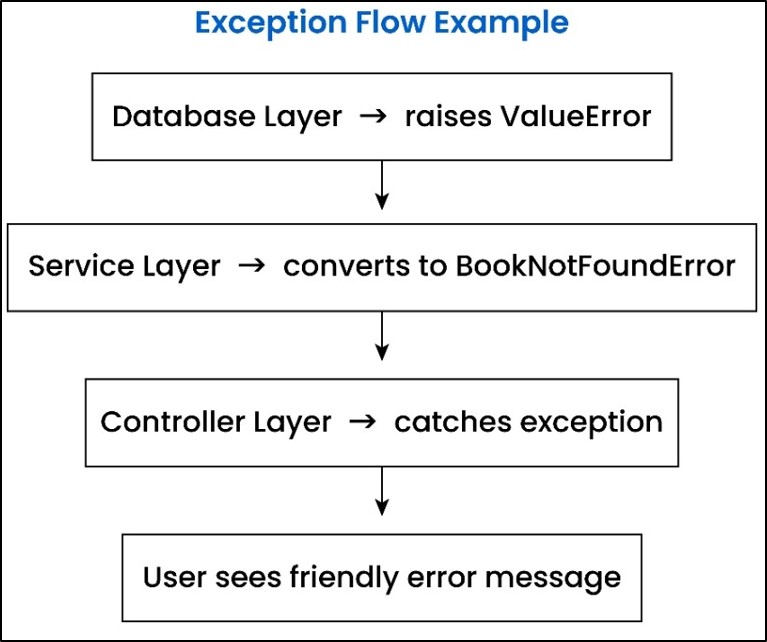
Example of how exceptions propagate across database, service, and controller layers.
This layered exception handling pattern is widely used in real production systems such as web applications, APIs, and enterprise backend architectures.
The key is to understand where exceptions are raised, where they are translated, and where they are finally handled.
• The technical failures (like missing data or connection errors) are detected in the database layer and raise exceptions.
• Technical exceptions are translated into business-level exceptions at the service layer.
• Those exceptions are caught at the controller layer, and it decides what response should be returned to the user.
Please remember that your lower layer should never decide user-facing responses, and the upper layer should not deal with raw database errors.
Thumb Rule:
From a production point of view, these three rules matter a lot:
• You should never log the same exception in multiple layers.
• Exceptions should not be swallowed silently.
• You should not mix technical errors with business errors.
Otherwise, your code would become tightly coupled and messy, and it would be difficult to debug your code as well.
Let us now try to understand how exceptions flow in a structured production system.
Example 1: Database Layer (Detects Technical Problem)
def get_book_from_db(book_id):

    if book_id != 1:
        raise ValueError("Book not found in database")

return {"id": 1, "name": "C++"}Explanation: -
It checks if the provided book_id is equal to 1 or not.
If the ID is 1, then the function returns a dictionary having details of the book.
Otherwise, the function raises an exception ValueError with the message "Book not found in database".
Example 2: Service Layer (Translates to Business Exception)
class BookNotFoundError(Exception):
    pass


def get_book_service(book_id):

    try:
        return get_book_from_db(book_id)

    except ValueError as e:
raise BookNotFoundError("Requested book does not exist.") from eExplanation:
After that, we call the function get_book_from_db(book_id) inside the function get_book_service().
If the database layer raises an exception (ValueError), then that exception is caught at the service layer.
After that, a business-friendly exception BookNotFoundError is raised, which clearly tells the application that the requested book does not exist.
In brief, in this way a low-level error is converted into a meaningful business exception by the service layer, and it also keeps the database logic separate from your business logic.
Example 3: Controller Layer (Handles Once)
def get_book_controller(book_id):

    try:
        book = get_book_service(book_id)
        print("Book found:", book)

    except BookNotFoundError as e:
        print("Error:", e)


# Run example
get_book_controller(2)Explanation: -
Here, get_book_service(book_id) function is called from get_book_controller(book_id).
If the book exists, it prints "Book found" along with book details.
On the other side, if the service layer raises an exception BookNotFoundError, then it is caught at the controller layer, and a user-friendly error message is printed.
Please note that the controller layer handles the exception only once, and the final response is shown to the user.
Now that you understand how exception handling works in production systems, let us see how it is applied in real-world scenarios like API calls.
21. Real-World API Exception Handling in Python
Modern applications often communicate with APIs to fetch or send data. These API calls can fail because of network issues, server errors, timeouts, or invalid responses.
That is why API exception handling is a critical skill for building reliable Python applications.
Let us understand this with a real example.
Example: Handling API Errors Using requests Library
import requests

try:

    response = requests.get("https://api.github.com", timeout=5)

    # Raise error if status code is not 200

    response.raise_for_status()


    data = response.json()

    print("API Response Received Successfully")


except requests.exceptions.Timeout:

    print("Request timed out. Please try again later.")

except requests.exceptions.HTTPError as e:

    print("HTTP error occurred:", e)

except requests.exceptions.RequestException as e:

    print("Something went wrong while calling API:", e)
Explanation:
Here, we are calling a real API using the requests library.
The timeout ensures the program does not wait forever if the server is slow. The raise_for_status() method raises an error when the API returns a failure response, such as 404 or 500.
Different exceptions handle different failure scenarios:
• Timeout → slow or unresponsive API
• HTTPError → server-side or client-side HTTP errors
• RequestException → other request-related failures
This pattern keeps your application stable even when external systems fail.
22. Common Mistakes Developers Make in Python Exception Handling
Most exception handling problems do not come from complex logic. They usually come from small mistakes that developers ignore in the beginning.
Let’s look at the most common mistakes so you can avoid them early.
1. Using a Bare except Block
Many developers write:
except:This catches all exceptions blindly, which is a very bad practice.
Why is this dangerous?
Because it hides real errors and makes debugging extremely difficult. You may never know what actually went wrong in your program.
Best Practice:
Always catch specific exceptions like ValueError, TypeError, or FileNotFoundError so that your code remains clear and predictable.
2. Not Logging Exceptions
A very common mistake is printing errors using print() and moving on.
Problem:
In real production systems, print statements are not useful because you cannot track errors properly.
Best Practice:
Always use logging instead of print so that errors can be monitored, analyzed, and fixed later.
3. Catching Exceptions but Ignoring Them
Sometimes developers catch exceptions but do nothing:
except ValueError:

    pass
Problem:
This silently ignores errors, which can break your system in unexpected ways.
Best Practice:
Always handle exceptions properly or log them. Never ignore errors without understanding them.
4. Using Exceptions for Normal Control Flow
Some developers use exceptions to control normal program logic.
Problem:
Exceptions are expensive operations and should not be used for regular decision-making.
Best Practice:
Use conditions (if-else) for normal logic and reserve exceptions only for unexpected situations.
5. Not Cleaning Up Resources
Many developers forget to close files, database connections, or network resources when an error occurs.
Problem:
This can lead to memory leaks, locked files, or system instability.
Best Practice:
Always use finally blocks or context managers (with statement) to ensure proper cleanup.
Final Thought:
In simple words, good exception handling is not about catching every error - it is about handling the right errors in the right way.
If you follow these best practices, your code will be cleaner, more stable, and production-ready.
23. Top Python Exception Handling Interview Questions
If you are preparing for Python interviews, exception handling is one of the most commonly asked topics.
Interviewers do not just check syntax. They want to see how you think about failures, debugging, and system reliability.
Let’s go through the most important questions with clear and practical answers.
1. What is the difference between try-except and try-finally in Python?
Ans: try-except is used to catch and handle errors so your program doesn’t crash.
try-finally is used to guarantee that cleanup code (like closing files or connections) always runs, whether an error occurs or not.
2. What happens if an exception occurs inside the except block?
Ans: If an error happens inside the except block, Python raises a new exception and stops normal execution.
If not handled properly, the original error context may be lost, making debugging harder.
3. What is the difference between raise and re-raise (raise vs raise e)?
Ans: Using raise (without arguments) re-throws the original exception and keeps the full traceback intact.
Using raise e resets the traceback, which can make it harder to track where the error actually occurred.
4. Why should we avoid using a bare except block?
Ans: A bare except catches all exceptions blindly, including unexpected ones.
This hides real problems and makes debugging very difficult in production systems.
5. What is exception chaining (raise ... from e)?
Ans: Exception chaining allows you to raise a new exception while preserving the original error.
This helps in debugging because you can see both the root cause and the higher-level error.
6. How does exception propagation work in Python?
Ans: If an exception is not handled in a function, it automatically moves upward in the call stack.
It continues until it is caught or the program terminates.
7. What is the difference between Exception and BaseException?
Ans: Exception is used for normal application errors that you can handle.
BaseException is the parent of all exceptions and includes system-level ones like KeyboardInterrupt, which are usually not handled.
8. When should you use custom exceptions in Python?
Ans: Custom exceptions are used when you want to represent business-specific errors clearly.
They make your code more readable and help separate system errors from business logic.
9. What is the use of else block in try-except?
Ans: The else block runs only when no exception occurs in the try block.
It helps keep your success logic separate from error-handling code.
10. What are best practices for exception handling in production systems?
Ans: Always catch specific exceptions, use logging instead of print, and never ignore errors silently.
Follow a layered approach where errors are raised, translated, and handled cleanly.
If you understand these questions deeply, you will not only perform well in interviews but also write clean and production-ready Python code.
24. Frequently Asked Questions (FAQ)
1. What is Python Exception Handling and why is it important in production systems?
Ans: It is a structured way to manage runtime errors using try, except, raise, and custom exceptions.
It is very important for production systems because it provides benefits like :-
• avoids crashes
• debugging clarity is improved
• ensures application stability under failure conditions
2. What is the difference between errors and exceptions in Python programming?
Ans: In Python, a syntax error occurs before execution of the program and cannot be handled.
But a runtime exception occurs during execution of a program, and it can be managed using structured exception handling.
3. When should I use try-except versus assert in Python?
Ans: You should use try-except blocks for handling real runtime failures.
Few examples are invalid user input, file errors, or network issues.
On the other side, you should use assert to validate internal developer assumptions during debugging time (not for production-level exception handling).
4. What are the best practices for production-level Python exception handling architecture?
Ans: In production-level Python exception handling, one should follow the best practices written below: -
• Your lower layer should raise exceptions
• Your middle layer should translate them
• And your upper layer should handle responses
5. What is ExceptionGroup in Python 3.11 and when should it be used?
Ans: It allows multiple exceptions to be raised and handled together.
It is used mainly in concurrent systems where multiple tasks may fail together.
25. Summary
In this guide, you learned how to handle errors in Python using try-except, custom exceptions, context managers, ExceptionGroup, and production-level patterns.
You also saw how exception handling works in real systems through layered architecture and API error handling examples.
If you practice these concepts, you will be able to write Python applications that are stable, reliable, and ready for production use.
Strong exception handling is one of the key skills that separates beginner developers from production-ready engineers.
Learn more in our “Python Modules and Packages" chapter.