Complete Python Regular Expressions Guide with Real Backend Validation Examples and Production Use Cases.
1. Introduction
Many developers encounter Python Regular Expressions (Regex) for the first time and immediately find them confusing. The patterns look unfamiliar, the symbols appear complicated, and it is often difficult to understand where Regex is actually used in real software development.
Most tutorials begin with patterns like:
^\w+@\w+\.\w+$
without explaining why developers need them in the first place.
In reality, Python Regex is much more than an interview topic. It is a powerful tool used in real-world backend applications to validate user input, process API responses, analyze application logs, extract useful information from text, and clean data before storing it in databases.
For example, when a user creates an account, a backend application may use Regex to validate email addresses, phone numbers, usernames, and passwords. Similarly, developers use Regex to extract order IDs from logs, verify transaction numbers, and process large amounts of text automatically.
Learning Regex can save hundreds of lines of manual string-processing code and make applications more efficient and reliable.
In this Python Regex tutorial for beginners, you will learn Regex from scratch using simple explanations, real backend examples, practical use cases, and production-style scenarios. By the end of this guide, you will understand not only how Python Regex works but also where professional developers use it in modern software applications.
2. What Is Regex in Python?
Regex, short for Regular Expression, is a pattern-matching technique used to search, extract, validate, and manipulate text in Python. Instead of looking for an exact word or value, Regex allows developers to identify text that follows a specific pattern.
For example, a pattern can be used to find numbers, email addresses, dates, product codes, or other structured text within a larger string. This makes Regex a powerful tool whenever applications need to work with dynamic text rather than fixed values.
Python provides built-in support for Regular Expressions through the "re" module, which allows developers to perform pattern matching efficiently.
3. Why Backend Developers Use Regex
Python offers several string methods such as find(), replace(), split(), and startswith(). These methods work well when developers need to search for exact text values.
However, many real-world applications deal with dynamic data where the exact value is unknown in advance. For example, every customer may have a different email address, phone number, order ID, or transaction number.
In these situations, searching for specific text is not practical. Instead, developers use Python Regex to define patterns that incoming data must follow. This approach makes validation, filtering, and text extraction much easier.
As backend systems grow and process larger amounts of user-generated data, Regex helps reduce complex validation logic and keeps the code easier to maintain.
Before learning Regex, it is helpful to understand how text is processed in Python. Our
Python Strings Tutorial for Beginners explains string methods, validation, slicing, and text manipulation concepts that form the foundation of Regular Expressions.
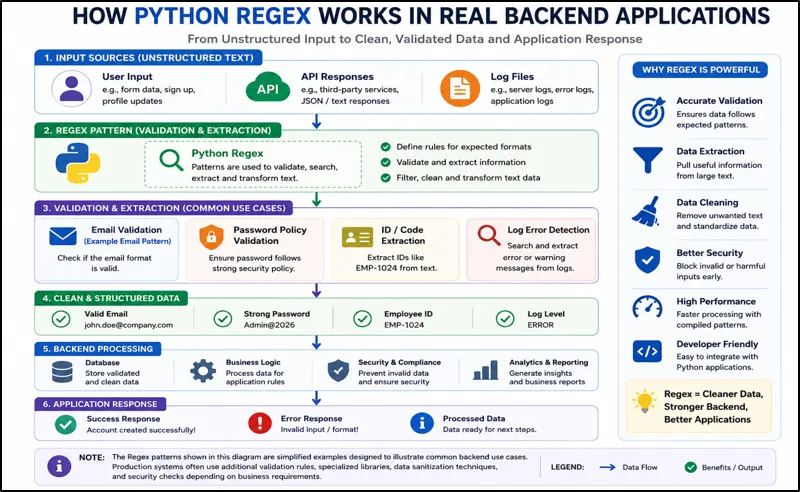
Figure: Python Regex Backend Workflow
This diagram shows how Python Regex supports backend development through input validation, data extraction, and text processing in APIs, SaaS applications, and enterprise systems.
4. Understanding the Python re Module
Python provides built-in Regex support through the re module.
Before using Regex, import the module.
import re
The re module contains several functions that developers use frequently.
The four most important ones are:
- match()
- search()
- findall()
- sub()
It is essential to understand these functions before working on real projects.
I. match() Function
The match() function checks whether a pattern exists at the beginning of a string. If the pattern matches from the first character, Python returns a match object; otherwise, it returns "None".
Example
import re

text = "Python Regex Tutorial"

result = re.match("Python", text)

print(result)
Output
<re.Match object>
Explanation
In this example, the string begins with the word "Python", so the pattern matches successfully. The match() function is commonly used when developers need to verify that a string starts with a specific format, such as a product code, employee ID, or transaction number.
II. search() Function
The search() function looks for a pattern anywhere inside a string. Unlike match(), the pattern does not need to appear at the beginning.
Example
import re

text = "Learn Python Regex"

result = re.search("Regex", text)

print(result)
Output
<re.Match object>
Explanation
In this example, the word "Regex" appears near the end of the string. Even though it is not at the beginning, the search() function successfully finds it. This makes search() useful for finding keywords, error messages, IDs, or other information within application logs, API responses, and text data.
III. findall() Function
The findall() function searches the entire string and returns all matching values as a list. It is useful when developers need to extract multiple pieces of information from text instead of finding only the first match.
Example
import re

text = "Order 1001, Order 1002, Order 1003"

numbers = re.findall(r"\d+", text)

print(numbers)
Output
['1001', '1002', '1003']
Explanation
In this example, the pattern \d+ matches one or more digits:
- \d → Digit (0–9)
- + → One or more occurrences
The findall() function extracts every order number from the string and stores them in a list. This technique is commonly used in analytics systems, log processing, reporting applications, and data extraction tasks where multiple values need to be collected from text.
IV. sub() Function
The sub() function replaces matching text with a new value. It is commonly used for data cleaning, text formatting, and standardizing information before processing or storing it.
Example
import re

text = "Price: $100"

result = re.sub(r"\d+", "200", text)

print(result)
Output
Price: $200
Explanation
In this example, the pattern \d+ matches the number 100. The sub() function then replaces it with 200, producing the updated text.
Developers frequently use sub() to clean imported data, remove unwanted characters, mask sensitive information, and transform text into a consistent format before it is stored in databases or sent to APIs.
5. Understanding Regex Patterns Visually
Most Python Regex patterns are built using a few common symbols. Understanding these building blocks makes it much easier to read and create Regular Expressions.
I. Digits (\d)
The pattern \d matches any single digit from 0 to 9. It is commonly used when working with numbers inside text.
Pattern
\d
Matches
0 1 2 3 4 5 6 7 8 9
II. Alphabets ([a-z] and [A-Z])
The pattern [a-z] matches any lowercase letter, while [A-Z] matches any uppercase letter.
Pattern
[a-z]
[A-Z]
Matches
a b c ... z
A B C ... Z
III. Word Characters (\w)
The pattern \w matches letters, digits, and the underscore character (_).
Pattern
\w
Matches
A-Z
a-z
0-9
_
IV. Whitespace Characters (\s)
The pattern \s matches whitespace characters such as spaces, tabs, and line breaks.
Pattern
\s
Matches
V. One or More Occurrences (+)
The + symbol means the preceding pattern can appear one or more times.
Example
\d+
Matches
1
22
333
4444
VI. Start of a String (^)
The ^ symbol ensures that matching begins from the start of a string.
Example Pattern
^Python
Matches:
- Python Tutorial
- Python Regex
- Python Basics
Does Not Match:
- Learn Python
- I Love Python
This is commonly used when validating complete input values.
VII. End of a String ($)
The $ symbol ensures that matching ends at the end of a string.
Example Pattern
Python$
Matches:
- Learn Python
- I Love Python
Does Not Match:
- Python Tutorial
- Python Regex Guide
When ^ and $ are used together, Regex validates the entire string from beginning to end.
Example:
^Python$
Matches:
Python
Does Not Match:
Python Tutorial
6. Real Backend Example 1: Email Validation
Imagine a user is creating an account on a website. Before storing the email address in a database, the application needs to verify whether the email follows a valid format. Accepting invalid email addresses can lead to login issues, failed notifications, and poor user experience.
Example
import re

email = "john.doe@gmail.com"

pattern = r'^[\w\.-]+@[\w\.-]+\.\w+$'

if re.match(pattern, email):

    print("Valid Email")

else:

    print("Invalid Email")
Output
Valid Email
Explanation
Let's understand how this Python Regex email validation pattern works step by step.
Note: The r before the pattern is called a raw string prefix. It tells Python not to treat backslashes (\) as special escape characters. This is useful in Regex because patterns often contain backslashes such as \w, \d, and \s. Using r allows us to write the Regex pattern exactly as intended without adding extra backslashes.
r'^[\w\.-]+@[\w\.-]+\.\w+$'
a) ^[\w\.-]+
Here:
- \w matches letters, numbers, and underscores
- \. matches a literal dot (.)
- - matches a hyphen (-)
- + means one or more of the allowed characters
- ^ ensures matching starts from the beginning of the string
The backslash (\) is called an escape character in Regex. It either gives special meaning to a character (such as \w) or removes the special meaning of a character (such as \. to match an actual dot).
b) @
This part checks for the presence of the @ symbol, which separates the username from the domain name.
Example:
john.doe@gmail.com
Every valid email address must contain exactly one @ symbol.
c) [\w\.-]+
This section validates the domain name.
Examples:
It allows letters, numbers, dots, and hyphens inside the domain portion.
d) \.\w+$
This part validates the domain extension.
Examples:
The \. matches the actual dot before the extension, while \w+ checks that the extension contains one or more characters.
The $ symbol ensures that matching ends at the end of the string.
How the Validation Works
Consider the email:
john.doe@gmail.com
Regex checks:
| john.doe | Valid Username |
| @ | Valid Separator |
| gmail | Valid Domain |
| com | Valid Extension |
Since all required parts are present, the email is considered valid.
Why This Matters in Real Applications
Consider a website where thousands of users create new accounts every day. If the application accepts invalid email addresses such as john@gmail or john@.com, users may face login issues, password reset failures, and missed notifications later.
To prevent these problems, developers use Python Regex email validation to check whether an email address follows the expected format before storing it in the database. This helps ensure that only properly structured email addresses enter the system.
After validation, application data is often stored and processed using dictionaries. Learn how key-value data structures work in our
Python Dictionary Tutorial.
As applications grow, Regex makes validation logic more reliable and easier to maintain than writing multiple conditional statements for every possible email format. This is one reason why email validation using Regex in Python is widely used in registration forms, customer portals, SaaS platforms, and enterprise applications.
7. Real Backend Example 2: Password Validation
Problem Statement
When users create accounts on websites, banking portals, SaaS platforms, or mobile applications, they often choose simple passwords such as:
password
admin123
12345678
These passwords are easy to guess using automated tools, making user accounts vulnerable to unauthorized access.
To improve security, applications validate passwords before accepting them. A common requirement is that the password must:
- Be at least 8 characters long
- Contain at least one uppercase letter
- Contain at least one lowercase letter
- Contain at least one number
Brief About This Coding Example
In this example, we use a Python Regular Expression (Regex) to verify whether a password follows all the required security rules.
If the password satisfies every rule, the program prints:
Strong Password
Otherwise, it prints:
Weak Password
This type of validation is commonly performed during user registration, password reset, and account creation processes.
Code
import re

password = "Python2026"

pattern = r'^(?=.*[a-z])(?=.*[A-Z])(?=.*\d).{8,}$'

if re.match(pattern, password):
    print("Strong Password")
else:
    print("Weak Password")
Output
Strong Password
Understanding the Regex Pattern
The Regex pattern used for validation is:
r'^(?=.*[a-z])(?=.*[A-Z])(?=.*\d).{8,}$'
At first glance, this pattern may look complicated. Let's break it into smaller pieces and understand what each part does.
a) ^ → Start of the String
The caret symbol (^) tells Regex to start checking from the beginning of the password.
Example:
Python2026
^
Regex starts its validation from the first character.
Without ^, Regex could start matching from somewhere in the middle of the text.
b) (?=.*[a-z]) → Check for a Lowercase Letter
This part verifies that at least one lowercase letter (a-z) exists somewhere in the password.
Let's break it further:
(?=.*[a-z])
- (?= ) → Lookahead assertion
- .* → Any number of characters
- [a-z] → Any lowercase letter from a to z
In simple words:
"Look through the entire password and make sure at least one lowercase letter exists."
Example:
Python2026
^
Regex finds lowercase letters such as:
y
t
h
o
n
Therefore, this condition passes.
Example passwords that satisfy this rule:
python
admin123
securePass
Example passwords that fail:
PYTHON2026
ADMIN123
Because they contain no lowercase letters.
c) (?=.*[A-Z]) → Check for an Uppercase Letter
This part verifies that at least one uppercase letter exists.
Pattern:
(?=.*[A-Z])
Here:
- [A-Z] means any uppercase letter from A to Z.
- .* allows Regex to search through the entire password.
Example:
Python2026
Regex finds:
P
Since an uppercase letter exists, this condition passes.
Valid examples:
Invalid examples:
Because they contain no uppercase letters.
d) (?=.*\d) → Check for a Number
This part verifies that at least one digit exists.
Pattern:
(?=.*\d)
Here:
- \d means any digit from 0 to 9.
- .* allows Regex to search through the entire password.
Example:
Python2026
Regex finds:
2
0
2
6
Therefore, this condition passes.
Valid examples:
Invalid examples:
Because they contain no numbers.
e) .{8,} → Minimum Length Check
This part checks the password length.
Pattern:
.{8,}
Let's break it down:
- . → Any character
- {8,} → 8 or more times
In simple words:
"The password must contain at least 8 characters."
Examples that pass:
Password
Python2026
Admin123
Examples that fail:
Pass1
Abc123
Because they contain fewer than 8 characters.
f) $ → End of the String
The dollar symbol ($) indicates the end of the password.
Example:
Python2026
Together, ^ and $ ensure that the entire password is validated from beginning to end.
^ ... $
This means Regex checks the complete password instead of only a small portion of it.
8. Real Backend Example 3: Phone Number Validation
Problem Statement
Phone numbers are commonly used for account creation, OTP verification, customer communication, order tracking, and account recovery. If invalid phone numbers are stored in a system, users may fail to receive important notifications, verification codes, or delivery updates.
To prevent these issues, applications validate phone numbers before storing them in a database.
Example
import re

phone = "9876543210"

pattern = r'^\d{10}$'

if re.match(pattern, phone):
    print("Valid Phone Number")
else:
    print("Invalid Phone Number")
Output
Valid Phone Number
Understanding the Regex Pattern
The pattern used for validation is:
^\d{10}$
Let's break it down:
a) ^ → Start of the String
Regex begins checking from the first character of the phone number.
b) \d → Any Digit
The \d symbol matches any digit from 0 to 9.
c) {10} → Exactly 10 Times
The {10} quantifier tells Regex that exactly 10 digits must be present.
d) $ → End of the String
The $ symbol ensures that matching ends after the tenth digit.
Together, ^ and $ ensure that the complete value contains exactly 10 digits and nothing else.
How the Validation Works
Consider the phone number:
| Start of String | Matched |
| 10 Digits Present | Matched |
| End of String | Matched |
Since all conditions are satisfied, the phone number is considered valid.
Why Phone Number Validation Matters
In real-world applications, accepting invalid phone numbers can cause failed OTP delivery, unsuccessful customer communication, and poor user experience. Validating phone numbers before storing them helps maintain data quality and reduces operational issues later.
Real-World Use Cases
Phone number validation using Python Regex is commonly used in:
- OTP verification systems
- Banking and financial applications
- E-commerce platforms
- Food delivery applications
- Ride-sharing services
- Customer registration portals
- Healthcare appointment systems
These applications rely on accurate phone numbers to communicate with users and deliver important notifications.
9. Why Freshers Should Learn Regex Early
Many freshers learn Python string methods but postpone Regex because the syntax initially looks unfamiliar. However, as projects become more complex, simple string operations are often not enough to handle real-world data efficiently.
A few months into backend development, developers frequently work with form validation, API integrations, log analysis, data migration, monitoring systems, and automation workflows. Regex helps solve many of these tasks with concise and maintainable code.
Learning Regex early makes it easier to understand production code, process large amounts of text, and automate repetitive text-processing tasks that commonly appear in software development.
I. Extracting Order IDs from Application Logs
Application logs are one of the most important sources of information for backend teams. They help developers monitor systems, investigate errors, track transactions, and troubleshoot production issues.
In large applications, manually searching through thousands of log entries is not practical. Instead, developers use Python Regex to quickly extract useful information such as order IDs, transaction numbers, request IDs, and error codes.
Explanation
The pattern:
ORD-\d+
looks for text that starts with ORD- followed by one or more digits. As Regex scans the log file, it automatically identifies every matching order ID and returns the results as a list.
This approach is commonly used in e-commerce platforms, payment systems, logistics applications, and ERP software where transaction tracking is critical.
II. Parsing API Responses with Regex
Modern applications communicate with external services through APIs. While API data is usually processed using JSON, developers sometimes need to extract or validate specific values before executing business logic.
Explanation
In this example, Regex searches for values that follow the format:
TXN-\d+
This pattern helps identify transaction IDs regardless of the actual number attached to them.
Developers often use similar techniques when validating transaction references, shipment IDs, invoice numbers, or other structured values received from external systems.
Most API responses are delivered in JSON format. Our
Python JSON Handling Tutorial explains how Python converts JSON data into dictionaries for processing in backend applications.
III. Cleaning User Input Before Database Storage
User input is not always clean. Customers may accidentally enter extra spaces, inconsistent formatting, or unwanted characters while filling out forms.
Before storing data in a database, applications often standardize the input to improve consistency and data quality.
Explanation
The Regex pattern:
^\s+|\s+$
removes unnecessary spaces from the beginning and end of the text.
Let's break it down:
- ^ → Start of the string
- \s+ → One or more whitespace characters
- | → OR operator
- \s+$ → One or more whitespace characters at the end of the string
Consider the input:
" John Doe "
Regex identifies the extra spaces before and after the name and removes them.
Result:
John Doe
This helps keep data clean and consistent before it is stored in a database. Similar data-cleaning techniques are commonly used for customer records, contact information, product catalogs, and imported CSV files.
IV. Regex for Web Scraping and Data Extraction
Web scraping projects often collect large amounts of raw text from websites. The challenge is identifying the specific information that is useful.
Regex helps developers extract structured information such as email addresses, phone numbers, product codes, URLs, and reference numbers from unstructured text.
Explanation
The Regex pattern:
[\w\.-]+@[\w\.-]+\.\w+
matches text that follows a typical email address format.
Examples:
support@company.com
sales@company.com
contact@example.org
As Regex scans the collected text, it automatically identifies and extracts matching email addresses. This approach is commonly used in lead generation systems, market research tools, competitor analysis platforms, and large-scale data collection projects.
10. 25 Most Useful Python Regex Patterns Every Developer Should Know
As developers work with forms, APIs, databases, log files, and automation scripts, certain Regex patterns appear repeatedly. Instead of creating these patterns from scratch every time, most developers maintain a collection of commonly used Regular Expressions that can be reused across projects.
In my own experience working on web applications and data-processing scripts, I found that having a ready-to-use collection of Regex patterns significantly reduced development time and helped avoid common validation errors.
The following Python Regex patterns cover many real-world tasks such as email validation, password verification, data extraction, user input validation, log processing, and text cleaning. Understanding these patterns can save development time and help solve common backend programming problems more efficiently.
Use Case | Regex Pattern | Example Match |
Email Address | ^[\w.-]+@[\w.-]+\.\w+$ | john@gmail.com |
Phone Number | ^\d{10}$ | 9876543210 |
Username | ^[A-Za-z0-9_]+$ | john_doe123 |
Password (Min 8 Characters) | ^.{8,}$ | Password123 |
Strong Password | ^(?=.*[a-z])(?=.*[A-Z])(?=.*\d).{8,}$ | Python2026 |
URL | https?://\S+ | https://example.com |
Zip Code | ^\d{5}$ | 90210 |
IPv4 Address | \d{1,3}(\.\d{1,3}){3} | 192.168.1.1 |
Date (YYYY-MM-DD) | ^\d{4}-\d{2}-\d{2}$ | 2026-01-15 |
Currency Amount | ^\$\d+(\.\d{2})?$ | $199.99 |
Product Code | ^[A-Z]{3}-\d{4}$ | ABC-1234 |
Employee ID | ^EMP-\d+$ | EMP-1001 |
Order ID | ^ORD-\d+$ | ORD-45892 |
Transaction ID | ^TXN-\d+$ | TXN-78234 |
Only Alphabets | ^[A-Za-z]+$ | Python |
Only Numbers | ^\d+$ | 123456 |
Alphanumeric | ^[A-Za-z0-9]+$ | Python123 |
Hashtag | #\w+ | #Python |
Mention | @\w+ | @developer |
HTML Tags | <.*?> | <h1>, <p>, <div> |
Multiple Spaces | \s+ | Multiple spaces |
Credit Card Pattern | \d{4}-\d{4}-\d{4}-\d{4} | 1234-5678-9012-3456 |
Time Format | ^\d{2}:\d{2}$ | 09:30 |
Hex Color | ^#([A-Fa-f0-9]{6})$ | #FF5733 |
Domain Name | ^[a-zA-Z0-9.-]+\.[a-zA-Z]{2,}$ | learnaiway.com |
Note:
The patterns shown in this section are simplified examples designed for learning purposes. Production systems may require additional validation rules depending on business requirements.
Always Remember:
You do not need to memorize every Regex pattern. Focus on understanding the common building blocks such as \d, \w, \s, +, *, ^, and $. Once these fundamentals are clear, creating and modifying Regex patterns becomes much easier.
11. Python Regex Cheat Sheet
After learning the most common Regex patterns, it is useful to keep a quick reference guide handy. Most developers do not memorize every Regex symbol. Instead, they refer to a cheat sheet whenever they need to build or modify a pattern.
The following Python Regex cheat sheet contains some of the most commonly used symbols that appear in validation, data extraction, text processing, automation scripts, and backend development projects.
Pattern | Meaning |
\d | Digit (0–9) |
\D | Non-digit character |
\w | Word character (letter, number, underscore) |
\W | Non-word character |
\s | Whitespace character |
\S | Non-whitespace character |
. | Any character except a newline |
+ | One or more occurrences |
* | Zero or more occurrences |
? | Optional occurrence |
^ | Start of a string |
$ | End of a string |
[ ] | Character set or range |
| | OR operator |
( ) | Grouping patterns together |
Why This Cheat Sheet Matters
When working on real projects, developers frequently need to validate user input, extract information from logs, process API responses, or clean imported data. Remembering every Regex symbol is not necessary, but understanding what the most common symbols do can significantly speed up development.
This Python Regex cheat sheet is also useful during coding interviews, debugging sessions, and day-to-day programming tasks because it provides a quick reminder of the building blocks used in Regular Expressions.
12. Common Regex Mistakes Beginners Make
Learning Python Regex takes practice, and most developers make a few mistakes when they first start working with Regular Expressions. Understanding these common mistakes can help you write cleaner, more reliable, and easier-to-maintain Regex patterns.
I. Using Regex for Everything
Many beginners try to solve every text-processing problem with Regex. However, simple string operations are often easier to read and maintain.
Bad
re.search("python", text)
Better
If a simple string method can solve the problem, it is usually the better choice.
II. Forgetting to Use Raw Strings
One of the most common Python Regex mistakes is forgetting the r prefix before a pattern.
Bad
"\d+"
Better
r"\d+"
III. Writing Complex Patterns Without Testing
Some beginners create long Regex patterns and immediately use them in production code without proper testing.
A small mistake can cause valid data to be rejected or invalid data to be accepted. Always test Regex patterns using multiple sample inputs before deploying an application.
Raw strings prevent confusion caused by escape characters and make Regex patterns easier to write and understand.
IV. Ignoring Edge Cases
A Regex pattern may work for one example but fail for real-world data.
For example, an email validation pattern should be tested with different email formats rather than a single email address. Considering edge cases helps create more reliable validation logic.
V. Creating Regex Patterns That Nobody Can Read
Regex can quickly become difficult to understand if too many conditions are packed into a single pattern.
While it may be tempting to write a very compact Regex, readability is important when other developers need to maintain the code. A slightly longer but easier-to-understand pattern is often the better choice.
Key Takeaway
The goal of Python Regex is not to create the shortest pattern possible. The goal is to solve text-processing problems in a way that is accurate, readable, and easy to maintain. Following these best practices will help you avoid many common Python Regex mistakes and write more reliable code.
13. Regex Performance Tips for Production Systems
As applications grow, they often need to process thousands or even millions of records. While Regex is powerful, poorly designed patterns can increase processing time and make applications harder to maintain.
The following Python Regex performance tips can help freshers and junior developers write more efficient and production-ready code.
I. Compile Frequently Used Patterns
If the same Regex pattern is used repeatedly, compiling it once can improve performance.
Instead of
re.search(pattern, text)
Use
compiled = re.compile(pattern)

compiled.search(text)
When a pattern is compiled, Python does not need to rebuild it every time it is used. This can be beneficial in applications that process large amounts of text repeatedly.
II. Keep Regex Patterns Simple
Beginners sometimes create very complex patterns that are difficult to understand and maintain.
A simpler pattern is often easier to debug, test, and optimize. In most cases, readability is more important than creating a clever one-line Regex.
III. Validate Data as Early as Possible
It is better to validate user input before performing expensive operations such as:
- Database queries
- API calls
- Business logic execution
- File processing
Early validation helps prevent invalid data from moving deeper into the application and reduces unnecessary processing.
IV. Use String Methods When Regex Is Not Needed
Not every text-processing problem requires Regex.
For example, checking whether a string contains a specific word can often be done more simply using Python string methods.
Instead of
re.search("python", text)
Simple string operations are usually easier to read and may perform better for straightforward tasks.
V. Test Regex Patterns with Real Data
A Regex pattern that works with one example may fail when real users enter unexpected data.
Before using a pattern in production, test it with:
- Valid inputs
- Invalid inputs
- Edge cases
- Large datasets
This helps identify potential issues early and improves the reliability of validation and data-processing logic.
Production applications should also handle validation failures gracefully. Learn how to manage runtime errors and invalid input using our
Python Exception Handling Guide.
Key Takeaway
Most performance problems are not caused by Regex itself but by using overly complex patterns or applying Regex where simpler solutions would work. By keeping patterns simple, validating data early, and testing thoroughly, developers can write Python Regex code that is both efficient and easy to maintain.
14. Python Regex Interview Questions
Regular expressions are frequently discussed in Python interviews because they test a candidate's understanding of text processing, input validation, and pattern matching. The following Python Regex interview questions are commonly asked during fresher, junior developer, backend developer, and automation testing interviews.
I. What Is Regex in Python?
Regex (Regular Expression) is a pattern-matching technique used to search, validate, extract, and replace text. It helps developers process structured and unstructured text efficiently.
II. What Is the Difference Between match() and search()?
match() checks for a pattern only at the beginning of a string, while search() looks for the pattern anywhere in the string.
As a result, search() is generally more flexible when working with larger text data.
III. What Is the Difference Between search() and findall()?
search() returns only the first matching occurrence, while findall() returns all matching values as a list.
This makes findall() useful when multiple matches need to be extracted from text.
IV. Why Are Raw Strings (r"") Used in Regex?
Raw strings prevent Python from treating backslashes as escape characters. This makes Regex patterns easier to read and write.
Example:
r"\d+"
V. What Does \d Mean in Regex?
The pattern \d matches any digit from 0 to 9. It is commonly used when validating numbers, phone numbers, IDs, and transaction codes.
VI. What Does the + Symbol Mean in Regex?
The + symbol means the preceding pattern must appear one or more times. For example, \d+ matches one or more digits.
VII. What Is the Difference Between + and * in Regex?
+ requires at least one occurrence of a pattern, whereas * allows zero or more occurrences.
For example, \d+ requires a digit, while \d* can match even if no digit exists.
VIII. What Is the Purpose of ^ and $ in Regex?
The ^ symbol represents the start of a string, while $ represents the end of a string.
These anchors are commonly used in email validation, password validation, phone number validation, and other input-validation patterns.
Interview Tip
In Python Regex interviews, interviewers usually focus on practical understanding rather than memorizing patterns. Being able to explain match(), search(), findall(), re.sub(), \d, \w, +, *, ^, and $ with simple examples is often more valuable than remembering complex Regular Expressions.
15. Real-World Project: Multi-Tenant SaaS User Registration and Audit Validation System
Problem Statement
Most Python Regex tutorials demonstrate how to validate a single email address or password. However, real-world applications rarely validate only one field.
Imagine building a Software-as-a-Service (SaaS) platform used by multiple companies. Whenever a new employee registers, the system must verify that all submitted information follows the organization's rules before creating the account.
For example, the application may need to ensure that:
- The email belongs to the company domain
- The username follows naming guidelines
- The password meets security requirements
- The employee ID follows the company's format
- Audit logs contain valid identifiers
If invalid data enters the system, it can create security risks, reporting issues, and user-management problems. This is why modern applications perform validation before storing information in a database.
Project Objective
In this project, we will use Python Regex patterns to validate multiple fields during the registration process. Instead of validating only one value, the application checks several pieces of information at the same time, similar to how real enterprise systems work.
Code
import re

email_pattern = r'^[\w\.-]+@company\.com$'
username_pattern = r'^[A-Za-z0-9_]{4,20}$'
employee_pattern = r'^EMP-\d{5}$'
password_pattern = r'^(?=.*[a-z])(?=.*[A-Z])(?=.*\d).{8,}$'

email = "john@company.com"
username = "john_admin"
employee_id = "EMP-12345"
password = "SecurePass2026"

print(bool(re.match(email_pattern, email)))
print(bool(re.match(username_pattern, username)))
print(bool(re.match(employee_pattern, employee_id)))
print(bool(re.match(password_pattern, password)))
Output
True
True
True
True
Understanding the Validation Rules
I. Company Email Validation
^[\w\.-]+@company\.com$
This pattern ensures that users register only with company email addresses such as:
john@company.com
admin@company.com
hr@company.com
This helps prevent unauthorized registrations from personal email providers.
II. Username Validation
^[A-Za-z0-9_]{4,20}$
This pattern allows letters, numbers, and underscores while enforcing a username length between 4 and 20 characters.
Examples:
john_admin
alex123
dev_team
III. Employee ID Validation
^EMP-\d{5}$
This pattern ensures that employee IDs follow the organization's standard format.
Examples:
EMP-12345
EMP-54321
Using a consistent format makes employee records easier to manage and search.
IV. Password Validation
^(?=.*[a-z])(?=.*[A-Z])(?=.*\d).{8,}$
This pattern checks that the password contains:
At least one lowercase letter
At least one uppercase letter
At least one number
A minimum length of 8 characters
This helps improve account security and reduce weak passwords.
Why This Project Matters
Many freshers learn Regex by validating a single email address and assume that is how Regex is used in production. In reality, business applications often validate multiple fields simultaneously before allowing a user to register.
The workflow typically looks like:
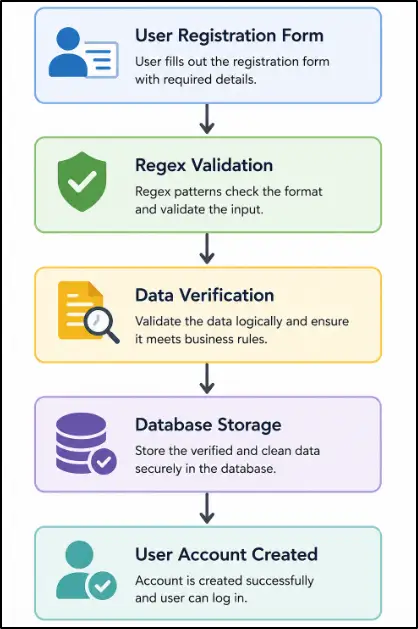
Similar validation workflows are commonly found in:
- SaaS platforms
- HR management systems
- Banking portals
- Enterprise applications
- Internal company dashboards
This project helps bridge the gap between learning Python Regex syntax and understanding how Regular Expressions are actually used in real software development projects.
16. Frequently Asked Questions (FAQs)
I. How Long Does It Take to Learn Python Regex?
Most beginners can understand the fundamentals of Python Regex within a few days of practice. Building confidence with real-world Regex patterns and backend validation examples typically takes a few weeks of hands-on coding.
II. Is Regex Still Used in 2026?
Yes. Python Regex is still widely used in backend development, automation, data processing, API integrations, and log analysis. Many modern applications rely on Regular Expressions for text validation and pattern matching.
III. Should Beginners Learn Regex in Python?
Yes. Learning Python Regex helps beginners understand input validation, text processing, and pattern matching, which are common requirements in real-world software development projects.
IV. Regex vs Python String Methods: Which Should You Use?
Python string methods are usually better for simple text searches, while Regex is more effective when working with patterns such as email addresses, phone numbers, dates, and product codes.
V. Where Is Regex Used in Real Software Development Projects?
Regex is commonly used in user registration systems, API processing, log analysis, data cleaning, web scraping, and automation workflows. It helps developers process and validate large amounts of text efficiently.
VI. Do Backend Developers Use Regex in Production Systems?
Yes. Backend developers regularly use Python Regex for validating user input, extracting structured information, processing logs, and enforcing business rules before data reaches databases or APIs.
VII. What Are the Most Common Uses of Regex in Python?
The most common Python Regex use cases include email validation, password validation, phone number validation, data extraction, text cleaning, and searching for patterns inside application logs.
VIII. What Python Regex Patterns Should Every Developer Know?
Every developer should understand common Regex patterns for emails, phone numbers, usernames, passwords, dates, order IDs, transaction IDs, and URLs because these appear frequently in real-world applications.
17. Final Thoughts
Text is everywhere in modern software applications. User registrations, payment references, API responses, product codes, log files, and business records all contain information that applications must understand and process correctly.
Python Regex provides a practical way to work with this information by identifying patterns that would otherwise require lengthy validation and text-processing logic. This ability becomes increasingly valuable as applications grow and handle larger volumes of data.
If you're wondering what to learn after Python Strings and Regex, follow our
Complete Python Developer Roadmap for Beginners (2026) to build backend, API, automation, and software engineering skills step by step.
The most effective way to improve Regex skills is through real projects. Start by validating form fields, extracting information from text, or cleaning imported data. Over time, these small exercises help build the confidence needed to work with more advanced patterns and production systems.
Rather than viewing Regex as a collection of symbols, think of it as a problem-solving tool. The ability to recognize patterns in text and process them efficiently is a skill that remains useful across backend development, automation, data processing, and many other areas of software engineering.
